Have any question?
How to Fix Http 503 Error – A Complete Guide

How to Fix Http 503 Error – A Complete Guide

How to Fix Http 503 Error

Browsing the internet is not always pain sailing. There are numerous errors that can pop up and disrupt the whole user experience and a few informed ones easily scoot past such trivial blunders.

A sudden-panic situation arises in the absence of troubleshooting options and all it takes is some knowledge of simple steps to alleviate this unfortunate little hindrance or stress.

A Complete Guide - How To Fix http 503 Error

In this post we will discuss what is http 503 error code and simple practical and effective ways to fix the http 503 error code.

What does HTTP 503 Error mean?

What is http 503 error code? A http 503 error code appears when there is something preventing your browser from accessing the target server and that server is unable to handle the request for some reason.

What Does HTTP 503 Error Mean

Users are often presented with a handful of suggested actions once an error appears including trying to access the website after an arbitrary period of time.

Some websites do not even offer this advice or just presents users with a blank error page which is fairly useless in solving the issue.

What is Http 503 Error Service Unavailable?

They are Hypertext Transfer Protocol – HTTP response status codes that are used for communication from server to client. These codes point out whether or not an HTTP request was able to be fulfilled.

Among the five types of HTTP responses – server errors (500- 599) sum up the fifth category and the http 503 error code is in this family of classification.

What is Http 503 Service Unavailable Error

It is absolutely important to understand the significance before we can deal with the http 503 error code causes.

A 503 error service unavailable is a HTTP status code which stipulates that a web server is unavailable to process the request which is being directly accessed or where the web browser is attempting to gain access to.

What is http 503 Service Temporarily Unavailable

On the other hand a http 503 error page can also indicate an internet or network inadequacy, a temporary error or pointing out that a server is temporarily unavailable. It does not necessarily mean that a server has crashed or shut down.

Anybody trying to gain access to a website, application or a browser through any operating system can come across this error.

In simple terms a http 503 error code arises due to a problem on the server end or fault in the internet connection which can be resolved with a fully functioning server.

A server sided error like this is different from client sided errors like 400-Bad request, 403-Forbidden, 404-Not Found, 408-Request Time Out, etc.

What is Server Side Error?

All those status codes that initiate with the number 5 indicate the instances where the server has met with an error – http error 503 backend fetch failed or http error 503 server too busy.

There are 11 such server sided errors which are not similarly related to each other.

Server Side Error

Most of them represent a server error response and each individual response stand for different server errors which are resolved in different ways.

All server sided errors can only be resolved by webmaster or app builder due to limited server access.

HTTP 503 Error Causes

In order to deal with http 503 error code it is essential to get to the root of the problem and recognise its causes.

As previously mentioned a http 503 error status code pops up due to server problems.

The failure of a web page or website to access any serve can be due to:

Server down for Maintenance

Ongoing server maintenance for example during a plugin, theme or software update can cause this http 503 error code.

In this case the website goes into maintenance mode and may display a message like – Briefly unavailable for scheduled maintenance. Check back in a minute. You can also check if your site is down for others too.

server down for maintenance

On the same page the http header communicates the time or date after which the server would be able to accept and process requests.

The maintenance mode only restricts the audience’s access until maintenance is fully completed and gives the administrators full autonomy.

This can also be the case if your WordPress site is in maintenance mode.

Technical Difficulties

Technical trouble encountered by the host provider can also contribute to the cause of http 503 error code resulting in communication blockade between a server and the website.

technical difficulties

Therefore it is always advisable to make sure you or your responsible administrator opt for a trusted and reliable hosting provider like Best-Digital Marketing Services who are able to provide the best and are available when needed.

Server Inadequacy

The incapacity of the server to support an overwhelming number of users due to an abrupt increase in traffic can also cause this http 503 error code. The sudden rise in traffic catches the server off-guard and throws it offline.

Therefore effective configuration of the website or application can aid to process these requests and in other times the service providers opt for bandwidth throttling to lower website congestion or to promote their other unlimited bandwidth services.

Throttling sometimes is purely a planned move by Internet Service Providers -ISPs.

Web Hosting Packages

With Best-Digital Marketing Services you will never face the http 503 error page due to server inadequacy as we provide dedicated servers with SSD storage, unlimited bandwidth, daily offline backup, daily malware scanning and clean-up, Let’s Encrypt SSL and 24/7 customer support by our experts with a starting price of just £39.99.

DDoS Attack

A Distributed Denial of Service – DDoS attack crams a website with innumerable access requests and causes it to malfunction thus affecting its functionality.

DDoS Attack

This prompts the website or its server to fall off the wagon and goes offline.

To avoid such an attack, the website owner or webmaster must invest in a good and dependable host provider that provides a great amount of security which proves to be beneficial.

Inaccurate DNS Configuration

A consistent http 503 error page can mean that you may have a faulty Domain Name System – DNS configuration. It is the DNS that converts a web address to its corresponding IP address.

This allows for websites to easily understand domain names instead of numbers which establishes a connection between domain name and IP address.

A faulty DNS configuration on your computer or router can easily redirect you to a different page and can display a 503 error service unavailable.

Configurate The correct DNS

The key to resolve a http 503 error is to figure out its cause and adopt appropriate measures and deal with each accordingly.

It is only with systematic supervision that such errors can be avoided. Our incredible well managed hosting can help you with your WordPress management and supervision skills.

With prices just starting at £39.99, you get your hands on free SSL, huge SSD storage, dedicated RAM and cloud, regular malware detection and cleaning, facilities of business emails, WP development and Server Support and much more. See our affordable plans offering a whole lot more of possibilities.

How a http 503 error code is projected on individual websites is totally at the mercy of website builder or designers.

Majority of big brands have their webpages built creatively with a touch of personality hence which can cause many different configurations and names of this http 503 error code.

No matter what or how – there will always be a http 503 error code present.

Identify http 503 Error

The http error 503 can present itself in the following ways:

  • HTTP 503
  • HTTP Error 503
  • 503 Service Unavailable
  • Error 503 Backend Fetch Failed
  • HTTP Error 503 Unable To Handle the Request
  • HTTP Server Error 503
  • 503 Service Temporarily Unavailable
  • 503 Error
  • Http/1.1 Service Unavailable
  • Error 503 Service Unavailable
  • Service Unavailable – DNS Failure

If any of the above http 503 error code pops up then the website administrators or app builders need to figure out its cause and act quickly.

A persisting http 503 error code can hamper the website or application popularity which depicts a server problem. It is not a computer system fault and nothing can be done on the user’s end to fix it.

How to Fix Http 503 Error?

There is not much that can be done to resolve this error from the user or client’s side – only a safe refresh and restart option.

On the other hand the website administrators need to carefully analyse the http 503 error codes that is causing it. Correct diagnosis of the error is essential so the appropriate troubleshooting measures can be applied.

how to fix http 503 error

Now let us discuss how to fix http 503 error codes. Most of the time the actual cause is not that severe but take your time to figure out the root cause.

How to Resolve Http 503 Error Service Unavailable

There are a couple of measures that can be taken to get ahead of the 503 error service temporarily unavailable which is caused by the server side.

The common fixes given below are divided into two section:

for the users

for developeres or web administrators

Http 503 Error Fixes for Users

1. Refresh or Reboot

A common way to address a http 503 error service unavailable is to refresh or reboot your laptop or computer.

Sometimes a temporary problem like this can be resolved in seconds by refreshing the page.

Refresh or Reboot

On the client or user end you can press the F5 button or Ctrl+R or the refresh button on the address bar which may solve the issue but more than often the http 503 error can only be dealt with from the administrator end.

Another option for users is to restart their devices if they encounter an http 503 error code is when they suspect an incorrect DNS configuration to be the cause.

Error arising due to a DNS fault is mostly conveyed through a message like Service Unavailable – DNS Failure.

Restart Your Devices

Simply restart the computer or router or as an alternative – choose a public DNS server (Google Server) and change the settings for both the computer and router.

If the error still persist after taking the above two measures then users can contact the website and ask for help. All legitimate websites usually supply their contact information with email addresses or contact numbers.

Developers, administrators and webmasters can oversee and remove this server side error more efficiently than any user could.

The following solutions could be used:

Despite going into specific troubleshooting options a website administrators can safely select the alternative to boot the server which quickly restarts the web server.

Reboot The Server

This removes any congestion in the server chain thus providing a smooth server reconnection and removes the 503 error in seconds.

Usually web hosting provider will always plan their reboots across multi servers in manner that would not disrupt the users browsing experience.

2. Examine Firewall Configuration

A firewall’s function is to sort the incoming traffic into potentially harmful and safe elements therefore it is essential that a significant security tool for website safety is used.

However in avoidable circumstances a faulty configuration can cause a firewall to malfunction which can cause some vital traffic to be barred from accessing the website.

Check Firewall Configuration

Normally Content Delivery Network – CDN based applications will undergo this firewall problem frequently.

Automatic firewall resources allow the CDNs to function as responsible third party platforms to hold the heavy content so as to maintain the application’s speed and smoothness.

But sometimes this firewall prevents even the secure data to pass through which then causes a http 503 error code.

Inspect the firewall or temporarily disable the CDN as one of the troubleshooting options.

3. Faulty Server Connection

Http 503 service unavailable errors can crop up due to a server connectivity issue.

In a chain of servers there might be one that would not be responding due to an ongoing maintenance or connection breakdown.

In this instance, all the administrator can do is try to detect the fault in the server connection or look out for the server in maintenance mode.

4. Detect Maintenance Mode

Server maintenance is the most common cause of http 503 error codes. In a planned maintenance schedule, the administrator will be aware and can select a specific time to execute the planned maintenance.

Check Maintenance Mode

There are some applications that may trigger an automatic maintenance mode which is true for WordPress and this automatic maintenance is uninformed therefore resulting in a http 503 error code.

It is advisable to webmasters to locate for any kind of maintenance before panicking at the sight of such an error.

5. Look into Web Server Resource

If there is an increase in traffic on the your website which is causing the http  503 error then it is high time for you to optimise your web server requirements.

Majority of the time it is the cheap hosting usage that causes this error. Growing popularity of your website is directly proportional to a spike in traffic.

Therefore using a CDN, better website hosting, limited plugins, reducing JavaScript and CSS files, adopting Gzip compression and more are the best ways to reduce these errors from arising.

Look Into Web Server Resources

Current hosting provider will resolve this 503 error momentarily and they will suggest you go for their upgrade version which will be costly but unnecessary in the first place.

With Best-Digital Marketing Services you will never face the http 503 error page since we provide dedicated servers with SSD storage, unlimited bandwidth, daily offline backup, daily malware scanning and clean-up, Let’s Encrypt SSL and 24/7 customer support by our experts with a starting price of just £39.99.

See our affordable plans offering a whole lot more of possibilities.

6. Check Server Logs

You should always look at your logs since they provide valuable information regarding your server, website errors and application functioning.

Server log conveys valuable information regarding the server used for running the website or the application. These logs can be further inspected via Cpanel to detect the status of the various other connected services.

Check Server Log

A closer look into these logs can help sort the http 503 error service unavailable issues once the root cause is established. A website also displays error logs that can provide a good lead to begin your root analysis.

7. Deactivate or Limit Themes or Plugins

A http 503 error service unavailable can sometimes be caused due to excessive plugins or unsupported themes. This is very common in WordPress hosted sites.

It may be possible that a plugin might be incompatible with your website. Disable the plugins via a FTP client and dive into the WordPress root folder.

Here in the wp-content, the plugin folder exists. Rename the folder – plugins_old so the plugins remain unrecognised by WordPress.
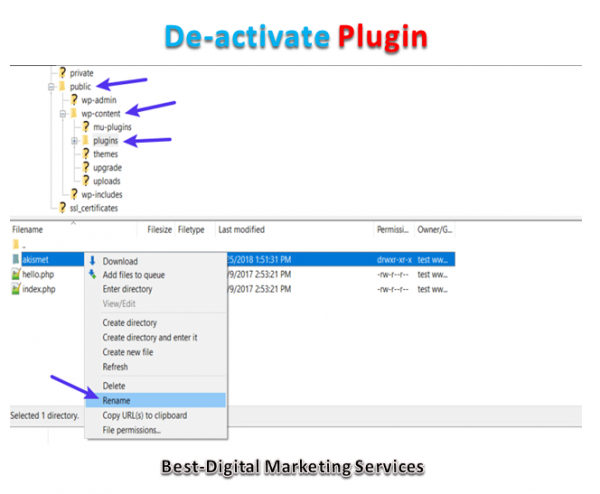
De-activate Plugins

Check and see if the 503 error has been removed. If the error is gone then it was the plugin that was causing unnecessary issue.

Otherwise there is also the theme set up that could have caused the error. In the WordPress database, change the website theme to a default one.

If it is the theme that is causing the error then this step will help to remove the http 503 error service unavailable.

Both the users and web administrators can make use of any of the troubleshooting options above to eliminate the http 503 error status code.

Conclusion

The upset of any http status code indicates a disturbance in the smooth operation of your website. The https 503 error code signifies a server fault or issue.

Despite that there are available options both for the client and server end as mentioned above. All you need to do is carefully identify the actual reason for the error and remove it.

For any server side issues it would be advisable to switch providers to a more reputable hosting provider like Best-Digital Marketing Services d to remove this problem altogether.

If you think that doing this is difficult then contact us today or our support team at Best-Digital Marketing Services who specialises in web performance optimisation.

For full Web Hosting Services package functionality

and select the package that suits your business needs.

If you prefer to discuss your requirements first just

or fill your details with a message of your requirements at

For more information about our services and how we can help you with your Video Marketing needs:-

Hope you are enjoying and learning a lot with abundance of information about:-

How to Fix Http 503 Error – A Complete Guide.


How to Find and Fix Broken Links in WordPress

How to Find and Fix Broken Links in WordPress

Find and Fix Broken Links in WordPress

Have you ever been in a situation where you were visiting a website to find your solution but ended up on a 404 error page?

We did a Google poll on what annoys you the most when visiting a website and look at the results!

What annoys you the most on a website

Broken Links has the most votes that annoy users the most. They are not only annoying but can also hurt your SEO efforts as well. Not only the users but search engines hate broken links too.

When visitors stumble upon a broken link they do not want to continue to explore any other pages because they cannot do so.

And when visitors spend lesser time on your site – search engines will assume that your website is not providing a good user experience and eventually give you a lower ranking.

Broken links will chase your visitors away and hurt your SEO efforts.

Therefore it is in your best interest to fix them. No one wants broken links on their website but not many website owners are willing to spend their time to check the links and fix or remove them.

What is a Broken Link?

A broken link also known as dead link – is a link that no longer works.

Broken links can happen for many reasons but the most common reason is when a page is either deleted or moved to a different location which causes the server to show a 404 not found error.

On WordPress sites broken links typically occur when moving a site to new domain name or when deleting a post or page without proper redirection.

Sometimes broken links can also happen due to a typo and they can go unnoticed for months if not years.

How to Find and Fix Broken Links in WordPress Website

Having broken links on your WordPress site is bad news for both your visitors and your site’s SEO therefore learning how to fix broken links in WordPress is an important part of running a successful WordPress site.

In this post we will dive into a deeper explanation for why broken links are something worth seeking out and correcting.

We will show you different methods that you can use to find and fix broken links in WordPress without slowing down your site.

There are 2 types of broken links on any website:

1. Internal Links

The internal links refer to links that go from one page on your website to another.

These links are the ones that you have control on your website. For example here is an internal link that will guide you to read the benefits of internal linking our team has written.

Internal Link or Links

Clicking on these internal links will direct users to the same website but a different page.

So whenever you update or make any changes to your website you should always check your internal links and make sure that the links are working.

2. External Links

External links or outbound links refer to the links that are pointing to another website.

However with external links – you will need to spend more time checking them because you would not know when the links will change as you are not in control.

So you would have to check it quite often to see if the link is still working and it will have to be done manually.

External Links

Let’s say I have linked to a particular website but a few months later the website owner took the link off their website. So when Google Spiders crawl my site and follow that link to the other website – it will read it as a dead end.

When Google Spiders detected too many 404 error pages then your website’s value will decrease from the search engines’ point of view.

So if you think that having broken links on your website would not damage your site then think again.

Why Broken Links Are Bad for WordPress Website?

Broken links are bad for your WordPress site for a few different reasons.

Why ….

Firstly there is the effect on your visitors. If someone is clicks on a link and they are doing so because they are interested in the content that they were told the link will take them to. Makes sense – right?

So by sending them to a broken link instead of the content that you promised – you are creating a frustrating experience for your visitors and that is why it is a good incentive to find and fix broken links on your site.

Broken links are bad for robots too especially the crawler bots used by search engines like Google.

Broken Links

Broken links waste your crawl equity in Google and every 404 page that a Googlebot encounters as a result of broken links is a live page that Google could have crawled instead.

Another point – broken links are also a waste of link equity. For example say if you have a broken internal link from one blog post to another then you are not getting the SEO benefit of that internal link which is a negative for your SEO efforts.

Broken Links will also affect your business in the following ways:

1. Sales / Revenue

Broken links are roadblocks in the conversion process.

No matter how much time you spend in getting customers to your site if they cannot get to the conversion page then all of your SEO efforts will be a waste.

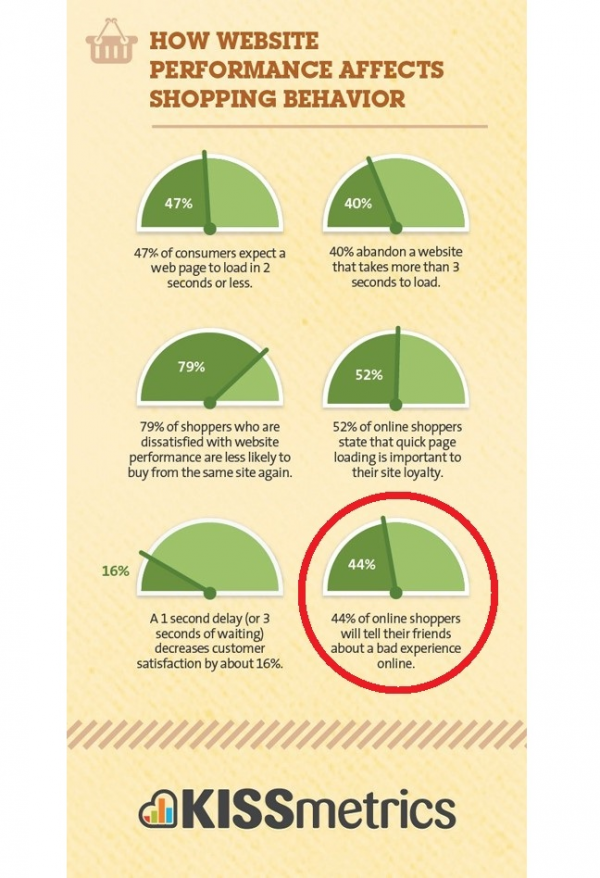
Other than losing revenues you are losing customers too and this is because when customers are unhappy they will let their friends know about it and you will end up losing more customers.

KISSmetrics research proves that 44% of users will tell the others when they have a bad online experience.

How website performance affects shopping behaviour

If you are not providing a good user experience then your visitors will spread the word and you will end up losing more customers and wasted your time and effort building your website.

Just think how annoying it is to find a link that you were going to get more information about but ended up on a 404 error page that the solution does not appear or exist.

2. Bounce Rate

404 error page is not just frustrating but it could also influence your bounce rate.

The bounce rate is measured by the number of time visitors spend on your page and if visitors do not stay for a certain amount of time then they would be considered as bounced from your page.

When you have unsatisfied visitors on your site and each of them leave your website then it results in a higher bounce rate.

Best-Digital Marketing Services Bad Bounce Rate

When search engines see high bounce rate on your pages -it will raise a red flag and it will class the whole site as irrelevant to the search engines.

Therefore it is absolutely crucial to keep your visitors happy when browsing your site by providing a good user experience – never lead them to any broken links.

3. Google Ranking

As mentioned above a high bounce rate can actually lead to lower ranking in Google’s Search Engine Results Pages (SERPs)

When Google sees that visitors are leaving your page within seconds of landing – they will assume that users did not find what they are looking for. Google will lower the ranking on SERPs since it is flagged as less credible and reliable.

google ranking algorithm components

Google uses a technology called Spiders to crawl through your website to gather valuable information that tells the search engines what is your page about.

A broken link is all it takes for Google Spiders to stop the indexing process which can ruin your chances to get a higher rank.

Now you can see how broken links can harm and potentially ruin your website.

What Does Error 404 Not Found Actually Mean?

Basically it means that the client or your visitor’s were able to connect to the host which is your website’s server but it was unable to find the actual resource that was requested like a specific URL or filename.

For example if someone tries to access yoursite.com/post-name but you do not have any content with the slug post-name. 

Pixar Broken Link Custom Page

Note that this error is not unique to WordPress alone. It can happen on any website.

The visitor will then see a 404 error because even though your web server is functioning normally the resource that was requested does not exist.

It is not just posts or pages but any asset missing can generate a 404 error on the server like a missing image file, missing JavaScript, missing CSS and more.

If you see this error on your entire site’s content then it is typically due to an issue with your WordPress site’s permalinks.

If you only see it on individual pieces of content then it is most likely because you changed a piece of content’s slug without setting up a redirect.

Additionally the 404 error is not always a bad thing but it is only bad when it is interfering with usability. And sometimes things are just out of your control!

Sometimes a person might just type the wrong URL in their address bar. In that case they will still see a 404 error but there is no actual problem with how your site is configured.

This is actually the desired response and you can create your own custom 404 page to help get visitors to the right spot.

Because different browsers display error messages differently so you might see a different message for this error.

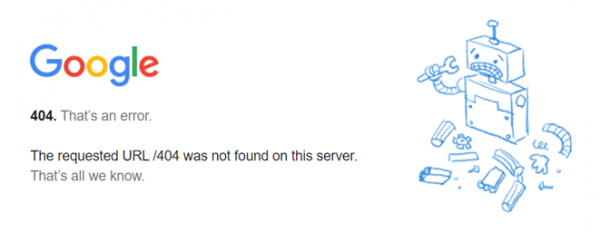
Broken Link - 404 Error Not Found

Other common variations include:

  • Error 404
  • Not Found
  • Page Not Found
  • 404 Not Found
  • HTTP Error 404
  • The page cannot be found
  • We cannot find the page you are looking for.
  • The requested URL was not found on this server. That is all we know.
  • The requested URL was not found on this server.

How to Fix Broken Links in WordPress

Now we are aware that broken links are bad for your WordPress site. It is time to answer the important question – how can you fix broken links in WordPress?

In the next sections we will cover ways how to fix broken links in WordPress.

How to Fix Broken Links on WordPress Website

1. Update Your WordPress Site’s Permalinks

If you are experiencing site wide 404 errors when trying to access content then the most likely cause is an issue with your permalinks or your htaccess file accessible via c-panel on your hosting server.

The easiest way to fix this is to update your permalink settings through the WordPress dashboard.

Save Permalinks

All you need to do is go to Settings → Permalinks and click Save Changes you do not need to make any changes – clicking Save Changes is enough.

If you are experiencing 404 errors on a specific piece of content then the issue is likely that you:

  • Changed the URL slug for that content.
  • Moved that piece of content manually like deleting the existing post and pasting it into a new post.

Users then try to access the content at the old location and see a 404 page instead of the resource they were expecting.

The best way to fix this is to automatically redirect anyone who tries to access the old location to the new location.

That way they will make it to the right spot without any 404 errors. It is also good for SEO.

Redirection 301

If you move or rename a post without adding a redirect then you lose all the domain authority attached to the backlinks pointed at that post.

WordPress by default will attempt to redirect changed/moved content. But it does not always work and you should never rely on WordPress for this functionality.

But do not worry there are several easy ways to set up redirects in WordPress.

First you can use the free Redirection plugin to manage redirects from your WordPress dashboard.

Once you have installed and activated the plugin go to Tools → Redirection and enter the 404 page URL in the Source URL box and the new location of the content in the Target URL box:

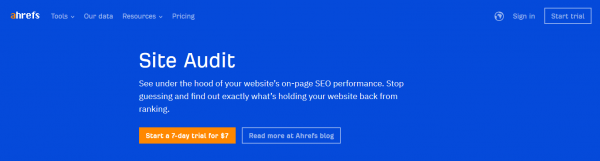
The first method we recommend to find and fix broken links in WordPress is to use a web-based SEO audit tool.

Two of the most popular ones are Ahrefs and SEMrush. Both of them include very powerful site audit tools in which you can automatically scan your WordPress site for errors.

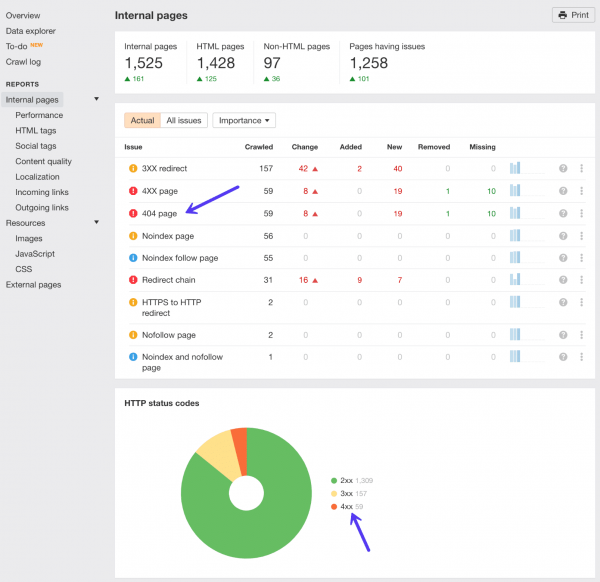
The first way to find broken links in Ahrefs Site audit tool. Simply set up a new project then input your WordPress site’s address and let it scan your site.

Depending on the size of your site this could take a good 20 minutes or so.

Ahrefs Site Audit Tool

After the scan has completed click into the reports section and you will find a list of all the 404 errors on your WordPress site.

You can then see all the broken links on your site and the internal pages they are appearing on. You should then update the broken links with the correct ones.

Ahrefs 404 Error Report

Option 2 – Find Broken Links with Ahrefs Site Explorer

You can also use the Ahrefs Site Explorer to find broken links.

Ahrefs Site Explorer

Simply put your WordPress site URL into Ahrefs Site Explorer -go to the Backlinks report and click Broken to see the strongest broken backlinks of your website.

Ahrefs Broken Backlinks Report

Alternatively you can also go to Best by links report and apply the 404 not found filter in HTTP codes.

Option 3 – Find Broken Outgoing Links with Ahrefs Site Explorer

Fixing internal broken backlinks on your WordPress site is number one priority and do not forget about broken outgoing links too.

When you link to broken content or resources on other people’s sites this is also frustrating for the user. High-quality outgoing links also play a part in your SEO.

Simply put your WordPress site URL into Ahrefs Site Explorer go to the Outgoing links report and click Broken links.

You can then see the post or page on your WordPress site where the link resides and the broken external link.

Ahrefs outgoing Broken Links Report

3. Desktop Software

Beyond the web-based SEO audit tools you can also find broken links using desktop software as well.

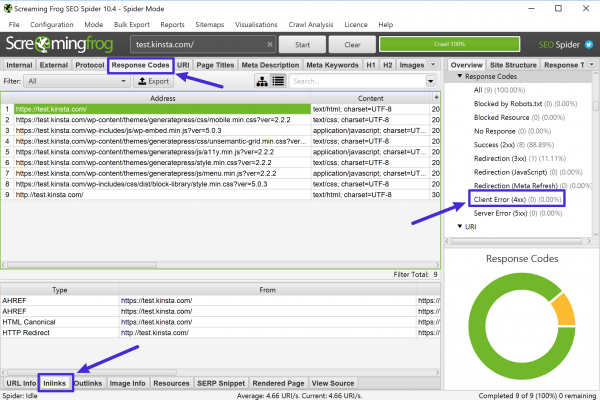
The most popular option here is Screaming Frog which is a well-known SEO tool that is free to use to find broken links.

Screaming Frog works on Windows, MacOS and Ubuntu.

Once you download and install the program here is how to use it to find broken links.

First add your site’s URL to the box at the top and click Start:

Screaming Frog

Next you can use the Response Codes option to filter out 404 pages and then use the Inlinks feature at the bottom to find links to those 404 pages:

Screaming Frog Broken Link Report

If you are using a Mac – Integrity is also another good desktop SEO tool that you can use to find broken links in WordPress.

4. Online Broken Link Checker Tool

If your site is not very large then you might be able to use a free online broken link checker tool to find broken links.

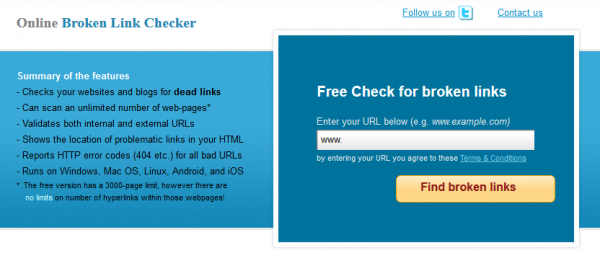
A good option here is the creatively named Online Broken Link Checker which lets you check up to 3,000 pages for free.

It is also really easy to use –

  • you just head to the website
  • plug in in your URL

click Find broken links:

Online Broken Link Checker

You can decide whether to report distinct broken links or all occurrences – all occurrences is more thorough but may take more time:

Online Broken Link Checker - Enter URL and security code

Next the tool will list out all of the broken internal and external links as well as provide links to the page where the broken link appears:

Online Broken Link Checker - broken link report

Then all you need to do is go in and fix the offending link/s.

5. Google Search Console

Google Search Console is a helpful tool from Google that helps you monitor, maintain and troubleshoot your site’s presence in Google Search results.

To get started you will need to verify your site with Google Search Console then you can start benefiting from its features including broken link detection.

As part of its functionality Google Search Console includes a Crawl Errors report that lets you see all the pages that returned a 404 error to Google:

Google Search Console

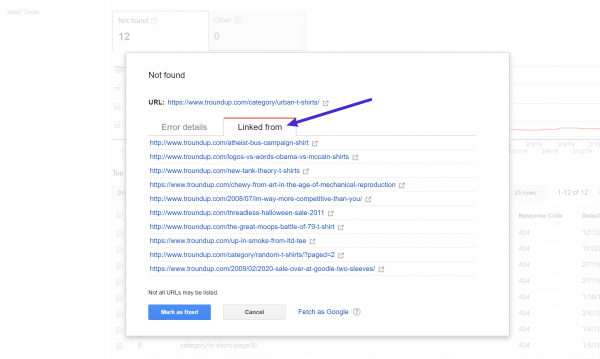
Clicking on any one of those links will open a popup where you can see which pages link to that 404 error page which lets you correct the broken link on those pages:

Google Search Console - broken link report

6. Broken Link Checker WordPress Plugin

We do not recommend using a WordPress plugin to check broken links because they can be a big drag on your site’s speed and performance.

From a performance perspective it is much better to off-load these duties to a separate tool via any one of the methods above.

If you absolutely must use a WordPress plugin to check broken links – do not leave it active and running all the time.

Instead run the plugin once and then delete it from your site after you have fixed the broken links.

Once again – our recommendation is to just use one of the other tools above and skip the plugins.

When it comes to broken link checker plugins the most popular option is the free Broken Link Checker plugin at WordPress.org.

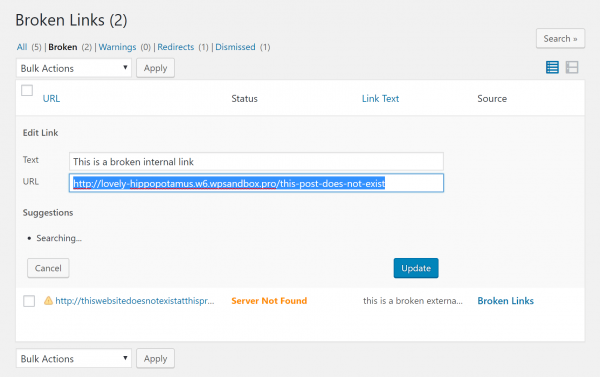
Once you install and activate the plugin, go to Tools → Broken Links to view the report with all of your broken internal and external links:

broken link checker wordpress - wp plugin

To quickly fix any broken links that the tool finds – you can hover over the link and choose Edit URL to edit the link without needing to open each individual page.

Features of Broken Link Checker –

  • The plugin monitors your blog post, pages, comments and custom fields etc.
  • You can easily filter and search links by URL and anchor text etc.
  • You do not have to edit links from that particular edit post page as it can be directly edited from plugin’s page.
  • The plugin notifies you either through the dashboard or via email notification.
  • It gives the facility to prevent search engines from following broken links.
broken link checker wordpress - wp plugin report

Manage Your Links Smartly

Having broken links on your WordPress site is bad for both user experience and SEO so you want to periodically check for broken links and fix as many of them as possible.

For the most performance-friendly way how to find broken links in WordPress – we recommend using an off-site solution.

Good options are:

While WordPress plugins like Broken Link Checker make it easy to find broken links on WordPress we do not recommend them because of the negative performance aspect of this plugin.

It is definitely not recommended to leave broken links on your site so it is important that you fix, remove or replace any of the broken links you find immediately.

Conclusion

But it is important to remember that you can actually fix these broken links yourself.

If you think that doing this is difficult then contact us today or our support team at Best-Digital Marketing Services who specialises in web performance optimisation.

If you enjoyed this post then you will love Best-Digital Marketing’s WordPress hosting platform. Turbocharge your website and get 24/7 support from our hosting team.

For full Web Hosting Services package functionality

and select the package that suits your business needs.

If you prefer to discuss your requirements first just

or fill your details with a message of your requirements at

For more information about our services and how we can help you with your Video Marketing needs:-

Hope you are enjoying and learning a lot with abundance of information about:-

How to Find and Fix Broken Links in WordPress.