Have any question?
How Trust Badges Increase Website Conversion Rate

How Trust Badges Increase Website Conversion Rates

Increase Website Conversion Rates with Trust Badges

It is probably one of the most frustrating things to see as an online retailer: abandoned shopping carts which can impact your conversion rates.

We have all done it – we have gone online, shopped for something, added it to our shopping cart and then did not follow through with the purchase dues to lack of trust badges.

How Trust Badges Increase Website Conversion Rates

We left our shopping carts abandoned with items remaining in them. It is similar to going to the grocery store -putting items in your cart then walking away and leaving it in the middle of an aisle.

Cart Abandonment Rate By Industry

Shopping cart abandonment can happen for a variety of reasons.

According to recent survey online retailers can lose on average:

 -75% of their sales to shopping cart abandonment.

– 17% due to concerns about security.

– 21% complicated checkout process.

This increase highlights how important online security has become to most consumers over the years.

That is why trust badges can increase conversion rates on your online e-commerce website.

Cart Abandonment During Checkout

This means that you could potentially increase your sales by ten percent or more and gaining the trust of your consumers by just adding trust badges.

It is a small pretty substantial increase after all and it is a simple fix.

Let us discover the top five trust badges to help increase your conversion rates.

What is a Trust Badge?

A trust badge is exactly what it sounds like. It’s a badge that you place on your web page that induces or inspires trust.

You often find them during the checkout process but more and more retailers are placing them on their landing or home pages. They are simple tools that can boost sales and satisfaction when browsing your website.

Behind these trust badges are some security features that help keep the customer’s credit card information and personal information safe.

The trust seal company that agrees to place their badge on your website confirms that your business is authentic therefore users know that all processes taking place on your website are safe and secure.

The Secure Sockets Layer or SSL is part of a complex system for internet safety that will encrypt certain information sent over the internet.

In general trust seals are issued when these secure systems are implemented and they increase conversion rates in e-commerce sector.

Safe Secure Layer - SSL

You can tell whether or not the site you are visiting is using some kind of SSL safety protocol by the little lock symbol that is next to the URL or by checking that the web address starts with HTTPS instead of HTTP.

Not everyone is aware of this hence that is why it is so important to have the trust seal visible on your site.

What Impact Do Trust Badges Have?

Actualinsights* asked study participants two key questions to see how trust badges has had an impact on them.

Here is the first question:-

Impact Of Trust Badges -Q1

A whopping 75+% of people did not buy because they did not recognise the particular logos – which shows that it is important to use the right trust badges that consumers recognise.

Here is the second question.

Impact Of Trust Badges -Q2

You can see – over 60% of consumers did not make a purchase because there were no trust badges.

Consumer’s still had a significant amount of doubt regarding a brand’s security measures when trust badges were not present.

Failure to use or include the right ones could be a potential deal breaker and can affect your overall conversion rates.

Can Trust Badges Improve Conversion Rates?

In today’s digital world it is normal for consumer to be cautious of online shopping since a lot of people have been losing their identities, security, cash and more simply buying a product online. 

When customers come to your e-commerce website for the first time they are being introduced to your brand.

You want to ensure that they know your e-commerce website is a safe, secure and trustable for them to complete their purchase.

On average over 75% of potential customers who visit an e-commerce site abandon their carts. Trust badges may be the answer to battling shopping cart abandonment.

There are numerous reasons why almost three-quarters of customers do not complete their purchases.

A study from the Baymard Institute outlines the major factors:

  • 17% of respondents said that they did not trust the website with the credit card information
  • 21% of them pointed to the lack of trust or complicated online checkout.

It is clear that building that trust is an integral part of increasing your conversion rates.

Cart Abandonment Rate During Checkout

There were a lot of different elements that play a role in building trust but the most important factor was having trust badges displayed on the website.

A whopping 48% of respondents said that trust badges reassure them that the site is secure and trustworthy

Trust Badges - Sense of Security & Trust

The same survey found that:

  • 76% of respondents said trust seals affected their sense of trust in a website.
  • 61% said that they had not made a purchase because there were no visible trust badges or logos when they went to a website. 

There are five main types of website trust badges that you can implement on your site. Each one has its own meaning and use.

You can decide which trust badges to use on your site based on the desired effect you would like to achieve.

Below you will find explanations for five different kinds of trust icon as well as examples of each and how to acquire them to increase your chances on conversion rates.

Examples Of Trust Badges

You can either use a couple or all of them on your website simultaneously and it depends on what you are trying to achieve and these will impact your conversion rates on your website.

This site badge may be the most important of the five. These are the trust badges that you get when you sign up with a company that provides an SSL certificate.

SSL stands for Secure Socket Layer and can be a little confusing but it protects the internet connection and the information that is transferred.

This type of trust badge will indicates that your checkout process on your website is safe and secure, the information shared is encrypted and that your customers’ identity or credit card information will not be stolen.

Best-Digital Marketing Services - symantec options & packages

Instilling this type of trust in your business will help tremendously with increasing your overall conversion rates. 

Using the most trusted and recognised safe checkout badges will quickly make your customers feel safe and secure.

The number one most recognised and trusted SSL badge is from Symantec.

Symantec owns what used to be called VeriSign as well as Norton and LifeLock. All of these names are well recognised and trusted security certificate providers.

Symantec offers a variety of options and packages to suit your needs.

Another well recognised and trusted security system is PayPal. You can purchase protection from PayPal just like from Symantec and receive the trusted security badge for your site.

Paypal Secure Payment

Shopify is one more example of an increasingly recognisable SSL provider.

If you open an ecommerce store using Shopify then you will automatically receive an integrated SSL certificates.

When ecommerce customers shop at a Shopify store they know that their personal information will be kept safe.

Keep in mind that one of the reasons the safe checkout trust badges work so well in increasing conversion rates is because they are recognised.

Best-Digital Marketing Services - shopify payment gateway

Brand recognition does play a major role in building trust since they are Accepted Payment trust badges

All these examples are of trust badges paid version. Display these badges near your Add to Cart buttons and at your checkout page.

Best-Digital Marketing Services - trust badges bottom- below add to cart button

They need to be clearly visible in order to have the desired effect. They can also be displayed at the bottom your landing page or home page to increase your conversion rates.

2. Accepted Payment Badges

Nothing instils confidence more than seeing a brand that you recognise. Having the Visa, MasterCard or PayPal badges listed as accepted payment options can boost the level of trust in your website without having to do a ton of legwork. 

A study performed by cxl.com revealed a whopping 42% chose Visa-MasterCard as the most recognised brand while PayPal was voted as the most trusted brand with 25%.

Furthermore it states that:

The hypothesis that familiarity accurately predicts a population’s perception of security is generally supported. For most part greater familiarity also meant greater feeling of security.

Most Familiar Brand vs Most Trusted Brands

The best part about these trust badges is that they are free and easy to get.

Visa does have a verified by Visa merchant program so when you sign up you receive a Visa Verified badge for your site that will boost confidence and conversion rates.

Best-Digital Marketing Services - accepted payments

These badges are more commonly displayed at the bottom of each page on your website.

They do not necessarily need to be at the centre of attention or glorified in any way.

Third-party endorsements can help induce trust in customers by showing them that you have credibility.

These programs generally involve an application process and a review of your site before being granted the badge.

Most Trusted Site Seal

If you cannot think of any third-party endorsement badges think about the Better Business Bureau Accredited Business and Google Customer Review badges – two of the most trusted examples.

The Better Business Bureau Accredited Business badge adds a significant amount of trust to your site.

According to the Better Business Bureau – 173 million people search BBB.org annually for existing business profiles in order to check their ratings.

After being granted this badge customers can click on the badge and verify your accreditation. Go to the Better Business Bureau website to find out more about the accreditation process.

Better Business Bureau - Accredited Business Badge - BBB

The Google Trusted Store badge was a recognised and trusted badge.

Please note that Google Trusted Store was closed in 2017 and moved to Google Customer Reviews badge.

To earn Google trust seal – you must apply and meet the requirements that Google sets for this program.

Once Google has approved your store your customers begin to receive surveys after making purchases. You are granted a badge after Google decides that the reviews are good enough.


Best-Digital Marketing Services - google verified customer reviews badge

These trust seals can take a little extra time and work but they are worth the effort and may also increase conversion rates for your online store.

It is a great way to show off your excellent ratings and reviews and at the same time increase trust for your customers.

Think about when you shop on Amazon – you look for highly-rated items with lots of reviews and even an Amazon Best Seller badge if you can.

Amazon Best Seller

The same goes for your E- commerce store. Consumers are more likely to buy from you if they know that other customers have had a great experience buying from your store.  

These badges are usually placed in the footer of your website and should be more prominent than the accepted payment badges.

This is possibly the most effective trust badge of all – the money-back guarantee trust badge. It eliminates the fear and perceived risk of buying a product or service online.

Although this does not address any of the technical security issues but it lets potential customers know that you have their best interests in mind.

Money Back Guarantee Seals-Badges

Also called the Homemade Special – this badge is completely free. You can either make these badges yourself or easily find a downloadable version. 

The idea is to help eliminate the fear and perceived risk of buying online which is one of the biggest factors in conversion rates. By doing so, consumers feel safe and are more likely to purchase from you.

Other Quality Guarantee Seals

If you have a Money-Back Guarantee Badge – you should display it loud and proud. You want to make sure that every single customer sees it and takes note to validate increase in conversion rates.

It should be in the same places as your Safe Checkout Badge – near the Add to Cart button and the Checkout pages.

5. Free Shipping and Returns Badge

This is another free trust badge which makes your customers aware that you offer free shipping and/or returns through your store.

Gaining the trust of customers is important. By offering free shipping and free returns you are letting your customers know that you believe in the quality of your products and also value their happiness and satisfaction

It highlights your store policy and excellent customer service.
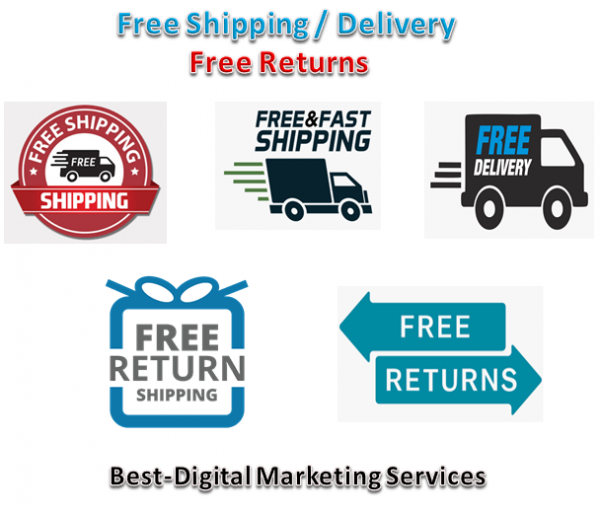
Free Shipping - Delivery & Free Returns

This badge has more flexibility in placement and can be used effectively in an array of places across your website.

We highly suggest having a Free Shipping and Free Returns badge on all Add to Cart and Checkout pages.

It can also be effective on your homepage – consider adding it to your header – and on you Frequently Asked Questions page or a dedicated Shipping and Returns page.

This trust badge should be displayed along with the money back guarantee badges should you choose to use them to increase conversion rates on your online store. 

There are many options when it comes to trust badges. Some of the most esteemed badges are expensive example – McAfee Secure starts at $15/month but scale up as the size of your business grows. 

If PayPal is one of the ways you accept payments then their free trust badges are a perfect way to start increasing your conversion rates. 

With downloadable PNGs or as source code available you can have a PayPal trust badge up on your e-commerce store today.

Click on the image below to view full list.

They have three different types of trust badges available:

  • Return Shipping is On Us
  • Backed by PayPal
  • Support Small Businesses 

If you have a Shopify E-commerce store then this app is available through the Shopify App Store and it is a perfect addition to your website.

Click on the image below to view full list.

You have access to 670 different accepted payment trust badges in a variety of design styles that you can easily drag and drop to your product pages.

If you upgrade to premium then you can have your accepted payment trust badges on your cart page, homepage and the footer.

Convertful’s free downloadable PNG badges are great for any e-commerce store with 60 different free badges that cover 6 major sales objectives.

Each badge comes in five different styles so you can choose something that works with your store’s design.

Click on the image below to view full list.

Convertful are looking at the problems that customers identify that lead them to abandoning their carts and tailor their badges to solve those problems and increase their conversion rates.

Trust Badges include:

  • Secure Payments for those worried about sharing their information online.
  • Money-Back Guarantee to inspire trust in your product and services.
  • Express Checkout to avoid losing the 35% of people who abandon carts when they have to create an account.
  • Free Shipping & Free Delivery to combat the extra costs that are too high.
  • Fast Shipping & Delivery for those worried about slow shipping times.
  • Payment Options to list the variety of payment options you accept.

TrustLock.co has over 120+ free website trust badges that you can use on your e-commerce store.

You must link back to their homepage to use them for free but that is a small price to pay for a somewhat recognisable badge.

Click on the image below to view full list.

The free trust badges include:

  • 30-Day Money-Back Guarantee 
  • Credit Card Processor Logos
  • Fully Secured SSL Checkout
  • 100% Satisfaction Guaranteed
  • 100% Money-Back Guarantee
  • Guaranteed Safe Checkout
  • AES 256-BIT SSL Secure
  • Best Price Guarantee
  • Free Shipping
  • PayPal Logos or Stripe Logos

The free trust badges do not have the TrustLock logo featured on them. To access badges with the logo you need to pay for a premium account which costs anywhere from $9 to $20 per month. 

Conclusion

With the number of data breaches that have occurred and identity theft being such a huge topic of conversation these days – it is understandable why consumers are so cautious about their online purchases.

You have approximately five seconds to build trust with your potential customers.

Displaying trust badges on your website is a cart abandonment solution that creates trust with your customers and guarantees increased conversion rates and return on investment in the long run.

However if you are finding it difficult then seek an experienced marketing agency like Best–Digital Marketing Services to help you set up strategies to recover sales through shopping cart abandonment.

Contact us today and see how we can help you increase or boost your conversion rates through implementing these trust badges.

For full Content Marketing package functionality

and select the package that suits your business needs.

If you prefer to discuss your requirements first just

or fill your details with a message of your requirements at

For more information about our services and how we can help you with your Video Marketing needs:-

Hope you are enjoying and learning a lot with abundance of information about:-

How Trust Badges Increase Website Conversion Rate

How to Find and Fix Broken Links in WordPress

How to Find and Fix Broken Links in WordPress

Find and Fix Broken Links in WordPress

Have you ever been in a situation where you were visiting a website to find your solution but ended up on a 404 error page?

We did a Google poll on what annoys you the most when visiting a website and look at the results!

What annoys you the most on a website

Broken Links has the most votes that annoy users the most. They are not only annoying but can also hurt your SEO efforts as well. Not only the users but search engines hate broken links too.

When visitors stumble upon a broken link they do not want to continue to explore any other pages because they cannot do so.

And when visitors spend lesser time on your site – search engines will assume that your website is not providing a good user experience and eventually give you a lower ranking.

Broken links will chase your visitors away and hurt your SEO efforts.

Therefore it is in your best interest to fix them. No one wants broken links on their website but not many website owners are willing to spend their time to check the links and fix or remove them.

What is a Broken Link?

A broken link also known as dead link – is a link that no longer works.

Broken links can happen for many reasons but the most common reason is when a page is either deleted or moved to a different location which causes the server to show a 404 not found error.

On WordPress sites broken links typically occur when moving a site to new domain name or when deleting a post or page without proper redirection.

Sometimes broken links can also happen due to a typo and they can go unnoticed for months if not years.

How to Find and Fix Broken Links in WordPress Website

Having broken links on your WordPress site is bad news for both your visitors and your site’s SEO therefore learning how to fix broken links in WordPress is an important part of running a successful WordPress site.

In this post we will dive into a deeper explanation for why broken links are something worth seeking out and correcting.

We will show you different methods that you can use to find and fix broken links in WordPress without slowing down your site.

There are 2 types of broken links on any website:

1. Internal Links

The internal links refer to links that go from one page on your website to another.

These links are the ones that you have control on your website. For example here is an internal link that will guide you to read the benefits of internal linking our team has written.

Internal Link or Links

Clicking on these internal links will direct users to the same website but a different page.

So whenever you update or make any changes to your website you should always check your internal links and make sure that the links are working.

2. External Links

External links or outbound links refer to the links that are pointing to another website.

However with external links – you will need to spend more time checking them because you would not know when the links will change as you are not in control.

So you would have to check it quite often to see if the link is still working and it will have to be done manually.

External Links

Let’s say I have linked to a particular website but a few months later the website owner took the link off their website. So when Google Spiders crawl my site and follow that link to the other website – it will read it as a dead end.

When Google Spiders detected too many 404 error pages then your website’s value will decrease from the search engines’ point of view.

So if you think that having broken links on your website would not damage your site then think again.

Why Broken Links Are Bad for WordPress Website?

Broken links are bad for your WordPress site for a few different reasons.

Why ….

Firstly there is the effect on your visitors. If someone is clicks on a link and they are doing so because they are interested in the content that they were told the link will take them to. Makes sense – right?

So by sending them to a broken link instead of the content that you promised – you are creating a frustrating experience for your visitors and that is why it is a good incentive to find and fix broken links on your site.

Broken links are bad for robots too especially the crawler bots used by search engines like Google.

Broken Links

Broken links waste your crawl equity in Google and every 404 page that a Googlebot encounters as a result of broken links is a live page that Google could have crawled instead.

Another point – broken links are also a waste of link equity. For example say if you have a broken internal link from one blog post to another then you are not getting the SEO benefit of that internal link which is a negative for your SEO efforts.

Broken Links will also affect your business in the following ways:

1. Sales / Revenue

Broken links are roadblocks in the conversion process.

No matter how much time you spend in getting customers to your site if they cannot get to the conversion page then all of your SEO efforts will be a waste.

Other than losing revenues you are losing customers too and this is because when customers are unhappy they will let their friends know about it and you will end up losing more customers.

KISSmetrics research proves that 44% of users will tell the others when they have a bad online experience.

How website performance affects shopping behaviour

If you are not providing a good user experience then your visitors will spread the word and you will end up losing more customers and wasted your time and effort building your website.

Just think how annoying it is to find a link that you were going to get more information about but ended up on a 404 error page that the solution does not appear or exist.

2. Bounce Rate

404 error page is not just frustrating but it could also influence your bounce rate.

The bounce rate is measured by the number of time visitors spend on your page and if visitors do not stay for a certain amount of time then they would be considered as bounced from your page.

When you have unsatisfied visitors on your site and each of them leave your website then it results in a higher bounce rate.

Best-Digital Marketing Services Bad Bounce Rate

When search engines see high bounce rate on your pages -it will raise a red flag and it will class the whole site as irrelevant to the search engines.

Therefore it is absolutely crucial to keep your visitors happy when browsing your site by providing a good user experience – never lead them to any broken links.

3. Google Ranking

As mentioned above a high bounce rate can actually lead to lower ranking in Google’s Search Engine Results Pages (SERPs)

When Google sees that visitors are leaving your page within seconds of landing – they will assume that users did not find what they are looking for. Google will lower the ranking on SERPs since it is flagged as less credible and reliable.

google ranking algorithm components

Google uses a technology called Spiders to crawl through your website to gather valuable information that tells the search engines what is your page about.

A broken link is all it takes for Google Spiders to stop the indexing process which can ruin your chances to get a higher rank.

Now you can see how broken links can harm and potentially ruin your website.

What Does Error 404 Not Found Actually Mean?

Basically it means that the client or your visitor’s were able to connect to the host which is your website’s server but it was unable to find the actual resource that was requested like a specific URL or filename.

For example if someone tries to access yoursite.com/post-name but you do not have any content with the slug post-name. 

Pixar Broken Link Custom Page

Note that this error is not unique to WordPress alone. It can happen on any website.

The visitor will then see a 404 error because even though your web server is functioning normally the resource that was requested does not exist.

It is not just posts or pages but any asset missing can generate a 404 error on the server like a missing image file, missing JavaScript, missing CSS and more.

If you see this error on your entire site’s content then it is typically due to an issue with your WordPress site’s permalinks.

If you only see it on individual pieces of content then it is most likely because you changed a piece of content’s slug without setting up a redirect.

Additionally the 404 error is not always a bad thing but it is only bad when it is interfering with usability. And sometimes things are just out of your control!

Sometimes a person might just type the wrong URL in their address bar. In that case they will still see a 404 error but there is no actual problem with how your site is configured.

This is actually the desired response and you can create your own custom 404 page to help get visitors to the right spot.

Because different browsers display error messages differently so you might see a different message for this error.

Broken Link - 404 Error Not Found

Other common variations include:

  • Error 404
  • Not Found
  • Page Not Found
  • 404 Not Found
  • HTTP Error 404
  • The page cannot be found
  • We cannot find the page you are looking for.
  • The requested URL was not found on this server. That is all we know.
  • The requested URL was not found on this server.

How to Fix Broken Links in WordPress

Now we are aware that broken links are bad for your WordPress site. It is time to answer the important question – how can you fix broken links in WordPress?

In the next sections we will cover ways how to fix broken links in WordPress.

How to Fix Broken Links on WordPress Website

1. Update Your WordPress Site’s Permalinks

If you are experiencing site wide 404 errors when trying to access content then the most likely cause is an issue with your permalinks or your htaccess file accessible via c-panel on your hosting server.

The easiest way to fix this is to update your permalink settings through the WordPress dashboard.

Save Permalinks

All you need to do is go to Settings → Permalinks and click Save Changes you do not need to make any changes – clicking Save Changes is enough.

If you are experiencing 404 errors on a specific piece of content then the issue is likely that you:

  • Changed the URL slug for that content.
  • Moved that piece of content manually like deleting the existing post and pasting it into a new post.

Users then try to access the content at the old location and see a 404 page instead of the resource they were expecting.

The best way to fix this is to automatically redirect anyone who tries to access the old location to the new location.

That way they will make it to the right spot without any 404 errors. It is also good for SEO.

Redirection 301

If you move or rename a post without adding a redirect then you lose all the domain authority attached to the backlinks pointed at that post.

WordPress by default will attempt to redirect changed/moved content. But it does not always work and you should never rely on WordPress for this functionality.

But do not worry there are several easy ways to set up redirects in WordPress.

First you can use the free Redirection plugin to manage redirects from your WordPress dashboard.

Once you have installed and activated the plugin go to Tools → Redirection and enter the 404 page URL in the Source URL box and the new location of the content in the Target URL box:

The first method we recommend to find and fix broken links in WordPress is to use a web-based SEO audit tool.

Two of the most popular ones are Ahrefs and SEMrush. Both of them include very powerful site audit tools in which you can automatically scan your WordPress site for errors.

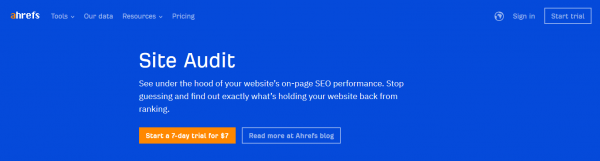
The first way to find broken links in Ahrefs Site audit tool. Simply set up a new project then input your WordPress site’s address and let it scan your site.

Depending on the size of your site this could take a good 20 minutes or so.

Ahrefs Site Audit Tool

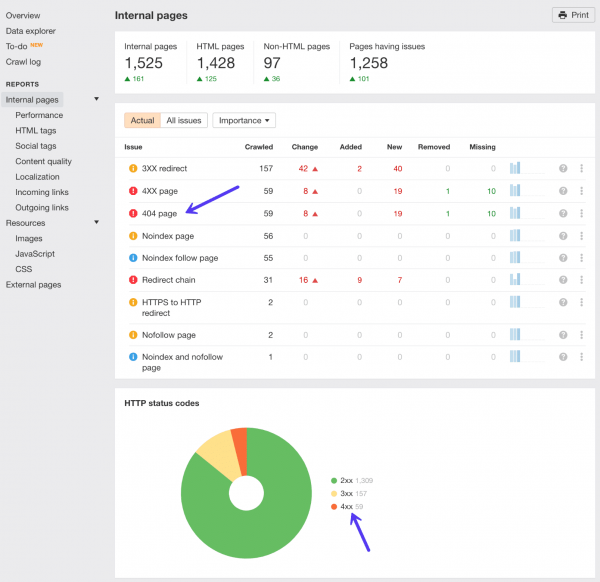
After the scan has completed click into the reports section and you will find a list of all the 404 errors on your WordPress site.

You can then see all the broken links on your site and the internal pages they are appearing on. You should then update the broken links with the correct ones.

Ahrefs 404 Error Report

Option 2 – Find Broken Links with Ahrefs Site Explorer

You can also use the Ahrefs Site Explorer to find broken links.

Ahrefs Site Explorer

Simply put your WordPress site URL into Ahrefs Site Explorer -go to the Backlinks report and click Broken to see the strongest broken backlinks of your website.

Ahrefs Broken Backlinks Report

Alternatively you can also go to Best by links report and apply the 404 not found filter in HTTP codes.

Option 3 – Find Broken Outgoing Links with Ahrefs Site Explorer

Fixing internal broken backlinks on your WordPress site is number one priority and do not forget about broken outgoing links too.

When you link to broken content or resources on other people’s sites this is also frustrating for the user. High-quality outgoing links also play a part in your SEO.

Simply put your WordPress site URL into Ahrefs Site Explorer go to the Outgoing links report and click Broken links.

You can then see the post or page on your WordPress site where the link resides and the broken external link.

Ahrefs outgoing Broken Links Report

3. Desktop Software

Beyond the web-based SEO audit tools you can also find broken links using desktop software as well.

The most popular option here is Screaming Frog which is a well-known SEO tool that is free to use to find broken links.

Screaming Frog works on Windows, MacOS and Ubuntu.

Once you download and install the program here is how to use it to find broken links.

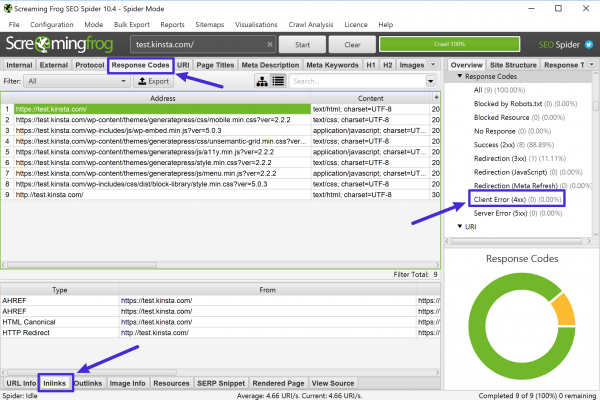
First add your site’s URL to the box at the top and click Start:

Screaming Frog

Next you can use the Response Codes option to filter out 404 pages and then use the Inlinks feature at the bottom to find links to those 404 pages:

Screaming Frog Broken Link Report

If you are using a Mac – Integrity is also another good desktop SEO tool that you can use to find broken links in WordPress.

4. Online Broken Link Checker Tool

If your site is not very large then you might be able to use a free online broken link checker tool to find broken links.

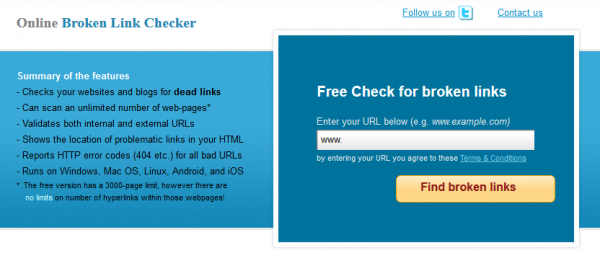
A good option here is the creatively named Online Broken Link Checker which lets you check up to 3,000 pages for free.

It is also really easy to use –

  • you just head to the website
  • plug in in your URL

click Find broken links:

Online Broken Link Checker

You can decide whether to report distinct broken links or all occurrences – all occurrences is more thorough but may take more time:

Online Broken Link Checker - Enter URL and security code

Next the tool will list out all of the broken internal and external links as well as provide links to the page where the broken link appears:

Online Broken Link Checker - broken link report

Then all you need to do is go in and fix the offending link/s.

5. Google Search Console

Google Search Console is a helpful tool from Google that helps you monitor, maintain and troubleshoot your site’s presence in Google Search results.

To get started you will need to verify your site with Google Search Console then you can start benefiting from its features including broken link detection.

As part of its functionality Google Search Console includes a Crawl Errors report that lets you see all the pages that returned a 404 error to Google:

Google Search Console

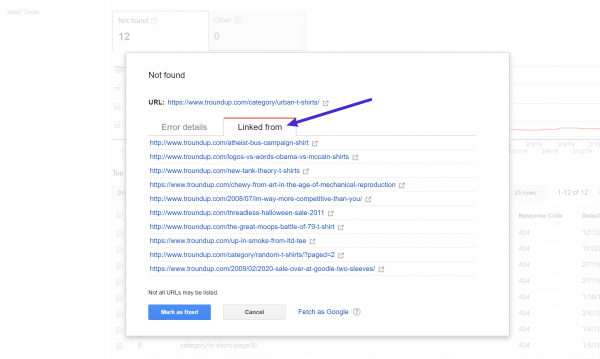
Clicking on any one of those links will open a popup where you can see which pages link to that 404 error page which lets you correct the broken link on those pages:

Google Search Console - broken link report

6. Broken Link Checker WordPress Plugin

We do not recommend using a WordPress plugin to check broken links because they can be a big drag on your site’s speed and performance.

From a performance perspective it is much better to off-load these duties to a separate tool via any one of the methods above.

If you absolutely must use a WordPress plugin to check broken links – do not leave it active and running all the time.

Instead run the plugin once and then delete it from your site after you have fixed the broken links.

Once again – our recommendation is to just use one of the other tools above and skip the plugins.

When it comes to broken link checker plugins the most popular option is the free Broken Link Checker plugin at WordPress.org.

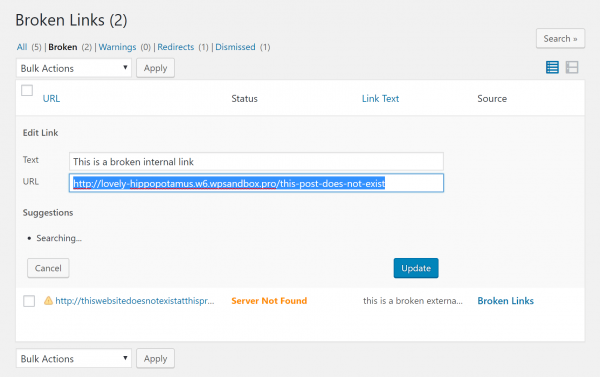
Once you install and activate the plugin, go to Tools → Broken Links to view the report with all of your broken internal and external links:

broken link checker wordpress - wp plugin

To quickly fix any broken links that the tool finds – you can hover over the link and choose Edit URL to edit the link without needing to open each individual page.

Features of Broken Link Checker –

  • The plugin monitors your blog post, pages, comments and custom fields etc.
  • You can easily filter and search links by URL and anchor text etc.
  • You do not have to edit links from that particular edit post page as it can be directly edited from plugin’s page.
  • The plugin notifies you either through the dashboard or via email notification.
  • It gives the facility to prevent search engines from following broken links.
broken link checker wordpress - wp plugin report

Manage Your Links Smartly

Having broken links on your WordPress site is bad for both user experience and SEO so you want to periodically check for broken links and fix as many of them as possible.

For the most performance-friendly way how to find broken links in WordPress – we recommend using an off-site solution.

Good options are:

While WordPress plugins like Broken Link Checker make it easy to find broken links on WordPress we do not recommend them because of the negative performance aspect of this plugin.

It is definitely not recommended to leave broken links on your site so it is important that you fix, remove or replace any of the broken links you find immediately.

Conclusion

But it is important to remember that you can actually fix these broken links yourself.

If you think that doing this is difficult then contact us today or our support team at Best-Digital Marketing Services who specialises in web performance optimisation.

If you enjoyed this post then you will love Best-Digital Marketing’s WordPress hosting platform. Turbocharge your website and get 24/7 support from our hosting team.

For full Web Hosting Services package functionality

and select the package that suits your business needs.

If you prefer to discuss your requirements first just

or fill your details with a message of your requirements at

For more information about our services and how we can help you with your Video Marketing needs:-

Hope you are enjoying and learning a lot with abundance of information about:-

How to Find and Fix Broken Links in WordPress.


How to Increase Engagement With Video Content Marketing

How to Increase Engagement With Video Content Marketing

Increase Engagement With Video Content Marketing

Video content marketing is not what it used to be a few years ago. Today it has become a lot more serious and more effective especially for businesses that have already managed to build an audience.

A large number of small businesses are taking advantage of video content marketing to stand out from the competition in order to achieve their goals.

Why video??

Because it works and nearly everyone is watching video these days in one way or another using different devices like mobile, tablets and laptop.

How Video Content Can Help Businesses

You will notice that video content is being consumed like never before. YouTube has become the second biggest search engine in the world.

Yes – not Bing or Yahoo but YouTube is where people are searching on after Google for everything. Product demos, how-to videos, Tutorial videos, Explainer videos – you name it they are searching for it.

Here are some more video content marketing stats to convince you about the power video holds on the web:

  • 82% of Twitter users watch video content on the Twitter.
  • 92% of mobile video viewers like to share them with others.
  • 87% of marketers leverage video content as a marketing tool.
  • 93% of Twitter videos are watched on mobile.
Video Content Marketing Statistics

This means that as a business you should not take video content marketing for granted.

With time your competitors will be leveraging video which means you need to start your video content marketing strategy now.

The content value of your video should not be underestimated if you want to succeed with your video content marketing efforts.

Visual Means High Impact

Storytelling Using Video

How can you use video content marketing strategy? It is important to understand what make videos click. One reason is that videos allow you to tell stories.

How do ….

Stories allow you to connect with your target audience. You as a marketer can leverage stories to create powerful impressions and long lasting relationships that deliver.

Video has the potential to help your prospects and customers understand your business and create a ground for future promotions.

Audience with Video Storytelling

It is also an amazing way to spread your ideas with meaningful exciting stories.

Consumers are more likely to engage to a narrative video that tells you the value of the product rather than a sales pitch.

What’s more …..

They are more likely to be connected emotionally to a brand if they feel that their lives will change once they use it.

You can use video to experiment with new and brave content to touch the emotional side of your target audience.

Because videos are a mixture of sounds, visuals and motion so they allow you to create a deep and meaningful connection with your target audience whilst positioning your brand in the best possible way.

Visual Means More Retention

In order to make the most of video content marketing you as a business should be aware and understand how to use it correctly.

Until you realise the true power of video content marketing strategy and take the right steps to leverage it you will not see the results you would like to see.

What is Video Content Marketing?

Video content marketing is nothing but the production and online distribution of content that is educational or informative in nature.

The aim of this content is to convert online content consumers into leads and customers.

What Is Video Content Marketing

It should also provide enough information to current customers and convince them to become repeat customers.

Video marketing can be used across various social media platforms with the help of different types of video content marketing strategy.

Obviously video is a big part of this strategy and not just limited to text.

Visual Content Statistics

Since video is a strong and effective way to spread your marketing message it can take your content marketing efforts to the next level.

This depends on how well you execute your video content marketing campaign and what do you want to achieve from it.

Why Use Video Content Marketing

Now you should know what video content marketing is and how it is growing rapidly.

It is a video content marketing tactic that your business needs to incorporate in order to get a higher return from your online marketing efforts.

Why Use Video Content Marketing

Below are a few reasons why you should invest in video content marketing ideas and make it a part of your core business strategy.

1. More Conversions

When it comes to video content marketing campaign the ultimate metric that matters is the conversion rate.

Yes …

So if you are not converting your prospects into leads or customers then your business is not growing.

By leveraging video content marketing you will be able to get more people to sign up for your newsletter or purchase your product or services.

Video content can give your prospects the clarity they need to make the final decision.

It gives you a certain edge over competitors and since quality video is not as easy to produce it can take a while before others catch up with you.

More Conversion with Video Contnet Marketing

A recent research shows that 70% of marketers have found video content marketing more conversion-friendly. It can help you get better results with minimal efforts when done correctly.

Studies have proven that visual content works great when it comes to engaging with your target audience.

Customers like to consume content that is visually appealing and engrossing not just pictures or photographs. Video content is proven to be a big part of the visual content movement.

Video or Visual vs text

With ever increasing consumers watching more video content on social media platforms like YouTube, Facebook, Instagram and Twitter you can see how video is helping generate strong engagement from target audiences.

When you create and share video content with your social followers you have a 10X chance of them engaging with your video that often translates to more shares, likes and comments.

Think About It - People Remember

Keep in mind that the quality of video content marketing matters to a huge extent and has a direct impact on the results you are able to generate.

Looking around social media platforms you will find that videos are being shared the most in comparison to other content types.

Why are they …

There are many reasons why people like sharing videos and one of them is that people connect to the right video content on an emotional level.

By creating videos that appeal to the emotions of your target audience you will give them a reason to consume your content and also spread it across their own network.

Video Content- Emotional Content

Just look at a traditional blog post you will not find the emotional cues that come with video content.

Everything can have a positive impact on the viewer – from the tone of voice to the sound effects or music being used. This makes your content stand out from the rest and also memorable.

When consumers watch your video that evokes their strongest emotions like happiness, awe, anger, sadness and more it may not push them towards taking action immediately.

Internet Traffic Is Video Content

However it will help them make a buying decision later on when they see more such content from you.

Therefore if you are in the B2B or the B2C market -impressing the emotions of your target audience with video content marketing can and will help you bring in more business.

4. Higher Accessibility

Let us be honest now video production is no longer a difficult task compared to a few years ago.

Really ??

You do not need to spend a lot of time on creating a video or have a huge budget to achieve studio level quality.

Video Content Marketing - Click-Swap-Render

Yes – previously video content was only for the big guys who were able to produce it.

Today – thanks to the advance technology and with new or innovative tools available creating and launching video has become much more affordable.

Creating video is much easier

In fact it will keep getting easier as more and more businesses jump into producing their own videos and starting their own channels.

5. Easier SEO Results

Can video content marketing have an impact on SEO? Do videos help you rank higher in the search engines for keywords that are hard to rank for? The answer is – YES provided it is done correctly.

There is no doubt that Google and other major search engines love video content and would not hesitate to rank it higher than traditional articles.

Videos increase Conversion Rate by 80%

Recent studies confirm that by just adding video content to your site: 

  • You are 53 times more likely to reach the front page of Google if it includes video. (Insivia)
  • On your landing page this can boost your conversion rate by up to 80%. (Unbounce)
  • Video increases organic search traffic on a website by 157%. (Conversion XL)
  • On average people spend 2.6x more time on pages with video than without. (Wistia)
  • Video is expected to make up 82% of internet traffic by 2021

This shows you that quality video content can make a big difference on your conversion rate and also generate organic search traffic.

Using video for marketing is more effective when you take a prospect though a well-defined video content marketing funnel.

By implementing video you will be able to generate more sales with your video content strategy.

Video Marketing Funnel

With the help of a proper video content marketing funnel you can:

  • Create more awareness among your target audience about your product or service while creating a positive impression on them. This is the first and the most important stage of content marketing because without awareness it is impossible to build trust.
  • Focus on the problem and the solution you offer, clearly explaining the benefits of using your product and educating your audience. This is the second stage where you help your prospective buyers understand how your products or services can help them.
  • Stand out from the competition and make it easy for prospects to reach a buying decision and do business with you. This is the final stage of the funnel where you can expect to actually close the sale.
  • Obtain thank you and success stories to help you with new releases and retain your current buyers.
Video Marketing Funnel equals Higher ROI

To make the most of your content marketing funnel it is important that you use the right type of content to take potential buyers through it.

When using video content marketing funnel – you become stronger by getting a higher return on investment (ROI).

You will find that video is the perfect medium to get more of everything from building brand loyalty to increasing your conversion rate.

Should you wish your video content marketing to deliver results then you need to take consistent approach to it.

How…..

Below are seven proven tactics or ways to help you make the most out of your video content marketing efforts to increase engagement.

There are in no order or importance since all of them are equally important in their own way.

Consistency plays a big role in any competition.

Why?

Because videos are visual which means you are free on how you present the content.

Every video you create can help your viewers resonate with your message by being consistent.

Your brand’s personality, design and look matters to a great extent in keeping your consistency high.

For example if your videos have a voice-over always ensure that the colours and designs in the videos you use stay consistent.

Create a Video Content Calendar

Similarly if you are creating videos with people in them then keep using the same cast so that your viewers are familiar with them.

You may also want to plan your video content well in advance by creating a video content calendar to ensure you are consistent with timing.

Your videos need to be customised to fit across all the relevant video platforms. The one size look fits all approach does not apply here.

So when posting on Instagram then it helps to create videos that look more natural, unedited or spontaneous. However on YouTube and Facebook people expect a professional feel and that is what you give them.

There is no doubt that your video content marketing plan has many other valuable video sharing channels or platforms that you can tap into besides YouTube.

No way …

Your aim is to reach out to your target audience in the best possible way and that is by focusing on all shareable platforms.

video marketing by platforms

The obvious reason why you need to consider other platforms is because of the potential to connect with various audiences.

For instance Facebook users discover video content in a different way compared to You Tube users and the different platforms have people from various age groups using them.

This is why it makes sense to leverage as many video platforms as you can and make sure to spend time on platforms where your target audience are watching most of the time and increasing engagement.

YouTube and other social media platforms such as Facebook, Twitter and Instagram tend to auto-play videos without sound.

The user may or may not choose to watch the video with sound. Statistics show that up to 85% of videos viewed on Facebook are watched with volume down to zero.

The simple reason for the silence revolution in the video world especially on social media is that consumers are increasingly watching videos on their mobile devices during office hours.

optimise for silence

Especially with people around them and this has become the norm that many users prefer to view videos with sound turned off on their social media platforms.

So how do you impress users when they are only watching and not listening?

By creating attractive, relevant and quality visuals that make the video feel engrossing. If there is dialogue in your video then add subtitles.

In short – have sound in your video but also optimise for silence and add subtitles for increased engagement.

Powerful video content marketing is all about giving immense value to the viewer in any form you choose.

Your content strategy should focus on adding value to the lives of your target audience.

How you provide this value is subjective depending on the different type of audiences.

video content Subjective Quality

You can give value by creating and publishing entertaining and informative videos or choose to create videos offering specific niche or industry related knowledge.

Just remember that any videos you produce must be watchable and enjoyable.

It should not be a drag, irrelevant or not valuable so be interesting, stay relevant and seek ways to increase engagement.

Today it is all about finding the best piece of content and internet users are not as patient as they used to be.

So do not be surprised if people jump your video to look for another one if they do not find it enticing enough.

online video attention span

The solution is to hook your viewers without wasting their time and delivering on your promise. You only have a few seconds to impress them which is less than 10 to be precise.

So start creating an interesting, relevant and quality video to reach out to your target audience.

Whatever your video is – long or short just give your viewers a reason to watch it without skipping it.

If you are investing in video content marketing then you need measurable results.

Having a clear Call to action (CTA) makes real business sense and it should not be ignored.

What is the use of video content marketing if there is no proper call to action in place?

CTA in video Content Marketing

Call to actions in videos can be complicated. Simply prompting viewers to visit your website or subscribe to your newsletter at the end of the video is usually enough.

But if you want to go further then why not have a call to action come up right in the middle of the video when the viewer is deeply engrossed in the video thus increasing engagement.

prompting CTA in middle of the Video

Over stuffing your videos with multiple call to action is a definite no. The last thing you want is to annoy your viewers who will then bounce away from the video and avoid sharing it with others.

Keeping up with quality is extremely important on any social media platforms because they are moderated by real communities.

Users will not think twice before giving your videos thumbs down if they do not see quality.

video content quality

So say hello to HD video content that people like to view and share with others and no to low-definition video.  

As video platforms improve in quality and service they expect to give their users a better experience whilst improving and increasing engagement.

Remember – quality over quantity is the number one rule of creating amazing video content.

To create amazing video content marketing ideas can seem challenging but it is not impossible.

What you do with video depends on your goals and if you are clear about them then it should be easy.

Below are a few video content marketing ideas that you can use in your business depending on your marketing goals.

Re-Purpose Your Content
  1. Share your business’s value using videos which can be anything from repurposing blog posts to staff testimonials.

The idea is to create video content that makes your brand stand out.

Just remember the more your audience sees your brand as unique and trustworthy the better it is.

Share Content On Social Media
  1. Deliver company news and making important announcements with videos must be shared through your social media channels.

Use a video explaining the benefits of a new feature on a product or create a video detailing the ins and outs of a special event that is coming up soon and how viewers can become a part of it.

Run a video Facebook ad and share it with your target audience when running a special promotion.

  1. Provide a product demo for those who do not want to read so they can see your product in action.

When prospective customers see your product in good running condition – you have position yourself as a trusted brand.

Show your audience what your product is about so it sells itself.

Make the video demo powerful enough to remove any doubts from your prospective customer’s minds.

Demonstrate With product demo video
  1. Show that your brand or business is a thought leader by creating videos about your industry and about evergreen topics related to your subject matter expertise.

Help your audience understand the difficult areas of your market.

Make their lives easier with your videos and in return they will give you more business.

Create Evergreen Content

For bigger brands especially those with technical products – animation videos are a great way of breaking down complicated subjects and features into an easy to digest medium that anybody can understand.

Because of that reason it is no surprise that animated videos are most often used as explainer videos which works well on a sales landing page.

Conclusion

Now is the time to start using video content marketing ideas to showcase your business, brand, product and services.

If not you would be missing out on massive opportunities to engage with your target audience and losing ground to your competitors.

No matter what type of business you run – video content marketing can and will help you grow.

However if you are finding it difficult then seek a great video content marketing agency like Best–Digital Marketing Services with a solid vidoe content marketing strategy.

Contact us today and see how we can help you utilise your brand, your audience and your goals – to start creating video content that gets the best results.

For full content marketing package functionality

and select the package that suits your business needs.

If you prefer to discuss your requirements first just

or fill your details with a message of your requirements at

For more information about our services and how we can help you with your Video Marketing needs:-

Hope you are enjoying and learning a lot with abundance of information about:-
How to Increase Engagement With Video Content Marketing


How to Rocket Your Content Marketing Using Emotional Marketing

How to Rocket Your Content Marketing Using Emotional Marketing

Rocket Your Content Marketing with Emotional Marketing

What makes content marketing compelling? The secret ingredient to awesome content is not about watertight argument or even a great concept. It is all about emotion.

Not only does emotional content performs nearly twice as well as fact-based content but consumers are also more likely to make decisions based on emotions rather than facts.

If your content has not been converting the way you want it to then inject some emotion and see the difference.

Rocket your content marketing with emotional marketing

Forging positive connections with your audience can increase sales and will also promote brand loyalty in the long run.

And as you learn how to leverage emotions in your content marketing strategy – your content will just keep getting better and better.

How Do You Write Emotional Content?

To get you started on your content marketing journey – below are some simple emotional marketing ideas that you can use to create more powerful and emotional content in your content marketing strategy.

There are in no order of importance since all of them are equally important.

Use them however you like to coincide with your overall content marketing strategy and business goals.

They are in no order of importance since all of them are equally important. You may choose to mix and choose some or all depending on your business goals.

1. Use Content to Tell a Story

If you want to keep your audience engaged then tell them a good interesting story.

Storytelling is simple yet an effective tool for grabbing target audience’s attention and getting them emotionally interested in your content marketing strategy.

Everyone wants to know what happens next especially if they can identify with the story’s hero.

Tell A Story

Telling stories about your business can increase your brand awareness factor.

For example you could tell your audience how you started your business, what challenges you faced and how you overcame them and how you are working toward your current goals.

Stories about customers can also be an effective way to connect with your audience – try putting your storytelling skills to work through case studies how your product or services helped your audience overcome their problems.

2. Making Target Audience Feel Powerful or Special

The desire to feel special drives a lot of purchasing decisions in today market place.

From clothes to gadgets to cars – consumers mostly buy things to feel unique or superior to other consumers. Harnessing this drive is a great way to build a strong image for your brand.

Make your target audience feel speical or powerful

To tap into your targeted audience’s desire to feel special always use content marketing ideas to paint a specific picture of your product or service which should be high-quality, distinctive and a bit exclusive.

Represent your current customers as people your target audience can identify with or would like to imitate.

Product demos, customer spotlights and evocative advertisements are all good ways of doing this.

Create Audience Buyer Persona

For this strategy and any other emotional marketing strategy to work well, you will need to know your audience.

Content marketing ideas that push target audience’s emotional buttons would not work on others therefore make sure to do your audience research as an ongoing part of your work. 

3. Create a Sense of Belonging

Content marketing strategy that makes target audience feel like part of a specific group or cause can be very effective because people like to feel accepted, liked and important. 

One way to make use of the feeling of belonging is to present your brand as a club or lifestyle not just a business.

A great content marketing example of how to put this idea into practice is to look at Apple brand.

create a sense of belonging

There is a major social and emotional component to Apple’s marketing. Some people consider using Apple products to be almost part of their identity.

Your business may not have the same reach as Apple but you can do the same thing on a smaller scale by creating a strong brand image and nurturing a sense of exclusivity around your product.     

4. Make Your Content More Compelling by Using Mystery

Using unanswered questions are always intriguing and that is why so many pieces of content are titled with a question. This prompts audience wanting to know the answer so they click.

If you want more target audience on your content then by adding a little mystery might be exactly what you need.

Consistent Compelling Content

Ask a question in your title and use the body of your content to answer it.

If there are any long-standing unanswered questions in your field then try creating content around them since consumers tend to be interested in the unknown.

The fear of missing out is a powerful force since nobody wants a great deal or a juicy secret to pass them by. This is another great content marketing idea.

If you can create a sense of anxiety or urgency in your audience then you will get a reaction out of them.

One good way to use FOMO is to promote a product or a deal for a limited time only.

Fear Of Missing Out - FOMO

This creates as sense of urgency and also starts the chemical flowing in the brains of your audience that they will be missing out on something big.

After all who has not bought a limited-edition product simply because it would not be available later? Yes – Guilty as charged.

Another idea is to offer an exclusive membership or loyalty program. If consumers worry about what they might be missing out they will be more interested in your brand and your product. 

6. Use Humour

Content Marketing does not have to be serious all the time and in fact including humour can be great for your brand awareness and image.

Laughter is a great way to form an instant connection with someone since it also shows that your brand does not take itself too seriously.

Use Humour In Content Marketing

If your content marketing plan has felt a little flat lately then try creating one or two humorous pieces and see how your audience receives it.

Although humour is versatile it is not always ideal in every situation. Be conscious what is appropriate in your field and careful not to say anything your audience might find insensitive or offensive.

In addition ensure that your humour does not stifle your brand’s authentic voice.

If you think your content marketing ideas might not be memorable enough then add an element of surprise.

Are there any common misconceptions in your field that you can break down?

What about surprising facts that most people would not believe at first?

Surprise Your Audience

Challenging someone’s ideas or changing their mind on an issue is a great way to get them to remember your brand.

Even a good twist plot at the end of a story can make your content stick in a reader’s mind long after they have clicked away.

8. Incorporate Pop Culture into Your Content

Content marketing strategy that ties in pop culture is primed for targeting a niche of dedicated fans who will want to share and discuss it like crazy while it simultaneously resonates on a surface level for many people.

Geek-culture themes such as comic books and sci-fi movies tend to attract a lot of attention thanks to massive fan bases.

Incorporate Pop Culture into Content

Trending pop culture phenomena are best for making your content marketing feel relevant to the current respective target audience.

On the other hand old school pop culture references are effective for creating strong feelings of nostalgia.

If your audience falls within a certain age bracket then consider what would be nostalgic to them.

What did they grow up with and how can you weave this into your content marketing plan?

Content with High Social Shares vs Low social Shares

Almost one in four pieces of content that did well on social media contained a pop culture reference.

Research by Fractl and Moz found that content marketing campaigns were more likely to perform well and to go viral on social media if they included a pop culture reference.

Think about what types of entertainment your audience likes, and choose pop culture references that will establish a feeling of common ground with them.

To increase the appeal try to feature a range of pop culture icons as opposed to just one such as a list of movies, musicians or TV shows.

This adds to the range of pop culture fans that will connect with the content rather than limiting the potential audience to one fan base.

Earning high-quality links is just one benefit of creating content that incorporates high emotionality, contrast, broad appeal or pop culture references – just be sure not to infringe on any copyright laws.

9. Promise to Help Your Audience Achieve Their Goals

Goal-setting and personal achievements are highly emotional topics.

For most consumers they are desires, fears and feelings of self-worth tied up in the most pedestrian goals.

So if you can figure out what your audience wants most then you have got a direct route to their emotions.

Help Audience Achieve Their Goals

Offer to help them get what they want and they will see you as an ally and probably make a purchase.

To find the right angle with this approach it is important to do your audience research.

Try to talk directly with your audience by polling or interviewing them. Then incorporate your findings into your content, highlighting how your product or service can help your audience get what they want out of life. 

Conclusion

Emotions are the key ingredient to create your ideal content marketing strategy that is both memorable and effective.

Targeting positive emotions such as amusement, empowerment and a sense of community is a great strategy but you can also use negative emotions like anxiety, sadness and anger to spur your audience to take action.

Try incorporating one or more of these highly effective emotional marketing ideas into your next piece of content marketing strategy and you might be surprised at the reaction you get from your audience.

Do you want to rocket your content marketing to convert? Contact us today to see how we can help you develop content marketing strategy that gets results.

There are also competent content marketing agencies like Best-Digital Marketing Services that can create catchy emotional martketing techniques to meet the needs of any business.

For full content marketing package functionality

and select the package that suits your business needs.

If you prefer to discuss your requirements first just

or fill your details with a message of your requirements at

For more information about our services and how we can help you with your Video Marketing needs:-

Hope you are enjoying and learning a lot with abundance of information about:-

How to Rocket Your Content Marketing Using Emotional Marketing.


How to Set Up a Facebook Business Page – A Comprehensive Guide

How to Set Up a Facebook Business Page – A Comprehensive Guide

The Comprehensive Guide - How to Set up Facebook Business Page

Creating a Facebook business page does not have to be difficult. You may already have all the photos, text and ideas you need to build your Facebook business page.

You just need to sit down and work through a few simple steps to get your page up and running.

FB Stats No 1

If you need some motivation to get started then consider that 2.5 billion people use Facebook every month and more than 140 million other businesses already use Facebook to connect with that massive audience.

Having a Facebook Business Page makes it easier for people to discover and interact with your business online.

FB Stats No 2

So let us start into how to create a Facebook account for a business.

If you follow these sequences to launch your page, we are sure by the end of the day you will have a Facebook Business Page up and running.

How to create a Facebook page for business

Before you can sign up for your Facebook business page you need to log into your personal Facebook account.

But do not worry the information from your personal account will not be publicly visible on your business page.

Create Page

So if you are not already logged into your personal account then log in now and go to the Page creation steps.

Below is a video of How to set up your Facebook Business page and you can read all of it after the video –

Click on the picture below

S1. Sign up

Go to facebook.com/pages/create.

Select the type of page you want to create – business or brand or community or public figure.

In this section we will assume you are creating a page for a business or brand so click the Get Started button for that option.

create a Page

Next enter your business information for your page name -use your business name or the name people are likely to search for when trying to find your business.

For category- type a word or two that describes your business and Facebook will suggest some options.

If your business falls into more than one of the category options then choose the one your customers are most likely to think of when they think about your business.

We will show you how to add more categories later.

Brand Or Business

When you choose your category the box will expand to ask for a few further details like your address and phone number.

You can choose whether to make this information public or to show only your city and state.

Once you are ready click Continue.

Note that doing so indicates your acceptance of Facebook’s Pages, Groups and Events Policies so you might want to check those out before you proceed.

S2. Add Pictures

Next you will need to upload profile and cover images for your Facebook page.

It is absolutely important to create a good visual first impression so choose wisely here.

Make sure the photos you choose align with your brand and are easily identifiable with your business.

You will need to upload your profile image first. This image accompanies your business name in the search results and when you interact with users. It also appears on the top left of your Facebook page.

If you have a recognisable brand then using your logo is probably a safe way to go. If you are a celebrity or public figure then a picture of your face will work like a charm.

And if you are a local business try a well-shot image of your signature offering.

The important thing is to help a potential follower or customer to recognise your page immediately.

For the best image sizes – your Facebook profile picture will display at 170 x 170 pixels on desktop and 128 x 128 pixels on mobile.

It will be cropped to a circle hence do not put any critical details in the corners.

Once you have chosen a great photo click Upload Profile Picture.

Add a profile photo -picture

Now it is time to choose your cover image and this is the most prominent image on your Facebook business page.

This image should capture the essence of your brand and convey your brand personality. It will display at 820 x 312 pixels on desktop or 640 x 360 pixels on mobile.

The image must be at least 400 pixels wide and 150 pixels tall but the recommended size to upload is 720 x 315 pixels.

You can also add a video to your cover photo and it should be between 20 to 90 seconds long with at least 820 x 312 pixels.

Once you have selected an appropriate image click Upload a Cover Photo.

Add a cover photo - picture- video

Voila – There you go. You have a Facebook business page although it is extremely sparse.

Of course this is just the skeleton of your Facebook Business Page. You still have work to do before you share it with your audience.

Do not worry since your page is not yet visible to the public and we will make that happen later along in this post.

What you are seeing now is just a preview.

S3. Create your username

Your username is also called your vanity URL – this is how you tell people where to find you on Facebook.

Your username can be up to 50 characters long but do not use extra characters just because you can.

You want it to be easy to type and easy to remember thus your business name or some obvious variation of it is a safe bet.

Click Create Page @Username in the left menu to set up your vanity URL.

Create Page Username

Click Create Username when you are done. A box will pop up showing you the links people can use to connect with your business on Facebook and Messenger.

Confirmation - you are all set.

S4. Add your business details

You may be tempted to leave the details for later but it is important to fill out all of the fields in your Facebook Page’s About section right from the start.

Since Facebook is often the very first place a customer goes to get information about you hence having it all there is important.

For example if someone is looking for a business that is open till 10pm then they want to confirm this information on your page. If they cannot find it then they will look until they find another place that is more promising.

To start filling out your business details click Edit Page Info in the top menu. From this screen you can share all the important information about your business.

Edit Page Info

Description

This is a short description that appears in search results.

It should be just a couple of sentences with maximum of 255 characters so there is no need to get carried away here. We will show you where to add a longer description later.

It is important to use short relevant keywords in this description.

Categories

Here you will see the category you entered in S1. If you want you can add additional categories here to make sure Facebook shows your page to all the right people.

Categories

Contact

Add all the contact details you want to make public here including your phone number, website and email.


If you have a physical storefront or office then check to make sure that your location is marked correctly on the map.

You can also add details about your service area here so people know for example which neighbourhoods you deliver to.

If your business is open to the public during specific hours then enter those here. This information appears in search results.

If relevant enter your impressum, price range and privacy policy link

An Impressum is essentially a statement of ownership and authorship. It was put into place to in an effort to protect user data, combat illegal content and spam by making website owners identify themselves and as a result assume responsibility for the content on their platform.

The Impressum is legally required on all commercial websites published in German-speaking countries (Germany, Austria, and Switzerland) whether the website is published via a .de top-level domain or not.

The point can be made that if you simply have a personal blog without ads and make no money from it then the Impressum is not required.

Facebook offers a way for users to add an Impressum for user-created public pages.

Even though there is no uniform way Facebook page owners can use the Impressum section they generally provide these kinds of basic information:

  • Name of the business or organisation
  • Address of the organisation
  • Contact information like e-mail, phone number, fax number etc.
  • Name of the owner or manager of the page and the organisation
  • Registration and license number/s

Click Save Changes under each section to implement your changes as you go.

S5. Tell your story

You have filled in all the simple details about your business but there is not much here yet to tell people why they should engage with your business on Facebook.

Alas there is a section of your Facebook business page where you can add a longer description of your business.

To access it click See more in the left menu then click About and then click Our Story on the right-hand side.

What is your story

Here you can add a detailed description of what your business offers customers and why they should Like or Follow your Page.

It provides you with 10,000 character space to describe all the important things about your business.

This is a great place to set expectations. How will you interact with fans through your Facebook Page? Offer a compelling reason for them to stick around.

Enter a headline and text for your story then upload a relevant photo and when you have finished click Publish.

example of story

S6. Create your first post

You have filled in all the simple details about your business but there is not much here yet to tell people why they should engage with your business on Facebook.

Create a Post

You could also create a specific type of post like an event or product offer—just click one of the options in the Create box at the top of your page.

Create Live Events or offer

Make sure – whatever you post in offers are of value to your visitors when they arrive at your Facebook page so they will be inclined to stick around.

Set the preferences of your business page by clicking on the more tab situated on the second column at the top of your business page.

In this section you can edit, update and customise settings based on the type of business.

Create Page Preference

S8. Publish your page and invite an audience

Your Facebook business page now represents a robust online presence that will make potential customers and fans feel comfortable interacting with you.

It is now time to hit that big green Publish Page button in the left-hand menu.

Publish Page

That is it – Your page is now live and visible to the world – You are online. Now you need to get some fans.

Start by inviting your existing Facebook friends to like your page. Use other channels like your website and Twitter to promote it.

Add follow us logos on your promotional materials and email signature. If you are comfortable doing so then you can ask your customers to review you on Facebook too.

Now you have already created your Facebook Business Account here are a few tips on:

How to Acquire First 100 Followers

Once you have created a Facebook business account it is essential to make your page visible and gain followers.

Here are some small yet useful tips to acquire first the 100 followers or more:

Tip 1
As mentioned in the above sections – you can start by inviting people from your friend-list to follow your page.

Tip 2
Next is to ask them to share the posts by your FB business page.

Once people come to see your posts on the wall of your friends they will come to your page and if they are interested they will follow you.

Tip 3
Eye-catching content will encourage more audience hence try to make your posts interesting

Tip 4
Invest in Facebook ads. You can customise your ad settings so that it reaches only people who are interested in something that your company has to offer.

You can also customise to show your ads to users living in a particular area, age and language by setting filters.

Tip 5
Once your ad is live and if the content is relatable and interesting – people will react to it.

You can send them automated notifications asking them to like their page.

This way you will be able to gain much more than 100 followers in a short period of time.

Here is how it works:

  • Create a Facebook Saved Audience
  • Select a Custom Audience or Lookalike Audience
  • Add interest- or demographics-based targeting options

Here a few more frequently asked questions – FAQs

How to set up a Facebook page without having a personal account?

Creating a Facebook page without a personal account is not possible.

There are a few articles available on the Internet which will provide unethical methods such as creating a fake account.

This is definitely not advisable since your account might come under scrutiny and hamper the progress you have made with the help of your Facebook online business page.

And this is not your business intention – anyway.

How much does Facebook business page cost?

Creating a Business Facebook Page does not cost anything. It provides a free platform for businesses for building brand awareness.

However if you want to advertise your ad so that it reaches the right audience then you may put in a sum depending upon your requirements or you could hire a social media experts like Best-Digital Marketing Services to create a deployable strategy based on your business goals.

How to verify your Facebook Business Page?

Facebook suggests that if the category of a Facebook page for business is categorised as an organisation or business then the page can be entitled to receive a grey verification badge.

In order to apply for the badge for your Facebook business account there are specific criteria that Facebook has set.

Verify Your FB Business Page

This includes putting a profile picture, a cover photo, an official phone number, or a document that certifies your business.

You also need a Facebook Business Manager Page in order to put a request for your Facebook online Business account verification.

Here are the steps you need to follow to verify your business:

  1. Go to Security Centre on your Business manager.
  1. In the Security Centre you will see your business verification status.
  1. There might be a possibility that you need to start the process verification on the dashboard if the manager requires an App Review.
  1. If it has already been resolved then you can go to the Security Centre and Click on Start Verification.
  1. Next -enter the necessary business details such as business name.
  1. Select your business industry.
  1. Confirm your business by providing your phone number and then click on Next.
  1. Enter the verification code that you receive on your mobile phone as a text message or a phone call.
  1. Finally – click on Submit.

Once you submit the request then Facebook will analyse your account and provide the grey tick.

However if there are any discrepancies with the details you provide then Facebook will get in touch to inquire about it and you may have to provide further information to validate your claim.

If your business page meets all the necessary requirements set by Facebook then you have already completed the first part.

Here are some tricks you can implement to get more likes on your Facebook Business Page:

Increase Likes on your FB Business Page
  1. Your page needs to create a unique user experience for visitors hence, posts and videos that attract their attention.

If they find your content relevant, relatable and interesting then there is a good chance that they will follow your page and like your posts on a regular basis.

  1. With the help of sponsored ads -you can customise your audience who might be interested in your products and services.

Facebook will show your ad to a specific category of audience with set parameters such as location, interests, gender, age and language.

You can also use sponsored posts to steer the people who have liked your posts to like your page.

  1. Facebook campaigns are a planned way of increase your likes organically. A considerable amount of Facebook campaigns are focused around festival and trending topics and current affairs.

The more trending, relevant and witty posts you provide – the more people will engage.

Posts that provide a call to action and evoke reactions help to increase more traffic and likes.

  1. Lucrative online contests and creative quizzes are useful tools to attract the attention of relevant audiences.

Everyone likes to win prizes especially when there is nothing at stake. Content like quizzes and activities helps in bringing more traffic than usual posts.

Exciting online offers and discounts are an established technique to get people to come to your page and like it.

You can grow your small business with the help of your Facebook online business page if you employ the right techniques and use Facebook business resources.

Here are some tips by Facebook business on how to make the most out of your Facebook business page by using the weekly growth technique:

In the first week you need to choose the approach that seems fit for the growth of your business goals.

Who Are You

The approach could be building brand awareness, attracting a relevant audience or driving conversion depending on your business goals.

  • You can begin by creating a buzz through interactive posts and content that would let people know about your brand.
  • Then you need to evoke curiosity in people so that they start visiting your Facebook online business page or website for more information.
  • Next is to steer people to buy your products by visiting your website or store.

Spend this week in studying and researching about what other business pages related to your industry are doing that are providing them a good number of audience and visibility.

What Are your competitors doing

Research your competitors and analyse what are they doing to increase followers, likes and shares and copy the same blueprint with your won creative contents, blogs, prizes, contests and much more.

In this week – you will need to strategize and research the appropriate action to be deployed.

Create standalone ads using the information that you have gathered along with attractive images, videos and content to attract the attention of your target audience.

Strategize - Execute - Optimise

Alternatively you can use ad sets or campaigns with a series of ads to tell your story and engage a large group of people to come to your FB business page and website.

Monitor and analyse the impact of your ad campaign with the help of Facebook Business Manager and Ads Reporting tool.

With the help of this insight – you will understand the performance of your technique and sort out what worked and what did not.

Use the techniques that work well for future campaigns and see how your brand builds up with follower, likes and shares and also in leads and conversions.

Assess - Plan - Act - Evaluate - Adapt Process

It is a gradual process but with the help of these steps along with persistence – we are confident that you can make your business grow.

Conclusion

Now you know everything there is to create your business page – you may also want to know all the necessary steps, trick and tips on – How to Optimise You Facebook Business Page for maximum returns.

Do you want help with your Facebook Business Page to set up, create and convert? Then Contact us today to see how we can help you to achieve your desired results.

However these are just the basics to get you up and running. For more advanced, optimised and creative solutions then your will need an expert like Best-Digital Marketing Services who can drive and bring you and your business to the ultimate level.

For full Social Media Marketing package functionality

and select the package that suits your business needs.

If you prefer to discuss your requirements first just

or fill your details with a message of your requirements at

For more information about our services and how we can help you with your Video Marketing needs:-

Hope you are enjoying and learning a lot with abundance of information about:-
How to Set Up a Facebook Business Page – A Comprehensive Guide.


How to Do Keyword Research - A Comprehensive Guide

How to Do Keyword Research: A Comprehensive Guide

A Comprehensive Guide To Keyword Research

This comprehensive guide will cover how to do keyword research to find powerful opportunities to help reach your target audience, grow your organic traffic and improve your SEO ranking.

Rest assured you will walk away knowing all the effective keyword research basics and keyword research best practices.

Keywords Are Relevant

We will also show you several keyword research tools that can help you at each point in the process.

To understand keyword research you need to know what a keyword is and what it does.

What is a Keyword?

A keyword is the phrase or word that consumers enter into search engines like Google, Yahoo or Bing to find their relevant content.

Google Search

The goal of SEO  is to get your content to show up in the top results on Search Engine Results Pages (SERP) for keywords that are relevant to your business.

If you do this correctly then you can increase your organic traffic and build brand awareness.

What is Keyword Research?

Keyword research is the process marketers use to identify what phrases are popular and frequently searched for by their target audience.

It also helps them prioritise their keyword research strategy by understanding how difficult it will be for their site to rank for specific keywords.

Keyword research is an essential part of any paid or organic search marketing workflow.

And it also helps you really understand your target audience – their interests, needs, problems and questions.

A Comprehensive Keyword Research Process

Here are the steps we recommend following for a comprehensive keyword research strategy.

  1. Brainstorm seed keyword topics
    1. Getting Specific
    2. Seed keywords via Keyword Explorer
    3. Seed keywords via Google Search Console
    4. Seed keywords for new sites and topics
  2. Define your goals
  3. Prepare for your keyword analysis
    1. What are the different types of keywords
    2. Who are your audience
    3. Be aware of your Competitive Power
    4. Look at keywords you already get traffic and rank for
  4. Know your share of voice for top industry keywords
    1. What Is Share Of Voice -SOV
    2. How To Calculate SOV
    3. What Can you Measure with SOV
  5. Create a keyword research template
  6. How to do keyword research
  7. Finding SEO keywords: How to do keyword research for SEO
    1. Find Competitor Keywords
      1. Social Mention
      2. Google Keyword Planner
      3. SEOBook
      4. Marketing Grader
      5. Google Alerts
    2. Find Keyword Gaps
      1. What is Keyword Gap
      2. How To Perform Keyword Gap Analysis
        1. Spyfu
        2. Ahrefs
      3. Semantics Analysis
    3. Find Buyer Keywords
      1. What Are Buyer Keyword
      2. Which of the above is buyer keywords
    4. Find Long Tail Keywords
      1. What Is Long Tail Keyword
    5. Find Low Competition Keywords
      1. Why are Low Competition Keywords Important
      2. How to Find Low Competition Keywords
        1. Find with Google Search Console
        2. Find with Ubersuggest
        3. Find with Ahrefs
        4. How To Find Low Competition With High Traffic Keywords
        5. Find another low competition keyword with High Traffic
    6. Find Related Keywords
      1. What Is Related Keywords
      2. How to Find Related Keywords?
        1. With Ubersuggest (Free)
        2. With Google Related Search (Free)
        3. Alexa Keyword Difficulty Tool ( Paid)
        4. Alexa Competitors Keyword Matrix (Paid)
      3. How To Use Related Keywords
        1. In Blog Posts
        2. As Inspiration For Other Content
        3. To Guide Your PPC Campaign
  8. How to do keyword research for Adwords
    1. Identify Competitors
    2. Find Paid Keyword Opportunities
  9. What to do with your keyword research
    1. Create Organic Keyword Strategy (SEO)
      1. Target the best organic keyword opportunities.
      2. Create content aligned to search intent.
      3. Optimise content for keywords
      4. Check for proper on-page SEO
      5. Check your overall site SEO
    2. Create Paid Keyword Strategy (SEM)
      1. Target the best paid keyword opportunities
      2. Optimise campaigns for quality scores
  10. Keyword issues To Avoid
    1. Keyword stuffing
    2. Keyword cannibalisation
    3. Skipping keyword research and optimisation
  11. Start your keyword research

How to Start Keyword Research

Start your keyword research with the right mind-set and keyword research tools.

These steps will help you set a good foundation for your keyword research process.

1. Brainstorm Seed Keyword Topics

Before beginning any keyword research process you need a starting point or several starting points. These are your seed keywords.

Your seed keywords are used to grow the list that will become your keyword research strategy.

When coming up with seed keywords you often start with your best guess.

Here are questions you can ask yourself to help you brainstorm:

  1. What is my website about?
  2. What do I sell?
  3. What keywords do I think I want to rank for?
  4. What keyword ads would I buy?
  5. If someone were just beginning to research the topic of my site what words would they use to start?

Write your answers down since you are going to use them soon.

Getting specific

It often helps to get specific keywords when choosing seed keywords.

If you run a motorcycle shop in Manchester you might think motorcycle would be a great keyword.

In reality it is so broad and so competitive that it would do you no good instead try being more specific.

Poor seed keyword
: motorcycle

Good seed keywords: motorcycle repair manuals, used motorcycle parts

Seed keywords for existing sites

If you have an existing website then a powerful place to find seed keywords is uncovering keyword phrases you already rank for.

These are phrases Google already finds relevant to your website and you are going to have an easier time ranking for phrases related to these seeds.

There are two quick ways to find seed keywords you already rank for.

1. Seed keywords via Keyword Explorer

One of the more powerful uses of Keyword Explorer is its ability to show you the ranking keywords for any website including your own.

  1. Navigate to the Ranking Keywords report
  2. Choose root domain or subdomain/exact URL depending on your needs.
  3. Enter your website or URL
  4. Select keywords ranking no:4-20 and adjust this based on your preferences
  5. By default the United States market is selected but Keyword Explorer also supports the UK, Canada and Australia
  6. Hit Analyse
Moz Keyword Explorer

When you get results the next part is very important: Sort the results by Monthly Volume from highest to lowest.

In this example your website sells motorcycle parts. Now we can select high-volume ranking seed keywords that are most relevant to the website.

Note that we selected keyword phrases ranking #4-20 which mean that we are filtering out keywords we already rank highly for.

It is fine to adjust this filter to any setting you want. By using this process we hope to find seed keywords:

  • with a good amount of search volume
  • that are relevant to our site
  • that we do not already rank highly for
Ranking Keywords By ....

In this case we found terrific seed words like motorcycle helmets. motorcycle jackets and bell helmets.

You want to ignore ranking keywords that may be irrelevant to your business such as Arai helmets assuming you do not sell them.

2. Seed keywords via Google Search Console

You can also find your ranking keywords in Google Search Console. Simply navigate to the Performance Report to view all your ranking queries.

Here are some top-ranking seed keywords for Moz.

Google Search Console

Note: Filter for Positions 1-10 and sort by impressions to find your most valuable seed keywords.

If you are building a new website and/or do not have any ranking keywords yet the see the next section.

Seed keywords for new sites and topics

If you are planning content for a brand new website or want to branch out into new topics on your website then you will be getting most of your data from third party sources.

Do not fear – this is a terrific place to start.

The easiest first step when gathering seed keywords for a new topic is simply to Google the specific keyword phrases that you want to rank for.

In this case we will search Google for motorcycle repair manuals.

Example of Google Search

If you can try to ignore large sites like Amazon, Ebay or Wikipedia that rank for everything and try to find sites that specifically focus on your keyword topic.

Next we will simply punch these sites into Keyword Explorer’s Ranking Keywords report. This report shows you all the keyword phrases the site or page ranks for.

Try looking at metrics for both the exact page and root domain to find the most helpful keywords.

To get the most out of this report it helps to limit results to keywords ranking in the top 1-10 and to sort your keywords by volume from high to low.

Example of Ranking Keywords

Using this technique we start to find some amazing keywords we might not have thought of otherwise like:

  • Haynes motorcycle manuals
  • Motorcycle repair manuals
  • Shop manuals
  • … and more

You will want to ignore most site-branded terms. For example if you were looking at Moz as a competitor then you do not want to try ranking for any branded keyword that contains Moz.

Be sure to export your seed phrases or record them in a spreadsheet.

As you perform keyword research you will come across hundreds of potential terms and phrases to use in your keyword research strategy.

An important part of learning how to do keyword research is knowing which keywords to choose and which to ignore.

Different keywords will drive different results. For example popular, broad keywords may have high search volumes and drive a lot of traffic.

Best-Digital Marketing Services - Define Your Goals

Alternatively less popular and more niche keywords may drive less traffic but more conversions.

Knowing your goals will help you determine which keywords to focus on.

A few examples of goals include:

  • Improving brand awareness
  • Driving more organic traffic
  • Attracting more leads or customers
  • Generating sales

To help you identify the terms that will produce the best results try to keep these keyword research tips in mind

As mentioned previously different types of keywords will drive different results based on the search intent of the user.

The types of keywords you should focus on will depend on the goals you defined.

For example if your primary goal is to drive new customer acquisition and sales then you might focus on creating product or service pages that target buyer keywords.

If your goal is to boost awareness among your audience then you might create a blogging strategy focused on long tail keywords that show educational intent.

To target the terms that your ideal customer uses and searches for you must know your audience. 

When you know their needs, questions and problems then you can target the terms that match the topics that matter most to them.

To help guide your keyword research – first create a buyer persona that outlines the characteristics, interests, demographics, values, goals, challenges, influences and buying habits of your ideal customer.

Target Customer Buyer Persona

When performing keyword research you want to target terms that you have the best chance of ranking for.

Most keyword research tools include a competition score for search terms that shows how difficult it is to rank for them.

You want to target terms that have a competition level you can compete at.  

Keyword Explorer’s Ranking Keywords metric shows what level of keyword competition you are most likely to rank for based on the past performance of your website in organic search.

When a website has a high score then it will be more likely to rank for high competition keywords.

Knowing your Competitive Power is useful because it will guide you toward terms you can rank for and away from terms that have too much competition.

That way you spend time and resources creating content that will give you the highest return on investment – ROI. 

To find your Competitive Power you can use Alexa’s Keyword Difficulty Tool. This keyword research tool assigns a Competitive Power score for your site based on its past performance, and indicates on the keyword results list if your site is authoritative enough to compete for the search term.

Alexa's Keyword Difficulty Tool

d. Look at keywords you already get traffic and rank for

You do not want to add keywords to your strategy if they are already working for you. 

Research and find what terms you are already ranking for and which phrases are already driving traffic to your site to avoid keyword cannibalisation.

To find out which keywords already drive traffic to your site use Wordtracker keyword research tool.

Enter your keywords that are sending the most traffic to the main sites for that relevant key word.

WordTracker

Another way to find what terms you already rank for and how well you rank is to use Google Search Console.

Once your site is set up on Google Search Console – go to the performance page and select to show average position for the queries in the list.

The report shows which search terms are driving traffic to your site (queries) and where your site ranks for each term (position) on Google search results pages.

Example of Google Search Console

Share of voice (SOV) is a measure of the market your brand owns compared to your competitors.

It acts as a gauge for your brand visibility and how much you dominate the conversation in your industry.

The more market share you have the greater popularity and authority you likely have among users and prospective customers.

Share Of Voice -SOV

It has a broader definition that can include various elements of digital marketing and advertising, including mentions on social media and traffic for certain keywords.

By knowing your SOV – your brand has a better understanding of the challenges and your current position in the market, giving you more insight into how to achieve growth and captivate users.

This can be useful when deciding whether to focus on improving performance for existing keywords.

Divide a target metric that represents your brand by the total in your market or industry. Multiply that number by 100 to get your percentage of market share for that particular metric.

For example if your branded hashtags appear 40 times compared to 60 times for the whole market then you have around (40/60) x 100 =67% of SOV which means that you  are establishing yourself as the leader in your field.

Examples of metrics to calculate for SOV include:

  • Organic keywords
  • Pay per click (PPC) keywords
  • Impressions
  • Reach
  • Revenue
  • Mentions
  • Hashtags

5. Create a keyword research template

As you go through the keyword research process always use a keyword research template to organise your findings, plan your future content creation and track performance.

Keep a track and document all viable keywords, performance metrics and contents that are created for each keyword to organise your work and results.

Air Table

Here is an example keyword research template we created using AirTable. It gives you a sample of the basic information we like to keep track of in our own keyword research and content planning.

6. How to Do Keyword Research

Finding keywords for Search Engine Optimisation – SEO is not exactly the same as finding keywords for Search Engine Marketing -SEM.

The processes are slightly different and the intent and goals of the keywords are not the same.

Best-Digital Marketing Services keyword research

It is important to know how to do keyword research effectively for both organic SEO and paid SEM campaigns.

Use these keyword research tools and tips to find valuable keywords for driving both organic and paid traffic.

7. Finding SEO Keywords: How to Do Keyword Research for SEO

Use these ideas to find keywords for your organic SEO strategy.

a. Find Competitor Keywords

Competitor keywords are the search terms and phrases driving traffic to sites that compete with you, share the same audience as you or publish content relevant to your industry and audience.

When you research competitor keywords you can identify the terms that already attract your target audience and leverage them for wider reach.

To find competitor keywords – first identify industry leaders who are excelling in search and then research their sites to see what keywords are driving traffic to them.

Note: There is more to learn from the leaders in your space than from direct competitors.

It is important to first research who is successful in SEO rather than assuming your business competitors are successful and worth emulating.

Identifying leaders can help you understand what it takes to succeed in search.

To identify competitors who share your audience you can use a few free keyword research tools.

Enter their website and start looking at your competitors. The report shows sites that might not be direct competitors but share an audience with you.

These sites and their keywords can help you find topics and keywords that attract your target audience.

This tool has lots of cool features that focus on blogs, video and social media cool stuff.

You enter in a search term either a keyword or a company and the tool will tell you what is being said about that term across blogs and social platforms.

You can see how many times and how often it is mentioned and you can even subscribe to an RSS feed for that term so you never miss a beat.

Social Mention

Best ways to use this tool:

  • Monitor and track keyword mentions
  • Monitor company mentions
  • Cross-analyse what is being said across different social networks

Price: Free

Formerly the Google Keyword Tool and Traffic Estimator – now this tool seems to have it all.

Although it does not focus specifically on competitor analysis and more on your own website, finding competitor data is one feature of the tool. Because it is from Google and it is considered one of the best out there.

Google Keyword Planner

Best ways to use this tool:

  • Find competitor keyword data – paid and organic.
  • Monitor your own website as well as those of your competitors

Price: You need to sign up for a free AdWords account to access the tool.

This is a really cool tool because you can place it right on your site and then get information about your competitors all in one place.

In other words it is more of a gadget than a tool which means that it is a little button you can use to find information using another competitive analysis tool which the installation will give you.

SEOBook

Best ways to use this tool:

  • Place the tool on your site for easy access
  • Gather information on your competitors in one place
  • Use it in conjunction with another tool of your choice

Price: Free

This is a cool tool because it gives each of your competitors an overall score based on social media activity, blogging success, SEO, and lead generation.

It is fun to see if their score fluctuates and then to notice if your score does the same.

Marketing Grader

Best ways to use this tool:

  • Monitor social activity of competitors
  • Monitor blogging and SEO success of competitors
  • Monitor lead generation success of competitors

Price: Free from HubSpot

This is a very simple and easy to use tool that will send reports right to your inbox.

If you want to know every single time your competitor is mentioned online, whether as a link or simply a mention then you will get that report.

You can monitor keywords as well and it is up to you what you want to track it.

Google Alerts

Best ways to use this tool:

  • Get competitors’ backlinks
  • Monitor social or other website mentions of your company
  • Monitor keyword mentions

Price: Free

Once you know the SEO leaders in your industry then you can research their keywords in the following ways:

  1. Research top keywords for a single competitor showing what keywords are driving traffic to that site plus other details such as their keyword share of voice, the percent of their search traffic that comes from each keyword and more.
  2. Find and combine the keywords for a set of industry leaders showing the top keywords driving traffic to that group of sites. The set of results can be filtered by various metrics depending on your goals and the types of keywords you want to find.

Keyword gaps are terms and phrases that drive traffic to your competitors but not to your site.

Keyword gap offers a side by side comparison between keyword profiles of up to five competitors.

 All you have to do is enter the domains and choose the types of keyword rankings whether it is organic, paid or PLA keywords to analyse.

The report will then show you all of the top opportunities for each site, total keyword overlap, common keywords shared by all sites and more.

This information is super beneficial to planning an SEO campaign as you can see exactly where the best opportunities lie in your niche. 

  • Instant SEO competitive analysis between you and your top competitors
  • See the unique keywords your competitor is ranking for that you are not
  • Organic, Paid and PLA (Google Shopping) analysis
  • Visual charts of keyword overlap between sites
  • Ability to compare mobile as well as desktop keywords
  • Ability to compare subdomains, subfolders and URLs which is available on many paid keyword tools platforms.

This type of analysis is available through any SEO platform these days.

Our two favourite ones are –

Spyfu offers an easy and quick way to find your keyword gaps. All you need is to enter your domain.

The tool will identify your organic or paid competitors and generate the list of keywords that you are missing.

In Spyfu the feature is called Kombat and it allows to research your keyword gaps based on the following intersections:

  • Keyword universe: Keywords unique to any of the entered domains
  • Weakness: Keywords both of your competitors are ranking, but you are not.
  • Exclusive keywords: Keywords that are unique to your domain (your competitors’ keyword gap).
Spyfu


The detailed view will let you see and export all your missing keywords together with their search volume and keyword difficulty that takes into account various factors like title optimisation, quality of backlinks pointing to the page and much more.

What we love about Spyfu’s tool is that it allows you to find keyword gaps for both organic and paid keywords.

Ahrefs’s content gap tool works similarly to Spyfu’s. What  is different about Ahrefs is that it helps you research a section of your site not just your domain or URL.

We find it pretty handy when looking closer at specific part of the site and identifying higher-level gaps.

Arhefs Content Gap Tool


For example if you were to analyse a flower shop using Ahrefs – you would be able to investigate keyword gaps for its /special-offers/ section including all URLs that are included into that section.

This is a very handy option to have especially if you are dealing with a large and/or multi-category site.

Unlike Spyfu and Ahrefs – Text Optimizer does not look at your specific competitors.

Instead it:

  1. Takes your search query
  2. Performs a search for it in Google or Bing
  3. Grabs search snippets those returned
  4. Applies semantic analysis to identify underlying concepts and entities
  5. Reads your content and identifies related concepts you failed to include in your copy.
Text Optimizer

There is no need to include ALL the suggestions in your content. But the more you include, the closer the gap between your page and its organic competitors will be.

We also like this tool because it pushes you to create longer, better-researched copy.

Buyer keywords are the phrases people use in search engines when they are searching to buy a product or service.

The intent behind buyer keywords shows that the searcher is actively in the buying cycle and is already aware of their need and seriously considering the solution they want.

So why should you care about buyer keywords? And how do you find them?

Before we answer these questions – it helps to understand how buyer keywords fit within the whole buying process and how people use search engines to move through that process.

The Buying Process & Search Keyword

The buying process for just about any product or service can be simplified into a set of stages.

Here are the stages we like to consider. You may see it differently but the purchase process stages are similar elsewhere.

  • Pain / Issue Awareness – This is where you recognise that you have a need for something. For example you might realise that your running shoes are causing some pain in your heels.
  • Research / Information-gathering – In this phase you do some general research related to your issue and possible solutions.

You may do some research to find out more about the pain in your heel from running, what kind of shoes prevent that and what doctors are recommending.

Example search phrases could be things like shoes to prevent foot pain, best cushion running shoes and things like that.

You are trying to quickly gather information about the issue and possible solutions. You will start to find some shoes that may help you with your problem. You may also find other things like inserts or other solutions.

You may even have found that some shoe manufacturers have created content like blog posts, videos, etc that talk about the issues you are facing.

This educational content is part of a content marketing strategy on their part.

  • Comparison / Narrowing – After researching the previous phase – say you have found a few shoe models that are focused on addressing the problem you are facing.

In this phase you will start to compare the quality, reviews, features and look of various brands and models of shoes that you have found.

You may enter things like Nike abc vs. ASIC xyz shoes into your favourite search engine.

The goal is to find out which model has the quality and features that you appreciate the most.

  • Risk-reduction / Buying – Once you know which model to shop for –  you are about ready to buy.

Now you want to find a store or vendor that you can trust. You want to find a good price and also reasonable terms such as a return policy or warranty.

If you want to buy it locally then you may search for things such as Nike abc London or Running shoe store London.

If you are price-conscious and can wait for shipping then you may enter things like Nike abc best price or Nike abc discount.

In the funnel phases above the buyer keywords are clearly those in no: 4 the Risk-reduction / Buying Stage.

In addition many of the comparison keywords from phase no: 3 are used at the same time as the buyer searches so you can lump many of those in as buyer keywords as well.

So in our shoe example the following would be considered buyer keywords—phrases used right when the searcher is ready to buy:

  • Nike abc vs. ASIC xyz – if I find the right comparison on your site as well as pricing and a buy button that may be enough for me to commit to a purchase.
  • Running shoe store London – I am looking for a place to buy shoes. Today.
  • Nike abc discount – if I find you online and you have a sale or coupon –  I am buying.

d. Find long-tail keywords

What is long -tail keyword?

Long tail keywords are those three and four keyword phrases which are very, very specific to whatever you are selling.

Whenever a customer uses a highly specific search phrase they tend to be looking for exactly what they are actually going to buy.

In every case, such very specific searches are far more likely to convert to sales than general generic searches that tend to be geared more toward the type of research that consumers typically do prior to making a buying decision.

Here are some examples of good long-tail keywords in the fitness niche:

examples of Long Tail keywords

If consumers have not made up their mind to purchase then they will be searching for informational keywords.

A few examples would be:

  • how to lose weight workouts
  • search engine optimisation tips
  • make money online with no money
  • make money on the internet free
  • free e-book download
  • top 10 free plugins for WordPress

However when consumers are ready to purchase then they would be using keywords of commercial intent.

Examples:

  • survival knife review
  • buy fire TV
  • weight loss programs

Commercial keywords usually contain certain prefixes or words that appear before or suffixes or words that appear after which modify or qualify the long tail keywords.

Long Tail keywords - explained

Small business owners would do well to learn the buy words. Here are some of the popular ones:

  • Buy
  • Review
  • Purchase
  • Discount
  • Coupon
  • Deal
  • Shipping
  • Order

You will usually find both informational and commercial intent keywords in your research.

With consistency you can improve your search ranking by targeting the keywords with useful and detailed content.

Here are a few examples:

example of informational and Commercial keywords

e. Find low competition keywords

Low competition keywords that are within your competitive power are search phrases that you are likely to rank for.

They are low-hanging fruit opportunities you can create content about to help generate organic traffic.

Why are low competition keywords important?

We work with many websites that do not have a lot of domain authority (DA) so they struggle in the search rankings for highly competitive, short tail keywords.

The competition is simply too tough and the top websites have huge domain authority and many links point to their page about different topics.

How to find low competition keywords?

You will need at least one of these SEO tools.

We will look at each of them in the following:

Find low competition keyword with Google Search Console

Google Search Console provides some great insights into your pages that rank in Google’ search results and the keywords, position and clicks you receive.

You will need a ranking website and existing Search Console with a few months of data to use this approach.

Go to Google Search Console

Next to Performance click Open Report

Google Search Console - Open Report

Last 28 days from the date filter

Google Search Console - Last 28 Days

Ensure the clicks, impressions, CTR and average position boxes are all selected and highlighted then press pages.

Google Search Console - Tick Relevenat Fields

Scroll through your pages until you find a page with a high number of impressions and few clicks.

Click on URL

Click the URL then queries then sort by impressions.

Google Search Console - Sort by queries and impressions

You will need the page to display multiple queries for this approach to work.

Look at the long-tail keyword we have highlighted

  • how to find low competition keywords with high traffic
  • 109 impressions
  • position 63
  • no clicks

then this long-tail keyword

  • low competition keywords with high traffic
  • 58 impressions
  • position 67

As mentioned previously we get 62 high converting clicks from a query with 156 impressions.

GSC - comparison

So 2 queries with the same number of queries represents similar opportunities.

We are ranking for these queries but the page does not answer the user intent very well hence the positions 67 and 63.

GSC - Final Step

So if we improve the page with more relevant content to better match the search intent or better answer than page then hopefully we will have a better chance to earn clicks.

This is from what we call a low competition high traffic opportunity.

How to find low competition keywords with Ubersuggest

Go to Ubersuggest

Enter a seed or root keyword in the search box, select your country and hit search

Ubersuggest

Select view all keywords.

Ubersuggest - view all keywords

Click the filter button and enter 5 in the max box of SEO Difficulty and press apply.

Ubersuggest -Click Filter and enter 5

The lower the number the lower in the SEO difficulty box should give you the lowest competition.

Look down this list of low search difficulty keywords.

Ubersuggest - Look for low search difficulty keywords

Obviously the monthly search volume will be low.

Just bear in mind the keyword ubersuggest vs ahrefs shows 0 searches a month in both – Ahrefs and Ubersuggest yet our page get 62 clicks per month.

Click the arrow next to the keyword.

Ubersuggest -Click Arrow next to keyword

Then on the right side of the screen look at the SERP (search engine ranking results).

Your best chance of ranking is to find pages in the top results that have clicks, do not have many links to their web page and their Domain Score (DS) are not really high.

Ubersuggest - Keyword Overview

SEO high competition keywords in the image above would be harder to rank for than best keywords for web design company.

The latter have less links pointing to the top 10 results.

Ubersuggest - best keyword for web design company

low competition keywords with Ahrefs

With an Ahrefs subscription you have the best keyword research tool and access to more search and click volume data.

When you say low competition what you really mean is low keyword difficulty.

You want to find keywords that are easy to rank on page 1.

Ahrefs measure low keyword difficulty based on the number of page links to the top ranking pages.

So KD of 5 means your page would need around 5 links to break into page 1.

It is a good measurement when doing keyword research.

But in reality we rank at number one for a local advertising query with 4 page links for a keyword with 43 keyword difficulty score.

Ahrefs Keyword Research Tool

It is easy to find more low difficulty keywords with Ahrefs than Ubersuggest and here is how:

  • Go to Ahrefs keyword explorer
  • Enter a seed keyword eg: sofa
  • Select phrase match
  • In the KD filter box enter 0 in the min and 5 in the max box and apply
Ahrefs - Getting Started

Look – 7775 keywords with low difficulty.

Ahrefs - Results

How do you find low competition and high traffic keywords?

Consider for a moment that around 50% of searches result in zero clicks.

Paid, Organic & Zero Click Search in Google

Then those who do click and those clicks are distributed between positions 1 and 10 and beyond.

So take this low difficulty keyword- 16,000 searches – 20,781 clicks.

Ahrefs - example

That means the clicks or traffic per month is greater than searches per month.

ie: low keyword difficulty and high traffic.

Now filter CPS greater than 1 or greater than 2 if you want to be adventurous.

You can also filter this keyword list, remove irrelevant keywords, include commercial keywords and much more.

Ahrefs - Click CPS greater than 1 or 2

Now you can click the SERP button and see the estimated traffic to the top search engine ranking pages.

Ahrefs - Click SERP Button

You will see these pages rank for multiple keywords and the top page earns 8159 clicks per month.

In a world with zero click searches and featured snippets this is a good example of low competition with high traffic.

Let us find another low competition keyword with high traffic

Filter keyword difficulty –KD from 0 to 0.

Filter by CPS; clicks per search

Ahrefs - Click KD and then CPS

For Danish sofa – this has 400 searches per month with 792 clicks.

Click the SERP button to see an estimate of the traffic to the top search engine ranking pages.

Ahrefs - Click on SERPS

Top pages earns 239 clicks and even the average page 1 result earns over 110 clicks per month excluding result 6.

f. Find related keywords

What Is a Related Keyword?

A related keyword is a term or phrase that is closely tied to a primary or seed keyword. It is semantically related or a synonymy or variation of a primary or seed keyword.

Related keywords are useful because:

  • When used on a webpage they further explain the content of the webpage so search engines can better understand, classify and rank the page.
  • They help marketers identify variations of phrases that searchers may be using to find content related to a topic. Marketers can use variations of their primary keyword to target other phrases in pay per click – PPC ads.
  • They help publishers and marketers discover other topics to write about on their website. The related keywords provide inspiration for other blog posts.

Identifying related keywords helps with attracting search engines, creating editorial calendars and performing better in search engine marketing.

How to find related keywords?

You can use both free and paid tools to find related keywords.

1. Find Related Keywords with Ubersuggest (Free)

Ubersuggest is a free keyword tool that provides an extensive list of terms that relate to a primary keyword.

As its name implies – Ubersuggest creates a list of phrases that could be suggestions for words to follow a primary term.

For example if you use the keyword coffee Ubersuggest will return a list of phrases that begin with coffee.

The list is organised with top suggestions at the beginning of the report. It then goes on to list suggestions for every letter and number that could follow the key term.

Ubersuggest - Related Keywords

This is a great way to find related keywords that offer inspiration for content ideas and post topics.

2. With Google Related Searches (Free)

Another very simple and free way to find related keywords is using Google search. Search for your primary keyword and scroll down to see the searches related to your term.

Google Search

Google provides this list of results to guide users to search phrases that will help them get closer to the information that they want.

You can use their suggestions as a list of potentially related keywords.

Google search - related keywords

Note that Google’s related searches may include suggestions for phrases that are specific to your location or previous searches so not every suggestion will be useful.

Use your discretion to select the best keywords that will help add context to your content and match searcher intent.

3. Using Alexa Keyword Difficulty Tool (Paid)

Alexa’s Keyword Difficulty Tool is a keyword generator that also includes performance scores that can help you qualify keywords to find the best and most powerful terms for your content.

Enter a primary phrase to produce a lengthy report of top keywords ranked by relevance.

Alexa's Key Difficulty Tool- eaxample

Use the popularity score which represents how frequently users search for the keyword and competition score which represents how hard it is to rank highly for the keyword to qualify terms.

If your goal is to create content that you can rank for and that will attract audiences then look for phrases that have a high popularity score and a low competition score.

And use those terms as inspiration for future content or as related keywords for blog posts.

4. Also with Alexa Competitor Keyword Matrix (Paid)

Another way to get ideas for keywords is to use Alexa’s Competitive Keyword Matrix.

This tool compares up to ten websites and displays a report of keywords that are performing well for each site.

Alexa's Competitive Keyword Matrix

With this information you can see what keywords your competitors are using and design a plan to target the keyword gaps that will give you opportunities to fill.

How to Use Related Keywords

In your blog posts.

Identify one primary keyword for each post. Then look for four to five related keywords that match the content and context of the page.

Use each of the related keywords at least once in the post.

If possible also use one of the related keywords along with the primary keyword in the post title, a subheading and the page’s meta description and SEO title.

Use related keywords as inspiration for other content.

Create a list of phrases that relate to a primary keyword for your site.

Look for high-performing, low-competition keywords that can be the primary phrase for other content you create.

To guide your PPC campaigns.

Allow your keyword research to guide your PPC campaigns. Identify terms that your ideal audience may be using to search for topics related to your primary keywords and incorporate them into your campaigns.

With these tips and tools, you can find related keywords that will enhance your content, user experience, and ability to appear on search engine results pages.

How to Do Keyword Research for AdWords

The following steps will help you find top keywords to use for driving paid traffic with pay per click marketing (PPC) campaigns.

1. Identify Competitors

Knowing your competitors is as important for PPC keyword research as it is for organic keyword research.

Go through the steps outlined above to identify the top sites that you will be competing with in your PPC campaigns.

2. Find Paid Keyword Opportunities

To find the best keywords for AdWords campaigns you can use Google’s free keyword tool, Ubersuggest or paid version like Alexa’s keyword research tools.

Use Google’s Keyword Planner to get bid estimates on keywords and then get more in-depth keyword data using Ubersuggest or Alexa’s Competitor Keyword Matrix and Keyword Share of Voice Tool.

While using Alexa’s Competitor Keyword Matrix, toggle the reports to show only paid keyword data.

This shows you the keywords your competitors are paying to rank for and how much visibility they have for those paid search terms.

It also helps you find keyword opportunities as you can see terms that are popular but not used in competitor paid search strategies.

Google Keyword Planner - results

As you find keyword opportunities in Competitor Keyword Matrix you can run them in the Keyword Share of Voice tool to see the top sites getting the most paid visibility for a specific keyword.

Alexa's Keyword Share of Voice

What to Do With Your Keyword Research

Once you have a list of keywords then it is time to put them to work. Create a strategy to use your keywords for SEO and/or SEM.

Create an Organic Keyword Strategy (SEO )

An organic keyword strategy includes creating SEO content like a blog post or landing page that is optimised to rank for a specific keyword.

To create a well-rounded organic keyword strategy, first develop an annual content calendar to plan and organise the assets you create.

Then use these content writing experts to create content for SEO.

1. Target the best organic keyword opportunities.

Find keywords that:

  • Are within your competitive power. Your site is authoritative enough to rank for the term and you can create the content needed to rank above currently ranking content.
  • Are regularly searched for. The search term is popular with users and has the potential to drive traffic to your site.
  • Are relevant to your audience. Your ideal customer uses the search phrase.
  • Match your goals. The search intent of the traffic will help you reach your marketing goals.

2. Create content aligned to search intent.

Go through your keywords and create content for them based on the search intent of the term. Search intent is the motive that drives audiences to search. Search intent could be:

  • Informational: The user wants to find general information or an answer to a question.
  • Navigational: The user wants to find information about a specific product, service, or brand.
  • Transactional: The user is looking for a page to buy a product or service and it is also known as buyer keywords.

Think about your marketing funnel and how your list of terms fit into the customer’s journey.

Create topics that fit into the funnel and position content ideas to match customer intent and need at each phase.

To learn more about creating content based on search intent -read: Creating Content Marketing Funnel That Works for Businesses.

3. Optimise content for keywords

For each page of content that you create make sure to assign one target keyword and optimise the content for that phrase or term.

Ensure that you properly optimise every new page of content for on-page SEO to help give your content the best chance of ranking.

Here is a helpful tip to use in your writing: Writing a Fully Optimised Content for Website.

4. Check for proper on-page SEO

Use an SEO checker to ensure that you properly optimised each page for the target keyword.

On Page SEO

To check on-page SEO, you can use Neil Patel’s SEO Analyser or Seobility.  Enter the page URL and your target keyword to produce a report on where you might have missed optimisation opportunities.

5. Check your overall site SEO

When your entire site is optimised for SEO you will be more likely to rank for targeted search terms. 

In addition to on-page SEO scan your whole site to identify any SEO problems or optimisation opportunities related to off-page or technical SEO.

Quickly check your entire site with Alexa’s SEO Audit Tool. The tool scans dozens of SEO best practices on your site and makes recommendations for how you can improve.

Alexa's SEO Audit Tool

Create a Paid Keyword Strategy (SEM)

A paid keyword strategy includes setting up pay per click – PPC or search engine marketing -SEM campaigns.

You select the best keywords and pay for placement on search engine results pages -SERPs.

Use these tips for successful PPC lead generation.

1. Target the best paid keyword opportunities

Find keywords that:

  • Are within your budget. Consider the CPC of each term and the ROI you can expect to receive from the campaign.
  • Are high converting phrases and terms. Choose bottom-of-the-funnel terms that quickly leads to sales.
  • Are regularly searched for. Select terms you know your target audience frequently uses.

2. Optimise campaigns for quality scores

Once you choose PPC keywords – create ads and landing pages for your campaign and optimise them for quality score.

Quality score is the rating that Google assigns to the quality and relevance of your keywords, ads and landing pages.

Ads with high-quality scores get higher ad rankings and lower cost per click -CPC.

To help boost your quality score try to incorporate target keywords in both your ad copy and landing page.

This sends consistent signals to AdWords that your ad and the destination URL are aligned to the searcher’s intent.

Keyword Issues to Avoid

Knowing how to do keyword research includes knowing what to do and also what not to do. 

As you go through the keyword research and optimisation process avoid errors that could negate your work or even worse lead to search engine penalties.

1. Avoid keyword stuffing

Keyword stuffing is a black hat SEO tactic that attempts to stuff a page full of a target keyword to get search engines to rank the page.

Not only is this practice unappealing to users since users are forced to read repetitive, low-quality content – it is also unattractive to search engines.

Keyword Stuffing

Search engines could penalize your site for engaging in keyword stuffing.

To avoid search penalties do not stuff your content with keywords. Aim for a 2% keyword density in your copy.

2. Keyword Cannibalisation

Keyword cannibalisation happens when multiple pages on a website are optimised for the same keyword.

While it may seem like optimising multiple pages for the same keyword will help attract search engines to a site – it can have an adverse effect.

Keyword Cannibalisation

When search engines scan a site and see multiple pages with the same keyword and they cannot determine which page is the top page so they may not rank any page.

Avoid keyword cannibalisation by targeting one keyword per page on your site. And be sure to fix any existing keyword issues on previously published content.

3. Skipping Keyword Reserach and Optimisation

Not doing keyword research or assuming that you know which keywords are best can result in a waste of time, resources and opportunities. 

You will miss valuable keyword opportunities, put effort into ranking for terms that are too competitive and possibly focus on phrases that your target audience never searches for.

Recognise the value in keyword research and start all of your SEO efforts with the keyword discovery strategies as outlined above in this post.

Not doing it

Start Your Keyword Research Today

Now that you know how to do keyword research put these strategies to work.

Use any of the keyword research tools mentioned in this post and start setting up a strong keyword research strategy today.

Conclusion

Our content marketing experts at Best-Digital Marketing Services are here to help your business to develop and implement effective keyword research content marketing to connect and improve conversions.

So contact us now and see how we can work together to create a more effective and efficient keyword research content marketing strategy to move forward.

For full content marketing package functionality

and select the package that suits your business needs.

If you prefer to discuss your requirements first just

or fill your details with a message of your requirements at

For more information about our services and how we can help you with your SEO needs:-

Hope you are enjoying and learning a lot with abundance of information about:-
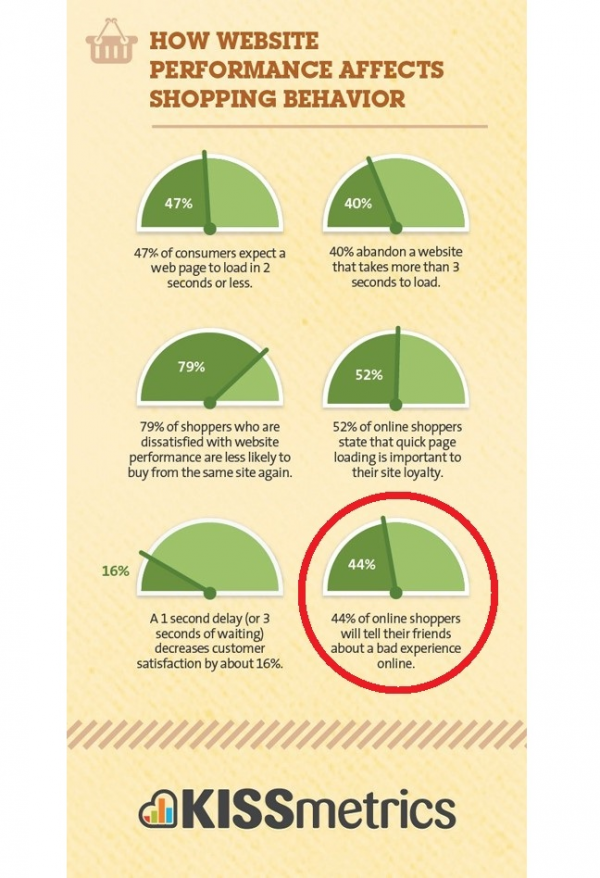
How to Do Keyword Research: A Comprehensive Guide