Have any question?
how much does video seo cost

How Much Does Video SEO Cost?

How Much Does Video SEO Cost?

As the world’s second-largest search engine, YouTube offers businesses or brands unprecedented access to online viewers and potential customers locally, nationally and globally.

With the correct video marketing strategies, businesses are able to drive traffic, leads and sales through engaging video content strategy.

how much does video seo cost

But getting viewers to find and click on your videos is not always clear and easy. Like every search engine – YouTube relies on its selective algorithm to determine which videos should rank high in the search results and which do not.

Optimising your videos for video SEO is the most effective way to increase your video rankings and attract viewers. Let’s find out – How much does video SEO cost?

Table of Content

Below are the content on How Much Does Video SEO Cost.

Click on any of them to get diectly to your prefered section or you can scroll down slowly and read from the start.

What Affects the Cost of Video SEO?

There is no single set rate for video SEO because the cost depends on the unique needs of each brand and their YouTube channel.

Some businesses or brands are more involved with their video marketing strategy and churn out several videos per week while others post one or two video per month.

At the same time – some niches are more competitive than others and require a more aggressive video optimisation strategy.

factors affecting video seo

There are some factors that affect the cost of video SEO and they include:

  • The video frequency – do you want to post every day, once a week, once a month?)
  • The keywords you are targeting – a competitive keyword is harder to rank for and will take more time to get right.
  • What the Call to Action – CTA is in the video – if you are driving viewers away from YouTube then you will rank lower.
  • If you have any social campaigns directing traffic to the video  – higher engagement is good for ranking YouTube videos
  • How the video SEO specialist charges  – do they charge per video, hourly, monthly, etc

The best way to get an accurate quote for video SEO is to contact a video SEO specialist or agency and request a custom quote based on the needs of your business.

They will consider the above factors to determine – how much video SEO will cost for your channel.

Who Needs Video SEO?

Any business or brand that:-

  • invests in video marketing optimisation and
  • wants to generate more traffic from their videos will benefit from video SEO.

It is not enough to simply just publish and pray – hoping for viewers to find your videos on their own.

everyone needs video SEO

If you do not optimise your videos with the right selected keywords, add relevant tags and optimise your video descriptions then your videos are most likely to get forgotten and buried in the search results.

Whether you are a blogger, an agency owner, a regular YouTuber, an e-commerce brand or any other type of business owner – if you are posting videos online then you should consider investing in video SEO.

Budgeting for Your Video SEO

When you are first getting started with video marketing optimisation – it may be difficult to scrape together a budget for video SEO especially if your business/channel has yet to monetise.

But setting some money aside for video SEO can certainly help your videos generate more traffic so you can start driving in revenue. That is why video SEO is a great investment for you to make so that you can start earning money from your channel.

videos and seo

Here are some tips when it comes to budgeting for video SEO:

  • Consider subscribing to video SEO tools like Tube Buddy to conduct keyword research for your videos.
  • Start small by hiring a video SEO agency for one video per month until you gain momentum.
  • Monetise your videos as quickly as possible through affiliate links, directing viewers to your product pages, etc to have more money to invest in your video marketing strategy.
  • Track the return on your investment – ROI for your videos so you can accurately budget for future video SEO services.
  • Know that video SEO – like Google SEO – can take a while to gain momentum. It is worth it to invest in video SEO from the beginning so you can see the best results from your videos.

What Is Included in Video SEO Services?

Most video SEO providers offer an all-in-one service for researching keywords for your videos and then optimising your videos for those selected keywords.

You can also find providers that specialise in a particular area of video SEO but it is often best to hire a single provider or agency to handle the entire video SEO optimisation process.

video seo services include

The most important video SEO services include:

  • Keyword Research. Includes the use of video SEO tools to find keywords worth targeting in your videos to attract the right kinds of viewers.
  • Optimising Video Titles. Use of target keywords in your video titles to rank in the search results and drive click through rates -CTRs.
  • Video Thumbnails. Design engaging video images to grab searchers’ attention and attract views.
  • Optimising Video Description. Optimisation of video descriptions with target keywords, plus links to valued resources like your business website, landing pages, affiliate links and much more.
  • Video Tags. Research and implementation of video tags to improve video rankings and increase visibility on YouTube.

Video SEO Cost Comparison

As with every different type of marketing – there are low to high tier video SEO service providers. Some video SEO specialists charge low rates due to their location, lack of experience and understanding while others charge much higher rates due to their experience, knowledge, expertise and track record of generating amazing results.

What you are able to spend on video SEO will depend on your budget but it is worth seeing – video SEO as an investment. Invest in high-quality services now and expect to see high-quality, revenue-generating leads, sales and best results.

Video SEO Services

Video SEO Costs varies according to:

  • Low-Tier Video SEO Services like Upwork, Fiverr: from £30 – £75 / hour
  • Mid-Tier Video SEO Services like Freelancers/Contractors: From £90 – £175 / hour
  • High-Tier Video SEO Services like Agencies, Consultants: from £200 and above / hour

Please be aware that some video SEO professionals may charge per video, per project or per month.

Once again, if you want to know how much video SEO will cost for your business then request a custom quote from a trusted video SEO provider.

Get Started with Video SEO

Video search engine optimisation can help your videos reach more viewers, generate more revenue and drive more customer traffic to your website. If you are investing in your video marketing strategy but not video SEO then you are leaving traffic and leads on the table.

Since the cost of video SEO varies based on the unique needs of your business – it is best to get a custom quote from a video SEO professional. At Best-Digital Marketing – we have helped various different businesses drive more traffic, leads and customers through our video SEO services and we would be happy to help you with your video marketing strategy.

For full Video SEO Services package and functionality

and select the package that suits your business needs.

If you prefer to discuss your requirements first just

or fill your details with a message of your requirements at

For more information about our Video Production Services and how we can help you with your Business needs:-

Join Our Blog Email List

I might send you 1 or 2 emails a month. Most probably less. Lots of tricks, tips, humour hacks, guides and exclusive ramblings in there for your good mental health and education.

limited time offer - time sensitive
education

You can unsubscribe anytime whenever you like. No risk or regrets. We will never spam your Inbox.

Hope you are enjoying and learning a lot with abundance of information about:-

How Much Video SEO Cost? 

How to Fix Http 404 Error - Not Found on WordPress Website

How to Fix Http 404 Error – Not Found on WordPress Site

How to Fix Error 404 - Not Found on WordPress Website

There are many potential errors you might see on your WordPress website and Error 404 Not Found is one of the common ones.

But that does not mean it is not frustrating when you or your visitors try to browse your site and keep running into the Error 404 Not Found message.

That is the last thing you want for first time potential customers to see of your brand.

How to Fix Http 404 Error - Not Found on WordPress Site

A 404 error can also be an indicator to you that something has changed or moved and a 301 redirect probably needs to be added for SEO purposes.

In this post we are going to help you get your site working again by explaining a few things:

What is the Error 404 Not Found?

Whenever you or any of your visitors go to your website, your browser sends a request to the web server and receives back data including something called an HTTP header. The HTTP header includes HTTP status codes to explain what happened with the request.

Most of the time the request works perfectly and you will never actually see the HTTP status code but if something goes wrong then your web browser will usually display a message with the HTTP status code to indicate the exact problem.

Just like other error messages -500 error, 502 error, 504 error, etc the Error 404 Not Found message is the result of that process.

What Does Error 404 Not Found Actually Mean?

Basically it means that the client – your visitor’s or web browser was able to successfully connect to the host – your website’s server but it was unable to find the actual resource that was requested like a specific URL or filename.

For instance If you try accessing a specific URL like a domain.com/what-is-WordPress and if no content carries that name then you will get a 404 error message.

What Does Error 404 Not Found Actually Mean

This error has absolutely nothing to do with your server -it just means the requested file such as image, page, JavaScript, CSS or post is missing.

When a 404 error message pops up it simply means the server cannot find the file the user requests.

What Causes Error 404 Not Found on WordPress?

Some of the common causes of 404 errors are as follows:

  • A mistyped URL.
  • Caching problems.
  • An issue with your Domain Name System (DNS) settings.
  • WordPress compatibility issues.

If you get this error on the entire sites content then it is typically due to an issue with your WordPress site’s permalinks.

However if you only see it on certain individual pieces of content then it is most likely because you changed a piece of content’s slug without setting up a redirect.

This means that the content accessible at the Web address URL you have just accessed does not exist or no longer exists.

what causes http 404 error

The difference between the two can often help a user find the right URL if they use common sense.

As a webmaster you need to correct the link as soon as possible because it may risk losing a very large majority of visitors and sales – who are not going to bother doing if they cannot access your product page or blog article or other by any other means.

The consequences can be devastating for both the traffic on the site and for the turnover of an online store therefore you must be vigilant and watch this closely to correct any 404 errors as soon as it occurs.

To monitor this Google Search Console will be ideal and saves time in corrective actions. We strongly recommend you to use 404 broken link finder tools mentioned below in this article.

Error 404 Not Found Variations

Because each web browser displays error messages differently – you might see a different message for this error.

Other common variations include:

  • Error 404
  • 404 Not Found
  • HTTP Error 404
  • 404 – file or directory not found.
  • ERROR 404. PAGE NOT FOUND On WordPress site
  • The requested URL was not found on this server.
  • The page cannot be found
  • We can’t find the page you are looking for.
  •  The requested URL was not found on this server
google 404 not found page

The Error 404 Not Found message is also unique in that many sites will actually create a custom page to address the error rather showing one of the messages above.

Some WordPress themes also include custom 404 pages by default. For that reason you might not actually see the error message at all because many sites will use funny or creative 404 pages instead.

custom error 404 not found page

If you create a 404 Error Page – try to include a search box and some of your recent blog posts to help visitors find what they might be looking for. Always include search functionality on your 404 page.

Error 404 Not Found Impact on SEO

Error 404 Not Found does not have any inherent negative impact on SEO. But it might have a negative impact depending on the reason for why the error is happening.

For example -if a visitor just mistypes a URL and sees a 404 error then there would not be a negative impact on SEO.

no negative impact on seo

But if you have individual errors because of broken URLs then that will inhibit Google’s ability to properly crawl your site and this can have a negative SEO effect in that way.

Additionally if a permalink issue is causing site wide 404 errors then Google would not be able to crawl any of your site’s content. In other words always fix your 404 errors as soon as possible.

Error 404 Not Found Impact on Site Performance

Many sites do not realise that generating a lot of 404 errors can easily run into performance issues since these responses are not cached especially on larger sites.

To minimise the impact of 404 requests on site performance you need to automatically cache 404 pages for 15 minutes.

If you create a new page with the same URL as the cached 404 page then you need to automatically purge the cache so your visitors will be able to see the new page immediately.

minimise error 404 impact on site performance

This means your site will be protected from Hypertext Preprocessor – PHP and CPU spikes caused by traffic to dynamic 404 pages.

You are probably generating more 404 errors than you think and using the appropriate tools can help you determine the exact amount.

For example – a certain site is missing some mobile icons such as /apple-touch-icon.png.

These are most likely in a theme or plugin’s code that is getting queried but the actual icons were never added therefore the server generates a 404 error as it cannot find the resources.

WordPress is a flexible platform – no doubt but its flexibility can be a double-edged sword. Sometimes doing too much can overtake some settings and the whole hell breaks loose, random errors start appearing and your site goes down.

Luckily because WordPress has so many users therefore finding help is not difficult. 

How to Fix Error 404 Page Not Found in WordPress?

We will cover a couple different methods for how to fix the Error 404 Not Found message depending on whether it is happening site wide or to specific content.

Because this error discloses inconsistency with a link therefore it can resolve the same by properly configuring and saving WordPress permalinks.

You should also correct the linking structure using a .htaccess file.

how to fix error 404 page not found

1. Update Your Permalinks

It is a simple solution to fix 404 error in WordPress by saving WordPress permalinks. This will update .htaccess file with the correct configurations for WordPress website.

The easiest way to fix this is to update your permalink settings through the WordPress dashboard via WP-login or WP-admin.

wordpress wp admin

All you need to do is go to Settings → Permalinks. 

permalinks settings

Then scroll down and click on Save Changes. You do not need to make any changes – clicking Save Changes is enough.

save settings

Now try accessing the posts to see if the 404 error is fixed.

If saving the permalinks did not solve the 404 issues then you can manually reset permalinks by editing the .htaccess file.

To do this you need to access WordPress files using FTP or cpanel. When connected via FTP locate .htaccess file and edit it.

manually reset permalinks ia htaccess files

Add in one of the following codes, save and upload the updated file to your server:

If site is on the main domain – e.g. www.yoursite.com then add this code to .htaccess file:

adding code

Or copy and paste below:

# BEGIN WordPress
<IfModule mod_rewrite.c>
RewriteEngine On
RewriteBase /
RewriteRule ^index\.php$ – [L]
RewriteCond %{REQUEST_FILENAME} !-f
RewriteCond %{REQUEST_FILENAME} !-d
RewriteRule . /index.php [L]
</IfModule>
# END WordPress

After editing and uploading a new file, refresh your site and access posts/pages to see if this fixes the 404 issues.

B. If WordPress Site in a Subdomain

If your site is installed in a subdomain like a blog.yoursite.com then use this code instead.

if wordpress is in a sundomain

Or copy and paste below:

RewriteEngine On
RewriteBase /
RewriteRule ^index\.php$ – [L]
RewriteRule ^wp-admin$ wp-admin/ [R=301,L]
RewriteCond %{REQUEST_FILENAME} -f [OR]
RewriteCond %{REQUEST_FILENAME} -d
RewriteRule ^ – [L]
RewriteRule ^(wp-(content|admin|includes).*) $1 [L]
RewriteRule ^(.*\.php)$ $1 [L]
RewriteRule . index.php [L]

C. When WordPress in subdirectory

If your site is on a subdirectory like as – www.yoursite.com/blog then edit .htaccess to include this code instead.

when wordpress is in subdirectory

Or copy and paste below:

RewriteEngine On
RewriteBase /
RewriteRule ^index\.php$ – [L]
RewriteRule ^([_0-9a-zA-Z-]+/)?wp-admin$ $1wp-admin/ [R=301,L]
RewriteCond %{REQUEST_FILENAME} -f [OR]
RewriteCond %{REQUEST_FILENAME} -d
RewriteRule ^ – [L]
RewriteRule ^([_0-9a-zA-Z-]+/)?(wp-(content|admin|includes).*) $2 [L]
RewriteRule ^([_0-9a-zA-Z-]+/)?(.*\.php)$ $2 [L]
RewriteRule . index.php [L]

3. Set Up 301 Redirects for Moved or Renamed Content

The 301 redirect is the most effective solution for correcting 404 errors on your site.

However it must be done correctly to redirect to the right pages as appropriate:

  • The page with error 404 has been replaced on the site by a new page which has a different URL: We are redirecting directly to this new page.
  • The page with error 404 has not been replaced on the site: We are redirecting to a page with similar content. If no similar content exists then it is also possible to redirect to the category page of the old content. As a last resort- redirect to the home page but do not do this systematically.
  • Before deleting a page and redirecting always ensure to check if it has backlinks or external links, visits and if it is still well-positioned in Google.
set up 301 redirects for moved - renamed contents

To begin -you can use a free Redirection plugin to fix redirects from your WordPress dashboard. After installing and configuring the plugin visit the Tools menu and select Redirection and then type the 404 page URL in the Source URL box and the new working URL in the Target URL box.

how to start redirection in wordpress

Manually in the .htaccess of your hosting panel via cpanel – using the piece of code:

  • To 301 Redirect a Page:

RedirectPermanent /old-file.html http:// www.domain.com/new-file.html

  • To 301 Redirect an Entire Domain:

RedirectPermanent / http:// www.new-domain.com/

Once you have inserted the commands to 301 redirect your pages you need to ensure that there is a blank line at the end of the file.

Your server will read the .htaccess file line by line which means you need to throw an end line character to signify that you are finished.

An easy way to do this is to put a blank line at the bottom of the file.

Now that you have cleaned up your 404 errors – you can now anticipate this type of problem by creating a well-designed custom 404 page.

You can get inspiration from Google which offers different original creations than others.

Edit .htaccess

You need to edit the .htaccess file and add a snippet of code at the top which can be done in a number of ways. You can either get it done through an FTP program’s edit mode or edit the file on your PC and then upload it to the server via FTP or you can do this via cPanel >> File Manager.

This is the code:

manual 301 redirection via htaccess files

Or copy and paste below:

# BEGIN WordPress

RewriteEngine On
RewriteBase /
RewriteRule ^index.php$ – [L]
RewriteCond %{REQUEST_FILENAME} !-f
RewriteCond %{REQUEST_FILENAME} !-d
RewriteRule ./index.php [L]

# END WordPress

While you can do your best to prevent 404 errors by using the tips above it is impossible to entirely eliminate 404 errors because some things are just plain outside your control. It is not uncommon for small WordPress sites to have thousands of 404 errors every month.

For example – if a visitor mistypes the URL or if another website links to a page that does not exist then people are going to get 404 errors no matter what.

To provide a more user-friendly error page you can use one of the many 404 page plugins.

create your own error 404 page not found

For example the free 404 page plugin lets you set up a custom 404 error page with:

  • A search box
  • Important links
  • Contact information

Another important feature of the 404page plugin is that it does not create redirects. A 404 page should never be redirected to a physical page such as yoursite.com/404.

The 404 error should always be generated dynamically on the page in question.

By including these elements you are providing your visitors the tools they need to find their way to the right page.

Always remember – keep your 404 page light for better performance and only include what is absolutely needed.

How to Monitor 404 Errors Going Forward

Going forward it would be beneficial to pay attention to which requests are causing 404 errors at your site.

This can help you:

  • Find broken links that are sending people to a non-existent resource which could be internal links or external links. You want to do your best to fix those links if it is all possible.
  • See which pages Google is having trouble crawling. You want to figure out why Google is trying to crawl a non-existent page and set up a redirect if needed.
  • Troubleshoot issues and improve performance with regards to 404 errors.
how to monitor 404 error going forward

Use Google Analytics Tools

For example – you could trigger the following event on load of the error page:

ga(‘send’, ‘event’, ‘error’, ‘404’, location.pathname);

With the help of Google Analytics, you can set up a custom report to track 404 errors from external links.

404 error using google analytic tool

Using Google Search Console

You can track 404 errors that Google’s crawlers encounter in Google Search Console.

Once you have verified your site with Google Search Console – go to Crawl → Crawl Errors → Not found to view a list of 404 errors that Google has encountered.

This is by far one of the easiest ways. It is also the best in terms of performance because it requires no third-party plugins or additional scanning against your site.

track 404 error with google search console

Google’s bots are already crawling your site on a regular basis so why not simply take advantage of the data they already provide? 😉

This can also help you to improve the user experience and the visibility of your website.

In most cases these solutions will fix the WordPress posts 404 error.

Use WordPress Plugin

If you want to use a WordPress plugin the abovementioned Redirection plugin can help you monitor for 404 errors from your WordPress dashboard.

Use Third-Party Audit Tool

You can also use a third-party audit tool like Ahrefs to monitor for 404 errors on your WordPress site. You can even set this up to run on a schedule.

ahref to track 404 error

To check every link on your website to determine whether the link leads to a 404 error, you can use broken link crawl or scan tools like:

Use Free broken link checker / dead links tools

error404.atomseo  – A free web-based online tool for checking broken or dead links (404 errors)

broken link checker - atomseo

Dead Link Checker: Free Broken Link Checking Tool

dead link checker

Broken Link Checker – Free Broken Link Checker Tool

broken link checker

Dr. Link Check: Broken Link Checker

Dr link checker

Hexometer – Broken Links Scanner for 404 or Dead links

hexometer

Conclusion

Unfortunately http 404 errors will happen on your site whether you like it or not.

The larger your WordPress site is the more you will start seeing this. We recommend getting a good workflow together for how you monitor these types of errors and go about fixing them.

404 errors are never good for visitors, your brand or business and Google definitely does not like to see them either.

For full Web Hosting Services package functionality

and select the package that suits your business needs.

If you prefer to discuss your requirements first just

or fill your details with a message of your requirements at

For more information about our services and how we can help you with your Web Hosting needs:-

Join Our Blog Email List

I might send you 1 or 2 emails a month. Most probably less. Lots of tricks, tips, humour hacks, guides and exclusive ramblings in there for your good mental health and education.

limited time offer - time sensitive
education

You can unsubscribe anytime whenever you like. No risk or regrets. We will never spam your Inbox.

Hope you are enjoying and learning a lot with abundance of information about:-

How to Fix Http 404 Error – Not Found on WordPress Website.

Best Video Length For Social Media Platforms

Best Video Length For Social Media Platforms

What Is the Best Length For A Video for Each Social Media Platform

The best length for a video is two minutes or less and this advice comes with conditions. Different platforms, messages and audiences require different video lengths. The trends toward micro-content means viewers expect videos to be shorter on platforms that allow long-form videos.

You will see the best results when you make targeted videos that are only as long as they need to be instead of sticking to rigid guidelines. This means you deliver one message in an entertaining way without tangents or fluff.

best results when target videos deliver right messages to target customers

Keep reading on for a more in-depth dive into your ideal video lengths for various social media platforms and hosting situations. We have organised the most important points into a handy way that explores the best length for a video – be it for business or entertainment.

Where did the two-minute rule originate from?

Back in 2016, a study by Wistia found that audience engagement drops off considerably after about 2 minutes which is about 5% points from minute 2 to minute 3. After this, engagement continues to drop at a similar rate until you hit the 6 ½ minute mark.

This is when it levels off just above 50%. Video engagement stays at this level until about the 13-minute mark when engagement begins to drop again.

There are a couple of important points to note here. First – any video length up to two minutes maintains the same level of engagement. Whether your video is 15 seconds long or 110 – you will see the same level of engagement.

Second – people do not automatically walk away at the two-minute mark. Some people will start to leave at this point but you still have the bulk of your audience.

2 minute rule

If your video really needs to be at least six minutes then audiences who have stuck with you this long will likely hang on a little longer so do not cut your content short for fear of losing them. If you are offering something useful or entertaining then they will probably stay with you for another few minutes.

However there are a few limitations to Wistia’s data that we should point out. Wistia is a video software and hosting company that works mostly with businesses that apply to self-hosted videos but may not be as relevant to social media platforms.

Their data also includes about 560,000 videos that have not been segmented based on audience, goals or industry which means that we are dealing with averages here. In short – your results may vary.

How to Choose the Best Length for a Business Video

If two minutes is just a broad guideline – how do you decide how long your video should be?

The answer is simple – your video should be exactly as long as it needs to be and no longer which means that you are not aiming for a specific number of minutes or seconds. You should focus on your message and how to make it clear, concise and engaging.

These best practices will help get you started and they are all equally important.

1. Start with a single - focused message

If you try to convey too many messages viewers are unlikely to hear any of them. Multiple messages require longer and more complex videos. The attention of your viewers may wander.

One focused message

If your topic is complex then drill down to a single question and just answer that. If necessary – you can create a series of videos to cover other related questions.

The key takeaway is: stay focused. Videos that take too long to get to the point lose viewer interest.

2. Where does your video fits in the marketing funnel

If someone has never heard of your business or product – they do not know what to expect and it might be too much to ask them to commit to a long video. On the other hand, videos for your established audiences can be much longer.

For example – a video tutorial on how to use your product might need to be less than a minute long if it is going to be shared on social media. The video that will be emailed to customers after they have purchased a product can be a little longer.

where does your videos fit in the marketing funnel

In the first case – your goal is to help new customers decide whether your product is easy to use. In the second case – you go into more detail because users are relying on you to help them understand what they have purchased.

3. Plan your video length based on your platform

From social media to self-hosting, the platform will determine how long your video can and should be. Do not just create a video and blast it out on every channel.

Make sure to learn and be aware from the start where you intend to share your video. We examine ideal video lengths for each platform in detail below.

Best Length for a Video By Platform

Every platform has its own length guidelines based on what the platform is capable of hosting and what it thinks its audience wants to see. When selecting an ideal video length, always keep your intended distribution channel in mind.

Plan your video length based on your social media platform

Here are some of the more common platforms and guidelines for each.

Facebook Ads

Length: 15 seconds

For Facebook feed video ads, you can share ads as long as 241 minutes. Yes – that is minutes and not seconds so in theory – you could have a Facebook ad that runs for 4 hours. We do not recommend doing so and neither does the platform. Facebook says that more people will watch to the end of video ads that are 15 seconds or less.

In-stream video ads  – this are ads played while someone is watching another video can be no more than 120 seconds and should be much shorter to avoid annoying your audience.

facebook video ads length

Remember – you are serving this ad to someone who is actively watching something else therefore minimising the disruption is a smart strategy. For videos shared on your Facebook page ensure to keep the two-minute rule in mind.

Video ads on Instagram can be no longer than 60 seconds. Facebook – which owns Instagram loves to stress that videos from Facebook can easily be repurposed as Instagram ads but this only works if your Facebook ads are short.

This is one reason why it is a good idea to apply Facebook’s 15-second guideline on Instagram too. Videos in an Instagram feed loop continuously so take that into account when planning your video.

instagram best video length and instagram tv -igtv

The rebranding of IGTV as Instagram TV means that organic videos on Instagram can now be up to 60 minutes long. Instagram Reels also updated their video length limits and you can now share videos up to 60 seconds long.

Tik Tok

Length: 16 seconds

Tik Tok lets you create videos up to 60 seconds long however the best average length was about 16 seconds according to one marketer who examined Tik Tok’s best 100 videos in 2019.

tik tok best video length

The exception might be if you are making a News Feed App Series Video Ad. In this case, you might want to aim for closer to 60 seconds.

Twitter

Length: 6 - 15 seconds

Videos on Twitter can be up to 140 seconds long. For ads, Twitter recommends videos that run between 6 to 15 seconds. Keep in mind that Twitter is all about quick content consumption so shorter is almost certainly better whether sharing to followers or serving an ad.

twitter best video length

Live videos are the exception to the shorter-is-better rule. With live videos, your goal is not to deliver a quick, focused message but you want to engage your audience in a more personal way.

Longer videos give more opportunity for your followers to see that you are live, join the stream and maybe even interact with you directly.

social media exception - as long as it is reasonable

When the live is over – you might take 20 to 60 seconds of it and repurpose that into a video for wider sharing and only do this if you have a section of the video that includes a clear, concise message.

Slicing out any random section of your live will not achieve much. You are much better off shooting a scripted video that gets your message across for those who were unable to join the live.

The average YouTube user can upload videos that are up to 15 minutes long. Verified accounts can go much longer. The platform hosts such a wide range of videos that it is not simple to make a unilateral statement about video length.

Many of the top most viewed videos of all time are music videos featuring celebrities. The rest are videos aimed at children.

It would be a mistake to assume that what works for them will work for you. Many YouTubers recommend making your video between 10 and 15 minutes.

youtube best video length

But these are professional YouTubers who want to make money from sponsorships and ad revenue. If your goal is to promote your business then choose your length based on where your viewer is in the funnel.

Self-hosted videos

Length: 2 to 15 minutes

The 2 minute rule also applies to self-hosted videos. If you are embedding a video on your website or directing them to your Wistia, Vimeo or another hosting page then assume that most of the audience will stick around for 2 minutes and about 50 percent will be gone by the time you get to 7 minutes.

self hosted videos best video length

Video Length by Location in Marketing Funnel

As we mentioned above – viewers who already know and trust you are more likely to watch longer videos.

Top of Funnel: Awareness

As short as possible - 30 sec or less

Top of funnel audiences have never heard of you or do not really know what you do. These audiences are least likely to invest time into watching your message.

Keep your videos aimed at them as short as possible. Ruthlessly remove anything that is not absolutely essential to your message.

top of funnel best video length

At this stage, the video should outline a problem and how you solve it and all essential info packed into a 30-second video so people who have never heard of them will be aware of your services.

Mid Funnel: Interest and Desire

Up to 2 minutes

Audiences who already know you exist are more likely to watch your videos for a longer period. People like the familiar and this gives you a few more seconds of their attention.

mid of funnel best video length

At this stage, your video needs to focus on a compelling case that shows why someone might want to purchase your product/services or join your organisation and be up to 2 minutes long.

Bottom of Funnel: Action

As long as it needs to be

At the bottom of the funnel – viewers are almost ready to act. They are willing to invest more time to make sure they are making the right decision.

bottom of funnel - as long as it needs to be

Webinars, tutorials and other long-form content can perform well if they are aimed at customers who are almost ready or ready to act.

Attention Spans: How Short Do You Think?

If all of these different guidelines have left your head spinning – do not worry. We can simplify this even further.

You may have seen the oft-repeated statistic that the modern human’s attention span is shorter than that of a goldfish. That might convince you that the best length for a video is always as short as possible – this is not true.

If it were, we would never finish a video project. Do you have any idea how long it takes to animate even 15 seconds of quality video?

The truth is that the average person will not spend more than eight seconds watching something that does not capture their interest. Your goal is not to condense your message into eight seconds or less but give your audiences a reason to keep watching.

give your target audiences a reason to keep watching

There are tonnes of content out there. Your audience must immediately know what your video is about and must quickly understand why it matters.

Video is useless – if audiences cannot tell what it is about, do not know why it matters and are not informed or entertained. Instead of focusing on length -focus on quality.

Concise, engaging and focused videos always outperform the competition every time.

The Secret to Optimal Video Length: Test and see

The secret of finding the perfect video length is that there is no perfect length that applies to all industries and all situations. You set your video up for success when you test several different video lengths and track your results.

You can streamline this process by partnering with a video creation company with experience in your industry. They will know what works and what does not.

there is no perfect length for a video

Remember that video views are not the best indicator of success – unless your goal is awareness. Choose a video metric that directly correlates to your goal for the video:

  • Did the person click the link at the end? This shows engagement.
  • Did they actually purchase something or at least sign up for a consultation call? If so, this video is effective no matter what the length is.

The best length for a video is not a hard and fast rule – it is a starting point. Your video can be longer than the ideal as long as it is that length for a reason.

If you have padded it out with extra information or gone off on tangents then cut it down.

Conclusion

The best video length for a video - meets your goals

Remember these guidelines for video length are just that – guidelines. Different audiences, industries and goals demand different video lengths.

For the simple reason – our video creation experts at Best-Digital Marketing Services have helped businesses in all kinds of industries to create the ideal video for their audience and goals.

Contact us today to start creating videos that are exactly as long as they need to be.

For full Video Production Services package functionality

and select the package that suits your business needs.

If you prefer to discuss your requirements first just

or fill your details with a message of your requirements at

For more information about our services and how we can help you with your Video Marketing needs:-

Join Our Blog Email List

I might send you 1 or 2 emails a month. Most probably less. Lots of tricks, tips, humour hacks, guides and exclusive ramblings in there for your good mental health and education.

limited time offer - time sensitive
education

You can unsubscribe anytime whenever you like. No risk or regrets. We will never spam your Inbox.

Hope you are enjoying and learning a lot with abundance of information about:-

Best Video Length For Social Media Platforms.


Choosing the Right Type of SSL Certificate for Your Website

Choosing the Right Type of SSL Certificate for Your Website

The Right Type of SSL Certificate for Your Website

A website secured with a SSL certificate confirms to your visitors that it is safe. It also compounds the approval of search engines, confirming that your site is safe for browsing. Therefore you must get a valid SSL certificate for your website.

SSL stands for Secure Sockets Layer and it is a security protocol used to encrypt and authenticate the data sent between an application -like your browser and a web server. SSL certificate secures the connection between your site and your visitors from malicious affiliations.

SSL Certificate - DV SLL - OV SLL - EV SSL

SSL is closely tied to another acronym – TLS. TLS is short for Transport Layer Security – is the successor and more up-to-date version of the original SSL protocol. SSL and TLS are often referred to as a group – e.g. SSL/TLS and used interchangeably.

In this guide, we will dive deep into the different types of SSL certificates to help you make the right decision.

When & Why You Need SSL Certificate

Whether you run an E-Commerce store or a blog post, SSL is becoming absolutely crucial for every website as wearing a seatbelt before driving.

Here are the three main reasons why you will need SSL certificate for your website:

1. Data Protection and Visitor Trust

The primary purpose of SSL certificate is to ensure that the data exchanged between the user and the webserver is encrypted and protected from cyber threats like hackers, phishing and identity theft.

You do not want your visitors to get the – your connection is not private warning when they visit your website. A valid SSL certificate will help you avoid such errors and more.

SSL is an indicator to your visitors that they can safely share sensitive information such as credit card details, IDs, email addresses and passwords on your website. Therefore SSL strengthens the trust between you and your customers or visitors.

Connection Is Not Private

2. Authentication and Integrity

When you visit a website – how do you make sure that it is genuine and not a scam to steal your information? Identity verification is essential when it comes to web security and this is where SSL comes in. SSL/TLS verifies the authenticity of the web server’s identity.

To install an SSL certificate you must go through an identity verification process. In simple terms SSL is proof that your website is indeed your site and not a scam or a fake company, making it an effective barrier against phishing sites. See how you can verify your SSL certificate.

Data integrity is another critical benefit of SSL/TLS. Using a message authentication code – MAC, SSL/TLS ensures the data transmitted is not lost or changed in any way. The messages sent are received as they are.

3. Improves Search Engine Ranking

Search engines like Google have cracked down on insecure websites and made it clear that they prefer SSL encrypted sites to make web browsing a safer place for all — HTTPS instead of HTTP. SSL turns Hypertext Transfer Protocol – HTTP to Hypertext Transfer Protocol Secure – HTTPS.

Therefore if you want your website to be on the first page of Google then having a valid SSL certificate is one of the must-haves. SSL is now part of SEO ranking signal.

A website secured with an SSL certificate informs customers or visitors that it is safe and wins the approval of search engines.

Choose The Right SSL Certificate

How SSL Certificates Work

We have established that SSL encrypts and secures the connection between the hosting server and your customer’s web browser or app.

Assuming that your website is secured with an SSL certificate so when a person visits your website, their browser will request your website’s hosting server to identify itself.

The server will respond by sending the browser a copy of its SSL certificate. The browser will also do some validation checks to verify that the SSL certificate is trusted and sends a signal to the server.

In return, the server will digitally respond in acknowledgment to begin an SSL encrypted session between your website and the visitor’s browser.

How SSL Certificate Works

Types of SSL Certificates

There are two different categories in differentiating the types of SSL certificates — the number of domains and subdomains and the level of validation of the certificate.

By definition there are four different SSL certificate types:

1. Single Domain SSL Certificates

As the name suggests this type of certificate secures a single domain and all the pages on that domain. It will not secure any associated subdomains.

For example, if you have an SSL certificate for the domain www.mysite.com. It will also cover all the pages related to this domain such as www.mysite.com/web-features/ but it will not cover any subdomains such as www.support.mysite.com.

2. Wildcard SSL Certificates

Like the single-domain SSL certificate, the Wildcard SSL certificate only secures a single domain. However it also covers unlimited number of subdomains relating to that single domain. A single Wildcard SSL certificate protects them all.

3. Multi-Domain SSL Certificates

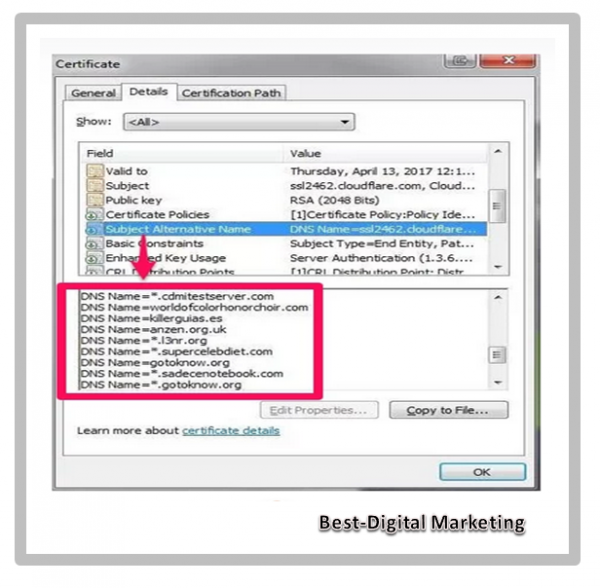
Multi-domain SSL certificates provide security for several different domains with just one certificate by using the SAN extension.

These certificates are usually called SAN certificates for this very reason.

Subject Alternative Name - SAN

With multi-domain SSL certificates, you can combine many different hostnames regardless of whether they are from the same domain or not.

This SSL certificate’s purpose is the complete opposite of the Wildcard SSL certificate as it secures multiple domains but does not secure any related subdomains. It is also known as Subject Alternative Name – SAN and Unified Communication Certificate – UCC.

The multi-domain Wildcard SSL certificate combines the features of both the multi-domain and the Wildcard SSL certificates.

In other words, with a single certificate, you are able to secure multiple domains as well as all their related subdomains.

SSL Validation Levels

Validation level refers to how the Certificate Authority – CA confirms the identity of the company and person/s who are applying to obtain the certificate.

There are three main types of certificates: Domain Validated – DV, Organisation Validated – OV and Extended Validation – EV.

When a security certificate is not trusted, users will receive the following notification:

Security Certificaate is Not Trusted

An authentic authority must obtain the certificate so that users will not see this message. Any certificate will provide the same level of protection no matter the type of validation.

But some authorities might require a specific level of validation to use certain services. For example – a payment system requires much more validation than a plain domain certificate.

This is because it is important to verify that the organisation collecting funds legally exists as a registered business.

Now let’s take a look at domain validated SSL certificates first.

Domain Validated SSL certificates show that a domain is registered and that a site administrator is running the URL.

The certificate authority can validate this through an email, DNS or HTTP.

Domain Validation - DV SSL

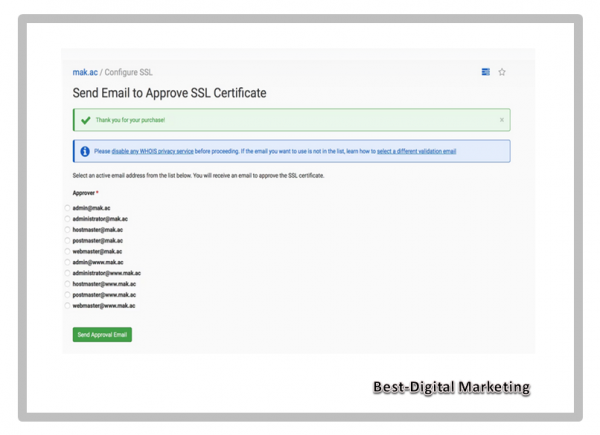
When validating via email – the certificate authority will send an email to the administrator who maybe the owner or manager of the site. He/she will need to click a link in the email requesting the certificate to verify.

E-mail Validation

With DNS verification, the owner or manager will validate that they own or manage the site through a DNS record that is attached to the website domain.

A DNS record is a text file showing which IP addresses each domain is associated with.

DNS Validation


HTTP validation includes the owner proving ownership by creating and saving a text file in the public web root of their domain.

Once a certificate is valid and the authority signs it, web browsers will show that there is now a secure HTTPS connection.

HTTPS Validation

Domain validated certificates are encryption certificates only. All you have to do to obtain one is prove your ownership of the site.

Because they are so easy to obtain there are several advantages and disadvantages of domain validated SSL certificates.

They are reasonably cheap. The process for obtaining a domain validated SSL certificate is normally via automation making it cost less than other SSL certificates.

It does not take long to obtain one. You can get an SSL in just a few minutes and you do not have to send extra documents to verify your business.

> They are not as secure as other SSL certificates. Any hacker can obtain a domain validated SSL certificate and then hide their identity. That is true for your site if they attack your DNS servers. There’s no way to verify identities for sure when it comes to domain validated certificates.

>  Because of this, visitors might not trust your site as much as they would if you had a certificate that forced you to validate your company.

>  Potential buyers might not feel comfortable handing their payment information over with this kind of certificate.

DV is the simplest form of SSL certificate validation and only applies to domain ownership verification.

It is usually done through email verification and does not require any further investigations from the CA. It is the cheapest and fastest way to acquire an SSL certificate.

2. Organisation Validation (OV) SSL Certificates

The organisation validated SSL certificate shows that you own a domain while also verifying that you own a business in a particular country, state and city.

The process for obtaining one of these certificates is exactly like getting a domain validated certificate but you need to take some extra steps to verify your company’s identity.

Organisation Validation

It does not take too long to obtain this kind of certificate – anywhere from a few hours to a few days.

These kinds of certificates also show your company’s information in the certificate details.

Having this extra information might seem a bit more legitimate for consumers – leading them to make a purchase. These certificates are considered very reliable.

3. Extended Validation (EV) SSL Certificates

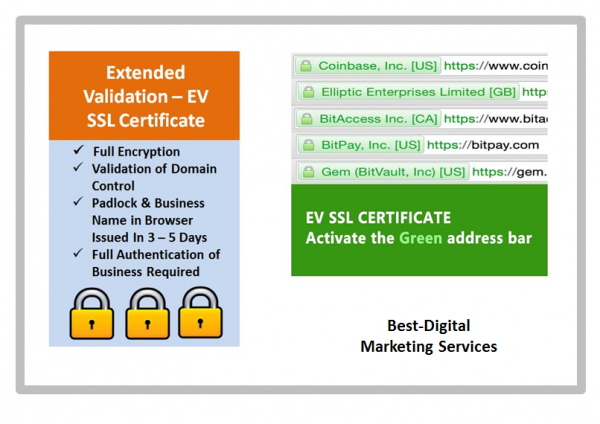
The extended validation SSL certificate requires businesses to provide even more records to prove their ownership of a company.

This certificate gives you the same kind of validation as both domain and organisation validated certificates and it also proves that you have legally registered your company as a business.

In addition, it also shows that a business is aware of the request for an SSL certificate and approves it.

Extended Validation

This validation can take days or weeks depending on what the certificate authority requires. This one requires you to provide documents certifying your company’s identity as well as some other bits of information.

You can easily identify these kinds of certificates by the green bar in your web browser that contains the company’s name.

The certificate authorities only grant these kinds of certificates after they have received documents that prove two things:

  1. the operational existence and location of a company and
  2. the consistency between those records.

After this, the certificate authority that issues the certificate will issue the proper authorisation to the company and the website. This is the most secure type of SSL certificate when it comes to validation level.

EV SSL is typical among business websites and offers the highest level of trust and reliability. It involves a full background check of your business. Acquiring this certificate involves a strict vetting process by the CA.

On some browsers, the business names with EV SSL certificates are displayed prominently. They will be shown in green beside the domain name when accessing their website.

SSL Certificate Type
Validation Level
Single Domain
DV or OV
Wildcard
DV or OV
Multi Domain
EV
Multi Domain Wildcard
EV

Benefits & Drawbacks of Different SSL Certificates

In terms of security, protecting your website with an SSL certificate does not carry any disadvantages. However each type of certificate has its strengths and weaknesses thus making each one suitable for a different purpose or needs.

Let’s look at the benefits and drawbacks of the different SSL certificates that we discussed above.

Starting with the single-domain SSL certificate, the main significant advantage is that it is an affordable certificate type and covers all the pages related to the domain. The only setback is that it does not secure any subdomains.

A Wildcard SSL certificate is more expensive but it covers a single domain -all its related pages and an unlimited number of subdomains at the first level. Unfortunately, it does not cover any subdomains at the second level.

Tired of underwhelming website hosting support without the answers and solutions? Try our world-class infrastructure and support team. Check out our plans.

Multi-domain SSL certificates cover multiple domains at the same time. Even though they seem expensive, you only acquire one that covers all your domains instead of obtaining an SSL certificate for each domain thus making it more cost-effective.

The multi-domain Wildcard SSL Certificate has the advantage of both types – covering up to 100 domains and unlimited subdomains at the first level. The only disadvantage is it can be very expensive however like the multi-domain SSL certificate, the Wildcard SSL is very cost-effective for large websites or businesses.

How to Choose the Right SSL Certificate

As mentioned earlier, SSL certificates come in different variation. If you want your website to look legitimate and be trusted by your visitors but not sure which SSL certificate will meet your needs, we will help you make the right choice.

  • For a small or personal website with a single domain then the single-domain SSL certificate is more suitable for you as it is affordable and does the job.
  • If your business website has a single domain with multiple subdomains then the Wildcard SSL certificate is the way to go and will be much cheaper than acquiring a separate SSL certificate for each subdomain.
  • For larger websites or businesses with more than one domain such as a company that owns multiple brands, each with its own domain then multi-domain SSL certificate is a wise choice. This will cover all your domains and is cheaper than getting an SSL certificate for each domain.
  • If your business or organisation wants to save both time and money, the multi-domain Wildcard SSL is ideal for securing multiple domains as well as an unlimited number of subdomains.

For your simplicity reference, here is a quick table outlining the benefits of each SSL certificate type:

How Do Visitors Know If Your Website Is Secure and Safe?

Your visitors will easily know if your website is safe and secure or whether your SSL certificate is valid or not. We will show you how.

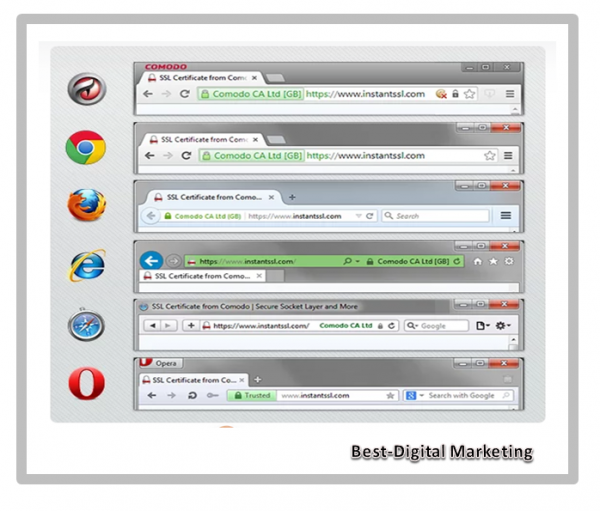
Look at the address bar of the website homepage and you will see a small padlock which means that your website is SSL secured.

If you are using the Google Chrome browser then click on the padlock sign and select Certificate. You will be able to view all the details you need to know about the SSL certificate installed on your website: who issued it, to whom it belongs and its validity date.

In addition to the small padlock sign, you will notice that the URL in the address bar starts with HTTPS.

HTTPS indicates that the connection on our website is safe, secure and that it has an authorised SSL certificate.

Secure Website - HTTPS - https

Cost of SSL Certificates

The cost of SSL certificates varies from pinch of salt to buying a Bentley per se depending on the type of certificate, validation level and where you are purchasing it from.

For example, Let’s Encrypt is an open Certificate Authority – CA that offers free SSL/TLS certificates. You can get free SSL hosting powered by Let’s Encrypt integration for all your WordPress sites from Best-Digital Marketing.

When investing in a premium or paid SSL certificate, the cost of DV and single-domain SSL certificates is the most affordable.

Best SSL Certificates Prices

As your business demand grows and you take higher steps up the SSL ladder, you will find that Wildcard SSL certificates come at a higher cost. In contrast, OV and EV SSL certificates are the most expensive and provide the highest encryption for organisations and enterprises.

Struggling to choose the right SSL certificate for your business? 

Conclusion

SSL certificates are widely adopted by almost every website to guarantee a secure internet connection and with the increase in cyber-attacks, its enforcement is strictly popular by search engines.

You now have a clear idea about the different types of SSL certificates and their various validation levels. We hope that it helps you choose the most suitable SSL certificate for your website.

Do you have any questions about choosing the right SSL certificate? Feel FREE to contact us should you need any help with SSL Certificates.

Save time, costs and maximise site performance with:

  • Instant help from your hosting experts – 24/7.
  • Cloud flare Enterprise integration.
  • Global audience reach with data centres worldwide.

Get all the above and much more in one plan with no long-term contracts, assisted migrations and a 30-day-money-back-guarantee. Check out our plans or talk to our experts to find the plan that is right for you.

For full SSL Certificate  information

and select the package that suits your business needs.

If you prefer to discuss your requirements first just

or fill your details with a message of your requirements at

For more information about our services and how we can help you with your  Website Design or Redesign needs:-

Join Our Blog Email List

I might send you 1 or 2 emails a month. Most probably less. Lots of tricks, tips, humour hacks, guides and exclusive ramblings in there for your good mental health and education.

limited time offer - time sensitive
education

You can unsubscribe anytime whenever you like. No risk or regrets. We will never spam your Inbox.

Hope you are enjoying and learning a lot with abundance of information about:-

Choosing the Right Type of SSL Certificate for Your Website

How To Launch A Website On Google With Checklist

How To Launch A Website On Google With Checklist

How To Launch A Website On Google With Checklist

Launching a new website can be a tedious task but you can alleviate some of the stress by using this comprehensive website launch checklist.

If you are just getting started on your first website then here is a comprehensive checklist that can help you streamline your process.

As professional website builders, we admit that launching a new website can be stressful and even so for the most seasoned digital marketers.

Websites are complex and sophisticated arena of the digital world. There are so many things that are easily overlooked such as a broken link or a misspelled word and of course – a handful of things could go exceptionally wrong. 

Launch Your Website On Google With Checklist

For instance – what if you forget to test an important data capture form that loses out on generating new leads or what if you forget to set up website redirects which gives valuable search engine visitors – a page not found message?

It would be much easier to have a comprehensive website checklist to run down before every website launch rather than worry about the uncertain. 

At Best-Digital Marketing – we have created just that. Keep reading to learn everything you need to do before launching a website and it is one that you could use for enterprise websites, microsites, landing pages and everything in between?

Table Of Content

Below are the content on Launching Your Website On Google With Checklist

Click on any of them to get diectly to your prefered section or you can scroll down slowly and read from the start.

What Should You Do Before Creating Your Website Design

Whether this is your first website that is being built from scratch or you are doing a website redesign, there are a few steps that you should take before hiring a web designer like Best-Digital Marketing or diving in yourself.

1. Analyse your existing website

In order to make good decisions, you must first understand where you have been. This means starting with your existing website if you have one. Ask yourself: 

  • What is the purpose for my new design or overhaul?
  • What have not accomplished with this existing site?
  • How will my new design serve my new business?
  • What does it lack to reach my full potential?

The answers to these questions will help you identify your gaps which will then confirm your goal setting for the new site.

Analyse Existing Website

2. Crawl existing site and document its structure.

You can get an idea of your site’s existing structure, pages and assets by using a crawling tool such as Screaming Frog, SEMrush, Deep Crawl or Sitechecker.pro.

This is an absolutely necessary step in creating your website development plan because you will have a concrete view of what pages existed before, what redirects are in place and what the Meta data currently looks like.

3. Compare new and old website for benchmark data and confirm testing procedures.

Here you want to compare how your new site is performing compared to the old one and continue to identify gaps that will provide data-driven insights to help your with your new strategy.

Ultimately you want to confirm testing procedures. The sooner you begin testing your website to make sure all the different components are working, everything flows and there is a system for tracking bugs and enhancements – the better.

Use a more streamlined form such as Google Forms instead of asking consumers to email their thoughts so the feedback-gathering process is well organised. Finally get one person in charge of choosing which bugs to prioritise and filter all the creative feedback you receive through the form.

4. Identify your goals for the new design.

Once the above gaps have been identified, you can now begin to craft your goals for the new design. You may come to conclusions such as: 

  • The current site is cumbersome and difficult and we need ease of use. 
  • The current site no longer trendy – so we need a visual refresh. 
  • The current site does not perform, so we need a more SEO-friendly structure with a better UX. 
  • And much more.

Whatever your goals are – you will want to understand exactly how a new site will help you achieve them so that you can craft its implementation accordingly. You need to know how to achieve them and how to measure its success.

5. Define and list action items, roles and responsibilities.

Draft and create a project management checklist for the website.

  • What content needs to be written?
  • What calls-to-action need to be created? 
  • Make a master list of the things you need for your website
  • Add deadlines for when they should be completed. 
  • Assign each action item to an individual or team. It usually takes a lot of people to launch a website.
  • You have marketers writing the content; designers choosing images and laying out the overall look and feel; a technical team doing all the back-end development. 

To ensure everyone is on the same page with no role confusion, you need to lay out a comprehensive plan for what each team or person is responsible for.

A great way to do this is by using the DARCI Decision Making Model that stands for Decision Maker/s, Accountable, Responsible, Consulted and Informed.

This is a powerful model or tool that will help everyone understand:

which individual is responsible for completing which action or item

which individual/s or group/s need to be consulted before any final decisions are made and

who needs to be consulted once a final decision has been made or an action has been taken. 

6. Prepare for worst-case scenarios.

Question and poll everyone involved in your website launch on their concerns about what could go wrong and devise a few backup plans for what to do when and if somethings go wrong.

7. Choose a Reputable and Solid Content Management System - CMS.

If you have never launched a website before then the exhaustive list below may help you. If you have already built your website then you might have already gained some experience using a CMS. 

A Content Management System or CMS often allows you to design a website from a pre-created template, optimising your content for SEO and editing content after it has been published.

Content Management System - CMS

If you are in the process of building a website – one way of going through this checklist in less time is by building your pages on a CMS that already does a lot of the work for you.

There are a few alternatives that you can test on CMS platforms however the most popular one is WordPress, Joomla, Drupal, Woo-Commerce, Wix, Elementor and much more.

8. Develop a consistent brand.

Always decide on a consistent brand message and tone – one that you are committed to present consistently across all digital presence and social media. This will make you look more legitimate, credible and memorable.

  1. Understand your value proposition.
  2. Choose a mission statement, vision statement and tagline that represent value for your brand identity. 
  3. Choose colours and fonts that convey your brand identity well. 
  4. Decide on the type of images that you want to further convey your brand identity and messaging.

Take some time to ensure that your website is given a solid foundation for Technical SEO success. From site architecture and content hierarchy to Meta data and XML sitemaps, do not leave any stone unturned.

  1. Perform SEO keyword research and decide what you want to rank for. 
  2. Create a content strategy that satisfies those keywords. 
  3. Understand how your existing pages can be adjusted and which pages will need to be created new. 
  4. Determine which pages are no longer necessary.
  5. Map out where unnecessary pages can be redirected to using a 301 redirect.

Once you have an understanding of the primary pages that will exist on your website – you need to figure out what actions you want users to take and how are you going to capture their information which includes: 

  • What top-of-the-funnel offers are needed?
  • What middle-of-the-funnel offers are needed?
  • What bottom-of-the-funnel action will be presented on main pages?
  • What forms need to be created?
  • What landing pages and thank you pages need to be created?
  • How conversions will be tracked?
  • What actions will take place after a website visitor converts – email responder, etc.

Web analytics is the measurement, collection, analysis and reporting of website data to understand and optimise web usage. Web analytics is not just a process for measuring web traffic but can be used as a tool for business and market research and assess and improve website effectiveness.

There are a few website analytics tools to use such as Google Analytics, Open Web Analytics, Wix Analytics, Chartbeat and much more.

  1. Choose which analytics platforms you will be using on the new site.
  2. Decide if any previous analytics tracking scripts will be used or if new accounts/scripts are needed. 
  3. Set up new accounts where applicable.

When you have an idea of what needs to get done before the launch – pick a feasible launch date. Give yourself at least a month.

Best-Digital Marketing plans for 2 to 3 months of research, design and development and we also cater for more immediate request if required.

Set A Launch Date

Before you launch, it is absolutely imperative to review all of the content on your website that means page content and premium content. From data -driven content and downloadable documents to rich media such as videos and images – you want to make sure everything is in place, working properly and looking beautiful.

It is important to set up a staging site to prepare your new website before going live. Staging sites are exact copies of your website on a private server that are used to prepare and proof content and code changes before they go live.

The staging site is a place to edit, amend and play around with updates in an environment that is identical to the one that will be going live. This is so you do not have to worry about crashing your site or messing something up when you make a change.

Later on you will sync content and templates between the staging environment and your live website via your Content Management System – CMS. It allows you to generate a preview of the entire site so you can click around and test things in context.

1. Ensure text is error-free and accurate.

Site content has been proofread for spelling and grammar.

Company contact details are accurate throughout the website.

Generic content such as lorem ipsum has been properly removed and replaced.

All premium content such as case studies, e-books and whitepapers have been proofread. Spelling and grammar are correct.

Copyright date in the footer includes the current year.

Test Are Error Free and Accurate

2. Replace all placeholder images with final images and designs.

On occasion, a website designer may use a placeholder image if they did not have the correct asset at the time of the page’s creation. It is up to you to make sure each page is picture-perfect.

3. Ensure copy aligns with the new brand.

The text has been copy-edited to ensure consistent brand voice and style. 

All company tag lines and mission statements are up-to-date.

Paragraphs, headers, lists and other formatting are correct.

Brand colours have been implemented correctly including link and button colours.

Scripts, images and CSS are optimised across web pages.

Even if you outsourced the design to a web designer/developer, the responsibility falls on you to ensure there are no copyright licensing issues.

Otherwise you could end up with a unavoidable infringement settlement on your hands.

No Copyright Infringement Intended
  • Website pages are compatible across browsers and devices.
  • Images, videos and audio files are in the correct places, formatted and working on all devices.
  • Social media share icons are associated with the correct accounts.
  • Company logo is linked to the homepage.
  • All premium contents such as case studies, e-books and whitepapers are stored in their proper libraries/databases and working properly.
  • Internal links across web pages are working properly. 
Testing Website For UX
  • All necessary forms are present. 
  • Landing pages and thank you pages have been implemented. 
  • The correct buttons and call to action – CTAs are present in the proper locations. 
  • Everything is linked together appropriately.

You can prevent loss of data and protect against malware and other damages by properly setting up site security and regular backups. Check that:

  • Backup schedule has been created. 
  • Backup location has been identified. 
  • A plan for implementation is set to be put in motion after launch.
Create Website Backup Strategy

10. Store passwords and credentials in a secure place.

Many individuals may have been involved in the website launch up until this point so ensure that passwords are reset when the time comes and proper password etiquette is followed.

Store Passwords & Credentials In Secure Place

You will be able to amend, change or delete any existing content that does not serve your target audience and refine future content to provide better outcome.

11. Audit the technical SEO implementation for errors.

  • Pages have unique page titles and appropriate Meta descriptions.
  • Each page has a specific purpose and pages meant to rank organically are optimised around a single keyword or set of keywords.

12. Carry out a stress test.

In a website redesign scenario, it may not be 100% necessary to do a stress test because the traffic spike may not overrun your server’s capacity. However a stress test – also called a load test is a must for any company that plans for a large influx of visitors during specific times such as the holidays or after a major press event.

This will help you figure out how much simultaneous traffic your website can handle by simulating up to tens of thousands of simultaneous virtual users from different locations around the world.

Stress tests simulate virtual users and does not totally replicate a real-life scenario so you need to find a load test that will bring you as close to reality as possible.

Load testing usually identifies:

  • The maximum operating capacity of an application.
  • Determine whether the current infrastructure is sufficient to run the application.
  • Sustainability of application with respect to peak user load.
  • Number of concurrent users that an application can support, and scalability to allow more users to access it.

Load testing is a type of non-functional testing. A load test is a type of software testing which is conducted to understand the behaviour of the application under a specific expected load. Load testing is performed to determine a system’s behaviour under both normal and at peak conditions.

At Best-Digital Marketing, we recommend using Apache JMeter. This is a pretty technical tool that is not ideal for someone who is new to the concept.

Make sure to notify your host or provider that you want to perform a stress test before you actually do one. Otherwise your test might look like a DDoS -Distributed Denial of Service attack on your provider. 

User Experience – UX is a key aspect of how they view your business so testing your website before it goes live will bring more confidence to your visitors whilst pleasing them with your services or offerings.

Pre-Launch Website Checklist

  1. Ensure Text is accurate and error free.
  2. Replace all placeholder images with final images and designs. 
  3. Ensure copy aligns with the new brand.
  4. Check all styling preferences have been implemented.
  5. Make sure your design is aesthetically pleasing.
  6. Ensure all rights to images, fonts and other content have been appropriately cited or licensed.
  7. Test the site for User Experience -UX.
  8. Check the conversion paths have been implemented properly.
  9. Create your site backup strategy. 
  10. Store passwords and credentials in a secure place. 
  11. Audit the Technical SEO implementation for errors.
  12. Conduct a Stress Test / Load Test.

Website Post-Launch Checklist

Let’s say you have completed the website and the button has been pushed – the domain is pointing to the new site and you are about ready to tell the world……. that you are here!

But hang on just one minute because you still have things to check for now that your site is officially live.

1. Test the site for user experience again.

Just in case there was an issue at the implementation stage, you want to ensure the experience is consistent with what you reviewed before it went live.

  • Ensure your design is rendering as you expected it to across browsers and devices. 
  • Ensure CSS/HTML is properly validated. 
  • CSS styling is rendering properly.
  • Favicon is in place and rendering properly. 
  • Internal links across web pages are working correctly.
  • External links across web pages are working properly and opens in a new tab.
  • Social media share icons are working correctly.
  • Feeds are working properly such as RSS, news, social media and so forth.
  • Company logo is linked to the homepage.
  • 404 Redirect pages are in place -page-not-found.aspx.

2. Test your conversion path's functionality.

Take some time to test and validate all of the different features on your website. Lead generation forms, CRM integration and any other technology should work flawlessly across your website.

  • Forms are submitting data properly.
  • Thank you message or page displays after form is submitted.
  • Form data is being emailed to a recipient and/or stored in a company database.
  • Auto-responders are working correctly -if applicable.

3. Check integrations that third-party tools are running smoothly.

Integrations such as your CRM, E-commerce software and/or marketing platform link to your website and help you run your business.

If there is a potential issue that can cause data loss, you do not want to find out later down the line. 

4. Copy the final website for backup purposes.

Now that everything is in place and finalised, you want to have a clean, clear and defined copy of it should you experience data corruption or loss. 

5. Make sure backups are running correctly.

Now is the time to check the implementation of your backup strategy. Check that ongoing copies of the website are being created and stored on a regular basis.

6. Ensure your site is secure.

  • 24/7 monitoring scripts are installed.
  • There is a plan in place for updating plugins – if applicable. 
  • Ensure that all applicable parties are aware of your businesses password etiquette policies.
  • Purchase an SSL certificate – if needed. An SSL certificate can take up to two weeks to purchase and set up so ensure you have it prior to launch.

An SSL certificate will ensure your website is encrypted so hackers cannot intercept any of your data and you will put your website visitors at ease too. It will also boost your website’s SEO since SSL is now part of Google’s search ranking algorithm.

SSL Certificate - DV SLL - OV SLL - EV SSL

7. Comply with relevant applicable laws.

Ensure your website complies with any and all applicable laws and regulations. Internet law can be diverse and each industry has its own set of rules to follow.

Hence it is best to consult with your legal counsel to make sure you are not missing or breaching anything — this post is not legal guidance.

Here are a few you might need to know about:

  • Web pages offer accessibility for users with disabilities –WAI-ARIA.
  • Web pages announce if the website uses cookies which may be required in some countries.
  • Website is compliant with usage rights for purchased or borrowed code, images and fonts.
  • Terms and privacy policies are visible to website visitors.
  • GDPR compliant if you are planning to offer services to EU countries.
  • Website is PCI compliant – if you are planning to store and process debit/credit cards details.
General Data Protection Regulation - GDPR

8. Crawl the site to highlight errors prior to launch.

Compare the crawl to the previous crawl and see if you find any inconsistencies that were not intended. You also want to ensure that all pages have the proper search engine indexing settings.

You also want to check for formatting consistency where sometimes font codes get dropped into a page by accident so you want to scour your site for any of these weird formatting errors.

Make sure all your formatting are consistent and any unwanted blips are mitigated from your copy.

9. Check technical SEO components for errors.

  • Page titles, Meta descriptions and URLs are all present and match the original technical SEO strategy.
  • Load time for site pages is optimised.
  • A dynamic XML sitemap has been created.
  • The XML sitemap has been submitted to search engines.
  • Page URLs consistently reflect site information architecture.
  • 301 redirects are in place for all old URLs – if applicable redirecting old and outdated pages to new pages.
  • rel=”nofollow” tags are in place on applicable links and pages.
  • Images on the website are properly compressed to help with load times. 

10. Optimise your Metadata.

  • Metadata is correctly in place for any content in an RSS feed and social media sharing content.
  • Spelling and grammar are correct in all Metadata.
  • Alt tags have been added to every image.
Data - Metadata

11. Set up analytics.

Make sure your website is set up to capture web data and analytics. This valuable information will allow you to continually improve your website going forward so make sure to get this optimised.

  • Your website analytics codes and tracking scripts have been inserted on website.
  • Relevant IP addresses have been excluded from analytics tracking.
  • Funnels and goals have been correctly created in your analytics software – if applicable.
  • Google Webmaster and Google Analytics accounts have been correctly synced.
  • Google Ads accounts have been correctly synced – if applicable.

12. Start a post-launch enhancement list.

The website you launch should be functional, well-designed and well-positioned. However it may not be everything you hoped and dreamed on the first go and you certainly do not want to spend months of effort designing a website that consumers will not react well to.

What if your clients do not like it? What if conversion rates fall? This could add up to lost time, money and effort.

Well there is a solution! – how about publishing a solid website then testing and building on top of it — a website creation approach known as Growth-Driven Design – GDD.

Create a document that lists out all the things you were unable to get done for the launch but want to add in the future and add features and elements to it as you discover more about how users interact with your website.

Post-Launch Website Checklist

  1. Test the site for user experience again. 
  2. Test your conversion path’s functionality.
  3. Check and ensure all third-party integrations tools are running smoothly.
  4. Make a copy of the final website for backup purposes. 
  5. Ensure that backups are running properly. 
  6. Ensure your site is secure.
  7. Comply with all applicable laws.
  8. Perform a crawl check on the site to ensure no errors happen on launch.
  9. Check the technical SEO components for errors. 
  10. Optimise your Meta data.
  11. Set up analytics.
  12. Start a post-launch enhancement list.

Launching a Website Announcement

You did all of this work so far for the benefit of your website visitors, prospects and existing customers.

Your next step is to tell the world about your new website design.

Here is how you do it:

1. Build anticipation teasers before going live.

Launching a new product, a new movie or a new website all requires marketing before the actual release date. Think of the last movie you watched in the cinemas. Did you see the trailer before you decided to buy those movie tickets along with popcorn and coke?

Teasers for your website launch can only help to build anticipation and get users wondering what the new experience will be like and this can build buzz and interest once you finally break the news.

2. Create social media strategy for the announcement.

Decide what social media channels you want to promote the news on, how will you make the announcement and how long the promotion will last.

As you create and craft your messaging – remember to focus on new features and how they benefit your audience. 

Social Media Strategy Announcement

3. Identify exciting ways to promote engagement for the new site.

For users who are not involved in your brand, a new website launch might not seem like a big deal.

Your goal is to provide an exclusive offer for the first users who visit the site or create a contest that promotes engagement with the website’s new features.

Whatever you choose, make sure you make it fun and interesting.

4. Email to your existing database.

You may want to give existing leads and customers a head’s up about your new design especially if it will cause any confusion when they visit the next time.

You can break the news as a matter of courtesy but also sneak in ways to underscore the value you are providing.

You can also alert all stakeholders of the redesign and ask them to spread the word of the new website. 

5. Promote the launch for a month or More.

Just because you post about your new website once on social media does not mean that your audience will drop everything to visit your website in their thousands.

Make your launch a big deal and keep the new functionality top of mind so that your audience is prompted multiple times to check it out.

Once your website is launched – do remember to resubmit your XML sitemap to all major search engines.

Launching a Website Announcement

  1. Build anticipation with teasers before the site is live. 
  2. Create a social media strategy for the announcement. 
  3. Identify exciting ways to promote engagement for the new site. 
  4. Send emails to your existing customer database. 
  5. Continue to promote the launch for a month or so.

Wrapping Up - Always Check When You Have Built Your Site

When you have chosen a CMS, built a website and ready to launch – here is a list of things to check before going live.

Do feel free to copy, edit and make your own based on the software you are using to launch and host your website.

Here is a list of the most important highlights from each section:

Complete Website Launch Checklist

Pre-Launch Website Checklist

  1. Ensure Text is accurate and error free.
  2. Replace all placeholder images with final images and designs. 
  3. Ensure copy aligns with the new brand.
  4. Check all styling preferences have been implemented.
  5. Make sure your design is aesthetically pleasing.
  6. Ensure all rights to images, fonts and other content have been appropriately cited or licensed.
  7. Test the site for User Experience -UX.
  8. Check the conversion paths have been implemented properly.
  9. Create your site backup strategy. 
  10. Store passwords and credentials in a secure place. 
  11. Audit the Technical SEO implementation for errors.
  12. Conduct a Stress Test / Load Test.

Post-Launch Website Checklist

  1. Test the site for user experience again. 
  2. Test your conversion path’s functionality.
  3. Check and ensure all third-party integrations tools are running smoothly.
  4. Make a copy of the final website for backup purposes. 
  5. Ensure that backups are running properly. 
  6. Ensure your site is secure.
  7. Comply with all applicable laws.
  8. Perform a crawl check on the site to ensure no errors happen on launch.
  9. Check the technical SEO components for errors. 
  10. Optimise your Meta data.
  11. Set up analytics.
  12. Start a post-launch enhancement list.

Launching a Website Announcement

  1. Build anticipation with teasers before the site is live. 
  2. Create a social media strategy for the announcement. 
  3. Identify exciting ways to promote engagement for the new site. 
  4. Send emails to your existing customer database. 
  5. Continue to promote the launch for a month or so.

We have grouped items based on pre-launch and post-launch making sure to touch on page content, design, functionality, SEO, branding, analytics, security, and compliance.

For full Content Creation information

and select the package that suits your business needs.

If you prefer to discuss your requirements first just

or fill your details with a message of your requirements at

For more information about our services and how we can help you with your  Website Design or Redesign needs:-

Hope you are enjoying and learning a lot with abundance of information about:-

How To Launch A Website On Google With Checklist

The Comprehensive Guide to Content Curation with 21+ Tools

Complete Guide To Content Curation with 21+ Tools

The Comprehensive Guide to Content Curation With 21+ Tools

In this guide we will teach you how to source and share great content on social media.

Content that your audience like, comment on and share with their followers whilst exposing your brand, business and product to a wider audience.

Comprehensive Guide to Content Curation with 21+ Tools

Would you like to become a professional content curator?  Yes

Then you have come to the right place but before we get to what’s, why’s and how’s of content curation…

What is Content Curation?

Content curation is the practice of searching and identifying meaningful content that is generated by third parties and sharing it with your target audience.

Given the benefits it provides, curation has become an integral part of a great content curation marketing strategy.

With the high volume of information available today and the reducing attention span of readers – curating enables marketers to share content that is valuable and convenient for their target audience.

what is content curation

From seasoning blog posts with statistics to sharing articles from influencers or industry leaders on social media, content curation has no boundaries.

Curated content can be shared in blogs, emails, newsletters, and social media platforms. 

Content curation definition Wikipedia is as follows:

Content curation is the process of gathering information relevant to a particular topic or area of interest, usually with the intention of adding value select, organise and look after the items in a collection or exhibition.

Services or people that implement content curation are called curators.

Why Is Content Curation Important?

In a survey – 49% of B2B marketers identified content creation as one of the challenges that contributed to the stagnation of content marketing efforts. 

Content creation is resource-intensive and only 55% of marketers have small teams of developing their own content.

This means there is insufficient workforce in-house to build relevant content consistently. A content curation strategy can help address this problem.

why is content curation important

By finding and sharing the best content that resonates with the audience -marketing teams can grow their thought leadership, improve relevancy, increase efficiency and bolster their editorial calendars.

Digital content curation can also lead to

Higher search engine ranking (SEO)

Increased brand visibility

Increased website traffic

Improved customer engagement

Building thought leadership

Furthermore – 85% of B2B content marketers attributed content curation to their organisations’ increased success and content marketing goals effectively.

Who Can Curate Content?

We have taken the time to provide some content curation examples of how people in various fields curate content.

These examples will help you understand how content curation development is part of everyone’s workflow.

If you do not see your particular field of work then do not worry because there are plenty of ideas mentioned below that you will relate to.

Once you understand how you can or are curating content we will dive into the top content curation tools.

1. Entrepreneur

If you run a company then you are likely to juggle a set of interactive content creation tools.

You have to be involved with your product/service, marketing strategy, sales goals, financials and much more.

To be an effective leader you need to be able to:

✓ manage your time

✓ be an effective communicator

Therefore being a great content curator is one skill set that will help you do both.

When you pull digital resources together and share them with others then it will help you:

✓ Save time communicating ideas

✓ Encourage creativity within your organization

Establish strong communication networks between you, your team and your customers

entrepreneurs

Here is a quick glimpse of a few content curation examples that you will change your entrepreneurial life:

  • Curate and share relevant articles and videos with your employees to encourage creative thought.
  • Share timely company news, content and press coverage with clients.
  • Collect and share important industry news to help your employees stay ahead of the latest trends.

As a leader in an organisation everyone is looking up to you to help guide the direction of the company.

This encompasses everything from company culture, product vision and goals.

When you increase your level of communication with employees and clients you are instantly helping build trust and credibility.

That trust translates into being looked at as a thought-leader.

It is no surprise that a survey conducted by Curata showed that one of the main objectives of content curation is to establish thought-leadership.

As a leader you are the visionary. When you share thoughtful digital content curation tools and resources with others then you will inspire creativity and trust.

The top content curation tools listed below will truly help you and your company excel.

2. Marketers

Did you know that 82% of marketers curate content?

Digital content marketing is one of the most vital components of an overall marketing strategy.

All marketers can attest that they are pushed to the limits when it comes to cranking out great quality content day-in and day-out.

marketers

Content curation is the white horse that will help you and your team save time and create great engaging content simultaneously.

Imagine being able to solidify your brand’s position as a thought-leader and gain the trust of your target market?

By curating the best of the web and sharing the best digital resources, news, videos and articles in your niche – you are helping keep your audience informed and inspired.

Content curation strategy can be used for virtually all marketing goals such as:

☑  Brand building

☑  Customer education

☑  Acquisition

☑  Retention

Here are some of the ways marketers include content curation methods in their content marketing strategy:

  • Send daily/weekly industry news with followers, subscribers, users and existing customers.
  • Embed helpful digital resources like videos, articles, documents, anything online with a web link on your company’s blog or website.
  • Curate topical company resource pages, marketing assets, FAQs, etc. to help increase the lifetime value of your customers.

If you are a marketer then you will need to include a content curation marketing strategy to help you reach your marketing goals quicker.

The best way to get started is by using the top content curation tools for marketing that will help you, curate, publish and share digital content wherever your target audience is especially content curation on social media.

3. Educators

In today’s digital information overload – teachers are required to play the role of content curators.

You have to ensure the information you present to your students is accurate and engaging.

Often when it comes to engagement many educators are including online content.

You are likely to spend time digging and curating the best videos, infographics, articles and digital visuals to include in your planned lessons.

Adding these visual elements will help inspire your students to learn.

Here are just some of the many ways educators use content curation learning and development in the classroom:

  • Share various forms of digital content related to your lesson with your students to enhance the learning experience.
  • Send daily/weekly newsletters on top of industry news to enhance classroom discussions or required online reading.
  • Curate and email daily thought-provoking teaching practices to inspire colleagues.
educators

In addition to curating digital content as an educator it is important that those skills are passed on to students.

It is a basic requirement in the digital age that all internet users have the necessary learning content curation tools and skills to curate online information to:

  • Identify trustworthy sources
  • Curate the best information across various digital mediums and websites or applications
  • Take notes on why the information is important
  • Share curated research with others
  • Create reports, articles, blog posts, research papers, etc. to teach others.

One of the biggest goals for any educator is to ensure your students are equipped with the proper learning content curation tools and skill sets to keep up with the digital world.

Take a look at the top content curation tools described below to help you and your students become brilliant digital content curators.

Did you know that every single blogger and influencer is a content curator?

> If you send out curated newsletters filled with blog posts, industry news, recommended products…you have curated content.

> If you select awesome digital content to put in front of your social media audience…you are a content curator.

> If you have selected amazing products or services that you are recommending to your followers…you are a content curator.

> If you have ever made a top 10 list about anything…you are a content curator.

Well now you get the point of this content curation BAD BOY.

Whether you use the term curation or not? You have most likely built an entire audience and following because of your amazing online content curation tools and skills.

If you know what is cool, trending, newsworthy and interesting then you will gain followers.

They support you because you are providing them with information they cannot access anywhere else.

bloggers

It is nearly impossible to be an expert at everything. We all look towards influencers who can help us focus on what matters.

There is a lot of content and noise in the digital world. We tend to gravitate toward those who provide us with information we need to do our jobs, fill our passions and make us smarter.

Here are some of the ways how online content curation methods used by influencers to curate content:

  • Create an email of the best of roundups (daily/weekly/monthly/yearly) of content you have created and share it with your followers and subscribers.
  • Share important daily industry news with your audience and be looked at as a thought-leader.
  • Curate list of press coverage where you have been mentioned, quoted or profiled to better inform your audience of your standing in your industry.

Identifying new topics to cover and keep your readers engaged does not happen without you researching.  

influencers

You have to spend time sifting through to find the best of the web. Top bloggers and influencers spend almost the same amount of time researching as they do creating the content itself.

The one way to save time and create more content is to use best content curation platforms.

They will help improve your productivity and allow you to create content faster and engage with your audience in new ways.

Focusing on the best content curation tools listed below will help you deliver curated content to your audience through social media, email and on your website.

What we know, how we manage and sharing it with others are essential keys to the info-game because it is all about managing people, organising and sharing information effectively with others.

Let us look at the benefits of curating content:-

This is number one for curating and sharing content. Others build an impression of your business by what shows before their eyes.

So then…

Be deliberate about what you want fans and followers to think about your brand.

be recognised as an expert

Be it on Twitter, LinkedIn, Instagram, Snapchat, Pinterest and all the usual suspects.

Curation content on social media is one aspect of your stay on top of mind campaign for being seen as an expert in your field.

By showing and sharing what is important for your business. Every time people see you in their feeds and screens, it is another note in their:

Yes – she is in the game.

you are in the game

It also alleviates the old me, me, me scenario when businesses post only their own stuff. As a social curator you are better than that.

Curating and sharing content keeps you on your business-toes.

keep updated-stay informed

Spending time finding, sifting and reading pieces across the web for your industry will help you learn more about your business.

Those are some of the key benefits of content curation. Now let us move onto the how to do content curation correctly.

If you got something worthwhile to say, create or curate then you have got consumer’s attention.

The more you share, the more consumers you will attract. Use this as your e-carrot to hook them into your email list.

When you help others, others will help you – this is how the universe works.

grow your network

Sharing and curating content can help you make connections with leaders and influencers in your industry.

This in turn could spark conversation with your social media audience in general.

Content curation vs content creation is a required piece for your content marketing strategy.

However writing blog posts, making YouTube videos, or Snapchatting takes time and energy so if you got the time and budget for it then do it.

easier to curate than create your own

Share something excellent that has already been created for you since it keeps the conversation going.

It is a relief to know how you can share what you are reading on your desktop, tablet or phone and even what you watch?

Firstly you will need to determine the topics to share with your fans.

Then locate the articles for those topics. There are content curation tools available for this. You will see some shortly.

how to curate content

To decide on which posts to share you need to consider…

Who should I share this with?

Why would this help them?

Is this a trustworthy source?

Is it unique and worthy of sharing?

Will it make the reader grin, snicker or blush?

Once you are completed the above then you can create the time to schedule them.

When doing this always consider the social media rule of thirds:

> Share a third on personal brand promotion

> A third of curated content

> A third about the conversations happening on social media

social media rule of thirds

Here are some factors to doing content curation successfully:

1. Identify Your Audience

Who are you trying to attract?

What kind of audience are you trying to build?

What content sharing can you engage in that is truly useful?

You are sharing because you care—caring about how this post will help readers do their job better.

2. Focus Your Content Sharing

Based on the audience you are trying to attract, their interest/needs and your own business goals always pick one or two topic areas about which you will share content.

The content you share has to be on topics that your audience cares about and is likely to read since 70% of people will only ever click on one topical category so choose carefully.

focus on content sharing

When you market yourself as a content curator – you will have the same challenges as a brand.

You need to convey your message clearly. This is one instance where you want consumers to apply a label to you – the social media expert, the IT guy, the restaurant critic, etc.

As a content curator – you are marketing yourself as a supplier of good, relevant, timely, interesting and useful information.

You are like a funnel that filters out the rubbish and only promotes the gems.

The more consumers can count on you and the quality of your content sharing – the more they will support you, re-share and click on your links and recommend you to others.

Quality is a differentiator as a curator.

Share on a regular basis. Sharing regularly and frequently gains you visibility.

Here is one of the biggest challenges in consistency – keep your content at the level you originally targeted.

If your audience are consumers who are new to online marketing then make sure you share content for novices.

Do not start sharing content that will only make sense to people already immersed in online marketing.

curate consistently

If your audience is small businesses then start sharing content on business issues and that are consistent.

Always summarise key points or takeaways to help readers identify your content and associate the post with your brand.

Whether target audience read your content or not they will still see an interesting or quirky or useful snippet in their feed.

Generally you want to brand yourself as the curator using your real name.

Ultimately social media is about people not logos. Companies try to humanise but people do not try to corporatize.

When you establish a personal brand via curation, you can carry that brand into your next job or business.

promote yourself

The value of your curation work accrues to you, while also benefiting whatever business you happen to be involved with at the moment.

As mentioned earlier sharing curated vs created content is your opportunity to show some breadth. Others will see how you use the web sphere to be a beast in your space and industry.

Share your own content too – say at a 1:10 ratio. You will look more real and less promotional and this is a killer for building trust.

You may be sharing too much of the same thing like topics on writing, designing, social media or any sort.

mix it up

So you can open up the share-pipes to productivity, self-help, simple apps and other human topics to improve how target audiences work each day.

Ultimately, caring about helping people to get clear, organised and efficient, informed and excited content is for humans to perform their job better, every day and feel great doing it.

Because it is a nice thing to do and it feels good – for you and them.

give credit where it deserves

Add a hashtag or @mention in a tweet or tag the content creator in a Facebook post for any content you are sharing.

Use a social media calendar to map out what you are going to post.

schedule it

Then use available programs to schedule your posts either on a set it and forget it approach one time versus posting multiple times a day.

But do not schedule it too far in advance since you want your posts to be on timely basis.

9. Monitor & Listen Socially

To learn what is working and what is not and what to change and when to change then one must monitor their own social media platforms to better understand social listening.

social listening

You will be able to amend, change or delete any existing content that does not serve your target audience and refine future content to provide better outcome.

Some of the Best Content Curation Tools

Here are the top lists of content curation tools in the market today to help you achieve your digital content curation goals.

They will help you increase your productivity by saving time, communicating effectively, building trust, engage with your audience and much more.

Get ready to find and share the best content across the web in a smart way.

Let us dive into these time-saving top content curation tools. There are in no order of importance since all of them are equally important in their own right.

Some of them are the best free content curation tools and some are payable tools.

LinkedIn Slide Share

Slide Share is the number one place to find PowerPoint and PDF presentations online.

Editors take the time to curate the best Slide Share presentations. It also has a great discovery engine allowing you to search, curate and save the best presentations.

LinkedIn is one of the top content curation tools that also helps you curate, save and share infographics, videos and other types of professional visual content.

Cost: Free

Triberr

If you are having problems promoting your blog posts and getting traffic then Triberr is a social network that helps content marketers connect with industry leaders and curate their content.

You need to join a tribe which are area of interest, begin curating content and then share your content.

It also helps brands find and connect with influencers through influencer marketing and a self-serve top content curation tool.

It adds a unique way to get your content in the hands of people who can help promote your work.

Cost: Free, Lite at $20/month and Prime $50/month

Content Gems

ContentGems is a content discovery engine. Every day it scans hundreds of thousands of articles from the best online sources and presents you with a stream of relevant and timely content.

This is based on your keywords, social signals, media type, and other filter settings you set up.

ContentGems provides you with the ability to share directly onto social media platform, create weekly e-newsletters or put it directly on your company intranet and/or portals.

You can also plug your content into a variety of platforms, such as Buffer, HootSuite, Feedly, Slack, and WordPress, to name a few.

Cost: There is a free plan and 3 other plan ranging from $10/month, $99/ month and $199/ month.

elink.io

elink.io is one of the top content curation tools that is a must-have in your tool belt regardless of your profession.

It is the fastest and most professional way to share curated content on any topic in a visually appealing way. Think of it as a professional Pinterest.

The content you curate on elink can be shared via social media as a stand-alone web page, embedded onto any website or sent as a responsive newsletter via Gmail, Mail Chimp or any other email platform.

It also offers a Chrome Extension and RSS feeds for faster curation. This tool pulls a title, description and image for each link that is entered which can be further customised to add your own voice.

Elink.io offers 30+ beautiful prebuilt responsive layouts so you never have to worry about design and can just focus on your content. The website is fully responsive allowing you to access it from any device.

There is no limit to how many elinks you can create so give it a try today.

Cost: Free plan (includes unlimited web pages) and PRO plan starts at $15/month and if you pay annually or bi-annually – the cost per month reduces. Education & Non-profit discounts are available.

Pocket

Pocket is one the top content curation tools out there that helps you save articles, videos or any other web content in Pocket that you want to read, watch or share at a later time.

It doubles as a discovery platform where users can browse through interesting new content posted by major publications and other content writers or curators.

Pocket has apps and a responsive website that are accessible from every device. You can also view content offline on the go.

It is a great app to collect information you want to read later especially when you are traveling and dubbed as the save button for the web

Cost: Free plan & Pocket Premium – $35.99/year or $3.95/ month.

Bit.ai

Bit.ai is a new-age document and content collaboration tool that helps teams collaborate, share, track and manage all company knowledge in one place.

Apart from being a great documentation tool it also brings all your content in one place, making it a versatile content curation tool.

You can add any weblink- Youtube video, Spotify, PDFs, cloud files, social media content, maps, charts, spreadsheets and more to a Bit document and can even embed this document on your website.

If you curate content in a team or colleague environment Bit provides a great way to collaborate and save content easily in one location.

Bit also has robust workspaces to keep everything organised like your curated content can stay in separate folders, making it easy to locate and use when necessary.

Cost: Free plan with limited features and PRO plan starts at $8/month paid annually. Education & Non-profit discounts are available.

Curata

Curata is a top content curation tool focused on marketers in enterprises discovery, organise, curate and share the best content from around the web.

Receive relevant content delivered automatically from hundreds of thousands of sources.

It also has an added feature of a centralised calendar to co-ordinate with team members, programs and organisation-wide content initiatives.

Cost: There is a free trial period and then Basic plan @ $499/month, Professional plan @ $667/month and Enterprise plan @ $999/month.

Flipboard

Flipboard allows you to collect content from the sources you trust. We added it to our top content curation tools list because it has a beautiful interface and presents your curated reading material in a magazine format.

It is a helpful way to keep up with your reading in a visually appealing way.

Select our interests and your feed will be curated with articles and recommended stories on those topics. You can also follow others who share similar interests.

Flipboard offers a variety of tools like the Flip.it button which is like a web bookmark that allows you to directly bookmark articles, videos and directly links to your Flipboard magazine.

Cost: Free

Paper.li

Paper.li is a content curation platform for creating online newspapers using the content from Twitter, Facebook, Google+, YouTube and RSS feeds.

This top content curation tool makes it easy for you to find, publish and share content on the web and social media by aggregating content from any web source.

Your content appears like a newspaper and it is a fun way to share curated content that is important to you.

Cost: There is a free trial period and then plan starts @ $12.99 paid monthly or  $10.78/month paid annually.

Listly

List.ly helps you to find, create, curate and share list articles on any topic.

This content curation tool is a great social way to engage your audience and share curated content publicly.

They have a great set of collaboration features making it a fun way to share the best of the web socially.

It comes with a Chrome Extension, WordPress plugin and a bookmarlet to help you save information on the go and grow your lists. Have fun creating listings on anything and everything!

Cost:  FREE – 3 free lists for new users, Pro plan @ $4.99/month or $49.99/year and Team plan @ $4.99/month/user or $49.99/year/user

Quuu

Quuu is also a hand-selected content curation tool. It gives you content suggestions even if you do not have a ton of blogs and online sources you trust.

You select from more than 300 interest categories to get content suggestions.

Choose how many suggestions you would like to send to your social media profiles or your Buffer or HubSpot accounts.

According to their website they hand-review more than 60,000 posts every day and they promise to review each and every piece of content they suggest.

Cost: Free, Pro plan @ $19/month and Business plan @ $50/month.

Sniply

With Snip.ly you can increase your web traffic when you share curated content.

It automatically adds a personalised call-to-action button to every shared link.

You can curate as much content as you want and drive conversion rates from external content you share.

This top content curation tool is a great way to keep your audience engaged with content you recommend and have a way for them to still interact with you and act accordingly.

Snip.ly allows you to easily monitor your audience engagement metrics and track results.

Cost: There is a 14 day free trial period and then Basic plan @ $29/Month, Pro plan @ $79/Month, Business plan @ $149/Month and Agency plan @ $299/Month

TrapIt

Trap.it is a top content curation tool and marketing automation software that puts your employees’ social media presence to work.

It is a platform that helps brands tap into their employees’ networks and reach a wider audience.

This top content curation tool makes it easy for marketing teams to curate industry-relevant content across multiple verticals.

Built-in analytics and reports provide valuable insight to shape your employee advocacy and social selling strategies.

Cost: Request for Quote

Content Studio

ContentStudio is a multi-use social media management and content marketing tool that allows you to discover, compose and share the best content.

It has a suite of products for content discovery, publishing, planning, analytics and automation to help marketing teams work and collaborate efficiently.

It is the perfect tool for discovering trending content, managing multiple social media networks, recycling evergreen posts, analysing performance, collaborating with the team and a lot more.

Cost: It offers a free trial. The paid version starts @ US$49/month to $299/month.

Pinterest

Pinterest is a visual curation bookmarking tool that helps you discover and save creative ideas.

It is a creative way to discover and share your tastes, interests and hobbies with others in the community.

Users can follow boards, like, comment and re-pin other users content.

This top content curation tool is a great place to collect visual inspiration for a wedding, recipes and more.

Cost: Free

Buzzsumo

Buzzsumo helps you curate content and identifying influencers who have shared a specific piece of content.

You can search for the most shared content using keywords, find out the most shared content from a specific domain and filter down to specific types of content such as infographics, videos and more.

You can also search by what news is trending in the past 24 hours and what content has been the most shared.

This content curation tool helps you analyse what content is performing best for any topic or for any competitor. You can find key influencers to help you promote your content.

Cost: It has a free trial version. The Pro plan @ $99/month, Plus plan @ $179/month and Large plan @ $299/month.

Quora

Quora is a top content curation tool focused on a community who answer curated answers based on their expertise and interest.

Anyone who has an account on Quora can ask a question and community members answer the question in detail.

All answers are searchable and well organised for anyone to access.

Quora pays attention to your interests and user-behaviour on the platform and displays content based on your reading and engagement habits.

Cost: Free

Juxtapost

Juxtapost helps you save and keep track of web content you want to save.

Everything you bookmark is categorised into pasteboards. Members of this top content curation tool can follow one-another and find inspiration of the best curated content.

One of the best parts is that you have the ability to preview your content in detail without needing to leave your browser.

Juxtopost also provides an option to export all of your bookmarked data in case you need to organise it via spreadsheets, etc.

Cost: Free

Scoop.It

Scoop.it increases your online visibility by helping you discover, curate and publish quality content.

You can ‘Scoop’ any content that you find useful and it will automatically be added to your page.

The content you curate can be shared socially within the network or shared on your social media channels, your website and blogs and newsletters.

This top content curation tool helps you link content directly from Twitter and Facebook page.

Cost: Free, Pro plan @ $14.99/month – paid annually and Business plan @ $67/month – paid annually.

Drum Up

DrumUp mines the web using sophisticated algorithms to find content relevant to your audience.

In other words it helps you energise your social media presence with fresh and relevant content.

This tool allows you to add multiple social media accounts to the dashboard.

You can schedule and share content on Facebook, LinkedIn and Twitter through the tools allowing you to find and share content across multiple social media accounts.

The tool also offers a Chrome extension that helps you find and share content relevant to the article you are reading on your browser.

Cost: Free, Starter plan @ $15/month, Pro plan @ $39/month and Small Business plan @ $79/month.

Post Planner

PostPlanner is a Facebook app for marketers and bloggers to curate and automate Facebook content.

This top content curation tool helps you find the best articles to share with your audience.

It also includes photos, status ideas and much more.

It is a smart way to grow your Facebook marketing team by just adding this tool to your marketing tool belt.

Cost: Starter plan @ $4/month, Solo plan @ $12/month and Business plan @ $24/month and Venture plan @ $59/month – all billed annually.

Feedly

Feedly is a way to organise, read and share content from your favourite websites, podcasts, keyword alerts and YouTube channels. You can access all of them in one place.

It is a useful tool since it has strong integration features with social media channels so you can easily share articles.

You can also schedule posts with HootSuite and Buffer.

You can also add articles to a read later section so you can access them when you need and you can discover fresh content on niche or broad topics.

It is always in sync so you can access it on a mobile device or via your desktop computer.

Feedly also has good collaboration features and one of those features is their shared boards section so you can work with your team to curate, comment, and prioritise the best articles about specific topics.

Cost: Pro plan @ $6/month, Pro + plan @ $8.25/month – both paid annually and Business plan @ $18/month.

anders pink

You will need to log in with Twitter to use Anders Pink. This content curation tool lets you create a briefing based on topics or sources.

You can add filters or exclude sources during setup or go back to do it later.

Once you are done then your dashboard will show you the top stories being shared on your topics and in your network so you can be part of ongoing conversations.

To keep up to date – you can receive daily digests by email. Anders Pink also integrates with Slack so you can keep your marketing team up to date with curated content on topics of interest.

Cost: You will have to contact Anders Pink for prices to their Partner plans, Enterprise plans and smaller and scaling teams.

Instapaper

Instapaper has been a major player among content curation tools for around 10 years.

With this app you can create an ad-free Instapaper website with content curated from the web and from some of the other curation apps on our list, like Flipboard.

You can read your Instapaper online or on any of the mobile apps which also allow you to read offline.

You can also highlight and comment on content, adding your opinion to make curated content even more useful for your audience.

Cost: Free plan and Premium plan @ $2.99/month or $29.99/year.

Twitter

No list of content curation tools would be complete without including Twitter.

That is because Twitter’s lists function lets you create lists around particular topics and follow users tweeting on those topics.

Then all you have to do is check those lists and retweet updates or even share content on other social media platforms.

Cost: Free

Wrapping Up - Which Tool Is Right For You?

Before you select the best tools for your business – it is important to understand the role content curation will play in your marketing operations and the size of your team.

If you are a one-person marketing department, the beginner or and intermediate person then the content curation free tolls options should suffice for your needs.

As your business and team grows then you will play a larger role and require more powerful digital content curation tools.

Regardless of your team or business size content curation should become a part of your content marketing strategy.

Great curators build trust with their audiences and become an indispensable resource as they help to sift through online information to distribute what is worth reading.

However if you are finding it difficult then seek an experienced marketing agency like Best–Digital Marketing Services to help you set up strategies to optimise your Content Creation and Marketing Strategies.

Contact us today and see how we can help you curate great content for your business through strategic optimisation.

For full Content Creation information

and select the package that suits your business needs.

If you prefer to discuss your requirements first just

or fill your details with a message of your requirements at

For more information about our services and how we can help you with your  Content Creation needs:-

Hope you are enjoying and learning a lot with abundance of information about:-

The Comprehensive Guide to Content Curation With 21+ Tools